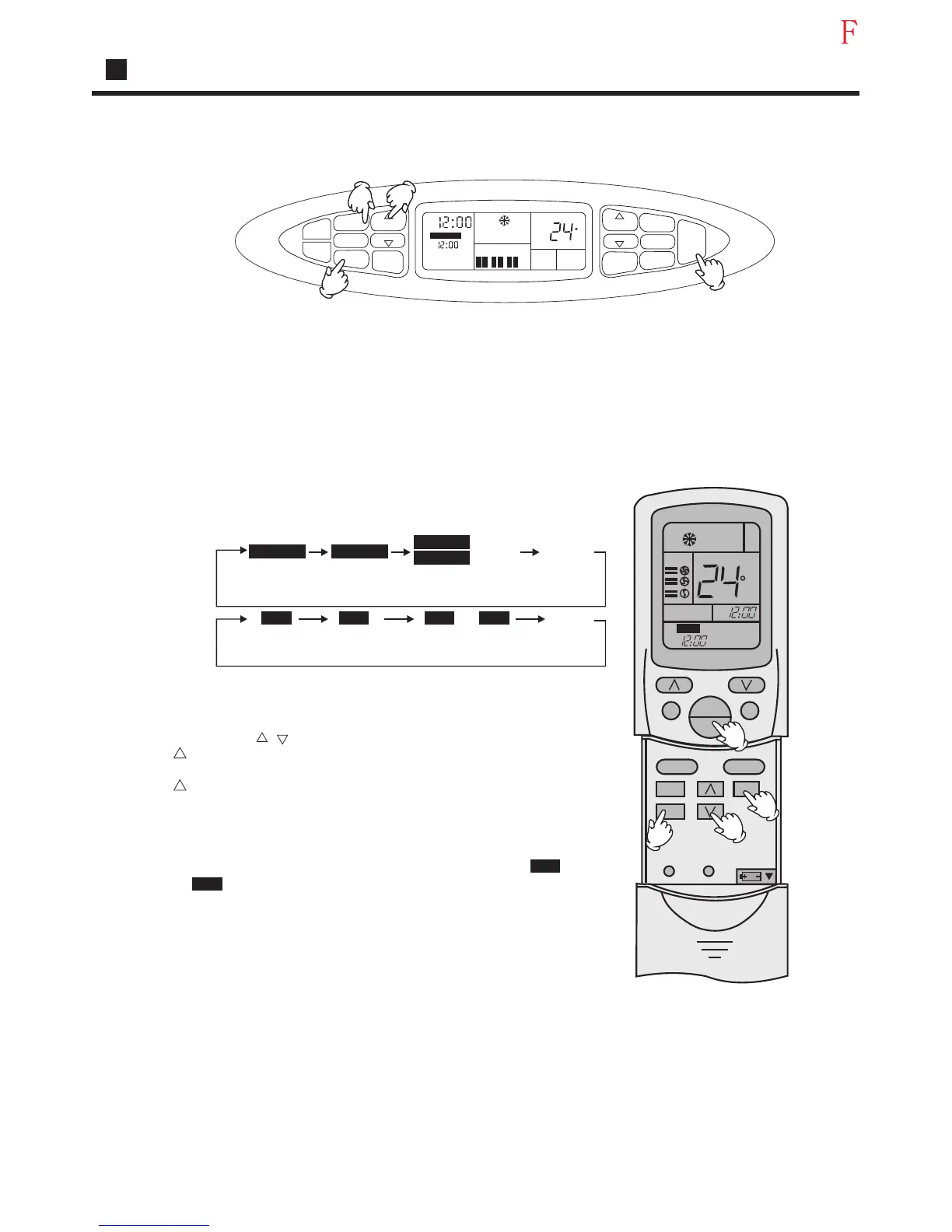
Timer on/off operation
Manual Operation
Remote controlled operation
TIMER operation
TIMER ON/OFF
Set Clock correctly before starting Timer operation(refer to page 3)
You can let unit start or stop automatically at following times: Before you wake up in
the morning, or get back from outside or after you fall asleep at night.
(1) After unit start,select your desired operation mode.
Operation mode will be displayed on LCD.
(2)TIMER mode selection
Press TIMER button to change TIMER mode.
Every time the button is pressed, display changes as follows:
Manual
Remote
control
TIMER ON
TIMER ON
TIMER ON-OFF
TIMER ON-OFF
BLANK
BLANK
AM
AM
PM PM
AM AM
AM
AM
TIMER ON
TIMER ON
ON ON
OFF OFF
TIMER OFF
TIMER OFF
12:00
12:00
12:00
12:00 12:00
12:00
12:00
12:00
TIMER OFF
TIMER OFF
Select your desired TIMER mode (TIMER ON or TIMER
OFF) ON or OFF will flash.
(3)Timer setting
Press HOUR / button.
Every time the button is pressed, time increases 10 min. If
button is kept pressed, time will change quickly.
Every time the button is pressed, time decreases 10 min. If
button is kept pressed, time will change quickly. Time will
be shown on LCD.It can be adjusted within 24 hours.
(4)Confirming your setting
After setting correct time,press SET button to confirm," "
or" "stops flashing.
Time displayed: Unit starts or stops at¡Á hour ¡Ámin(TIMER
ON or TIMER OFF)
Timer mode indicator on indoor unit lights up.
To cancel TIMER mode
Just press TIMER button several times until TIMER mode disappears.
Hints
After replacing batteries or a power failure happens, Time setting should be reset.
Remote controller possesses memory function when use TIMER mode next time,just
press SET button after mode selecting if timer setting is the same as previous one.
TIMER ON
AM
TIMER
TIME
TEMP
TEMP
TIME
CLOCK
SET
SLEEP
SWING
FAN SPEED
MODE
ON
OFF
AM
LOW
MID
HIGH
ROOM
TEMP
C
C
ON
AM
AM
TEMP
SWING
MODE
CLOCK
TIMER
SLEEP
SET
FAN
ON
OFF
RESETLOCK
1
4
3
2
1
4
3
2
ON
OFF
Operation
25




 To Next Page