7
5
4
3
2
25
26
27
28
29
30
31
32
33
34
35
36
37
38
39
24
1
6
7
10
11
12
13
14
15
16
17
18
19
20
21
22
23
1
2
3
4
5
6
7
8
9
10
11
12
13
14
15
16
17
18
19
20
21
22
23
24
25
26
27
28
29
30
31
32
33
34
35
36
37
38
39
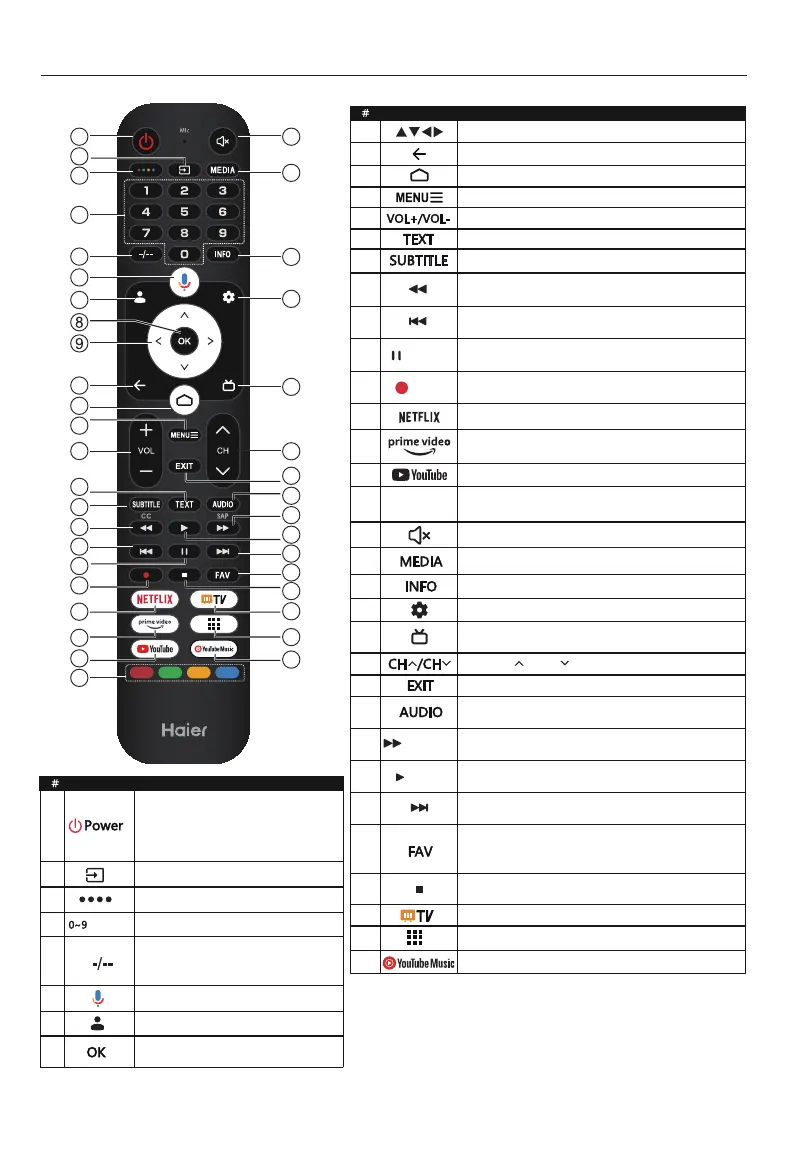
REMOTE CONTROL
through it. To completely disconnect
Item
Descriptions
Press to open the input source list.
Press to enter a TV channel number.
number
It is used to enter channel numbers
1 – 11 – 111.
Press to open the Google Assistant.
Press to open user account page.
Press CH or CH to change TV channels.
is playing.
mode.
Press to select the teletext mode.
Press to open the mute.
Press to open or close the on-screen menu.
mode.
playing.
ATV and DTV.
mode.
mode.
Press to display electronic programme guide in
TV mode.
Press to open the NETFLIX.
Press to open the YouTube.
Press to open the Home Page.
Press to open the app list.
Press to select Mono, Nicam, Stereo for ATV
channel, Audio language for DTV channels.
in DTV mode.
Press to open the YouTube Music.
( Pause)
(forward)
(play)
(REC)
Coloured
bu�ons
Item
Descriptions



 To Next Page