14
INSTRUCCIONES DE FUNCIONAMIENTO
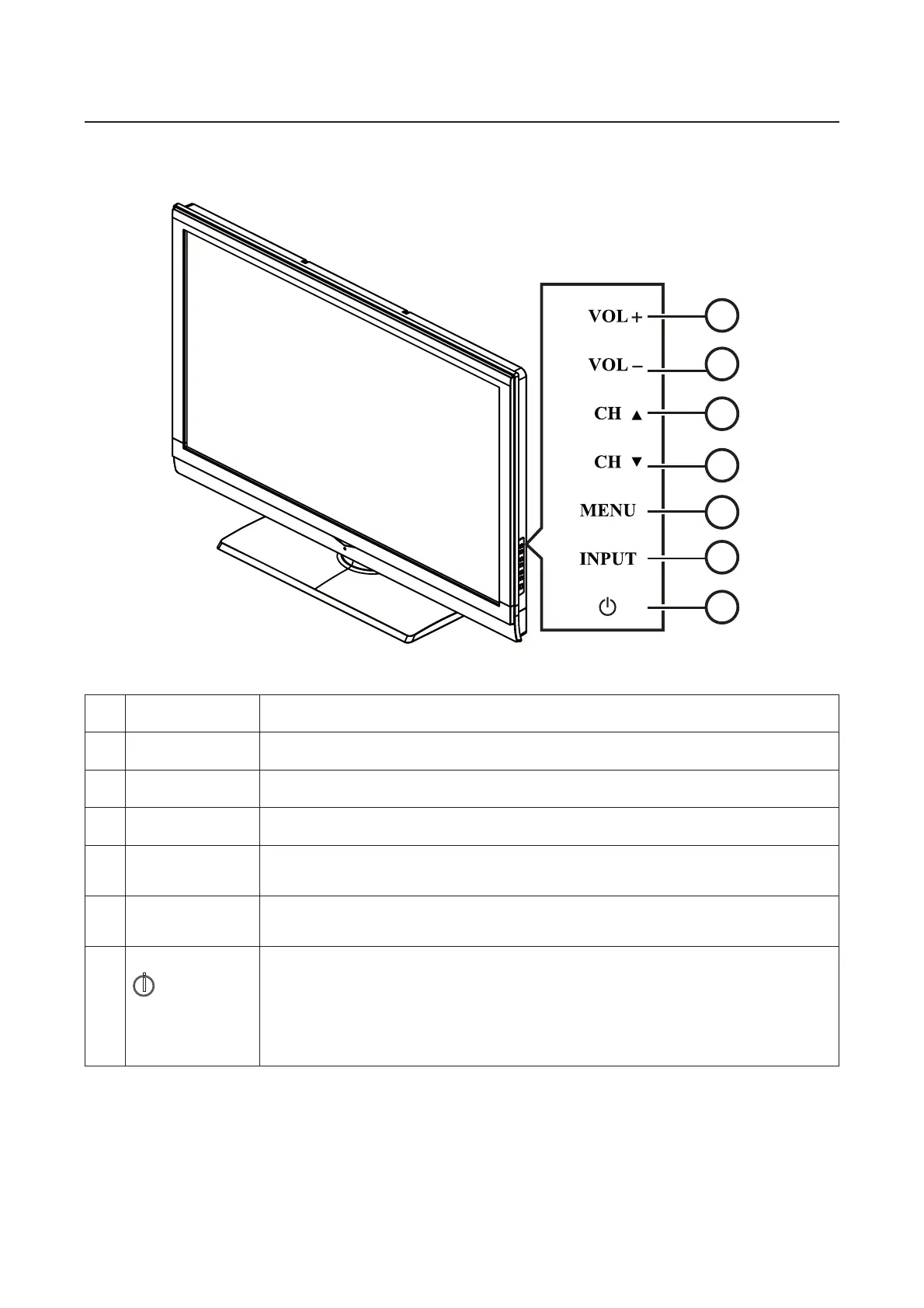
PARA UTILIZAR EL PANEL DE CONTROL FRONTAL
1
2
3
5
6
4
7
1 VOL + Presione este botón para subir el nivel de volumen.
2. VOL - Presione este botón para bajar el nivel de volumen.
3. CH
Ÿ
Presione este botón para seleccionar el número de programa siguiente.
4. CH
ź
Presione este botón para seleccionar el número de programa anterior.
5.
MENU
(MENÚ)
Presione este botón para ingresar o salir del menú OSD.
6.
INPUT
(ENTRADA)
Presione este botón para seleccionar la fuente de entrada.
7.
i
POWER
(ENCENDIDO/
APAGADO)
Presione este botón para encender/apagar (modo de espera) la TV.
(Presione este botón para encender la TV luego de que el indicador
LED de encendido/apagado aparezca de color azul y haya dejado de
parpadear).



 To Next Page