14
5
1
6
7
2
3
4
8
9
10
13
14
15
17
18
21
22
23
11
12
16
19
20
24
25
1 2
3
4
5
6
789
0
ENTER
PREV
DISPLAY
FAVORITE
CH.LIST
NEXT
VOL+
CH+
VOL
CH
PICTURE
AUDIO
ZOOM
CCD
MTS/SAP
SLEEP
INPUT
ETUMUNEM
EXIT
RECALL
USB
PLAY/PAUSE
STOP
REPEAT
REV FWD
FREEZE
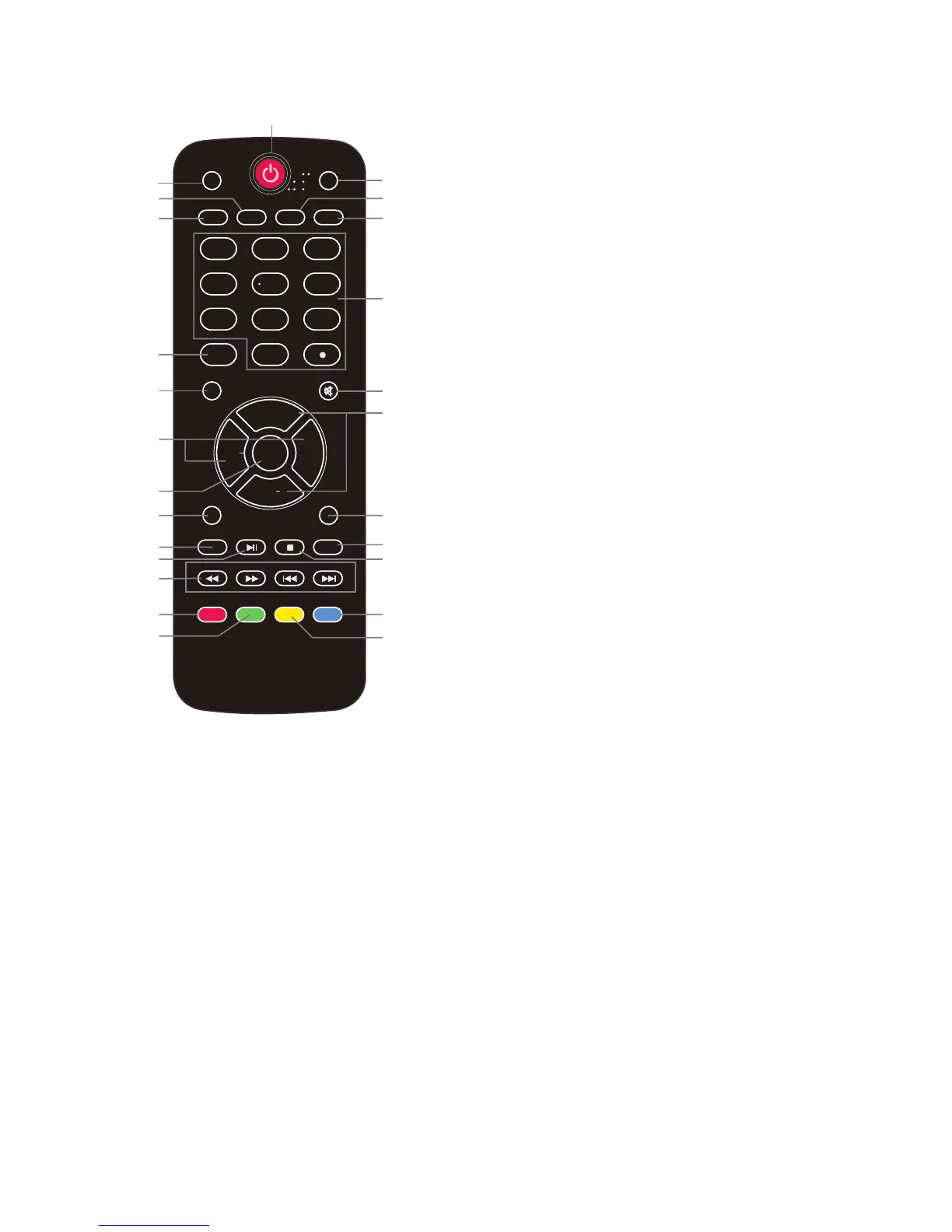
12/13. Allows you to navigate the on-screen
menus and adjust the system settings.
14.
ENTER
: CONFIRM button.
15.
EXIT
: Press to exit the OSD menu.
16.
RECALL:
Return to the previous channel
viewed.
17.
USB
: Press to enter the USB multimedia
mode.
18.
PLAY/PAUSE:
Press to play/pause music
or photo slideshow in the USB multimedia
mode.
19. REPEAT:
Press to toggle repeat none/
repeat 1/ repeat all mode in Multimedia
mode.
20. STOP: Press to Stop playing in
Multimedia mode.
21. Reverse, Fast forward, Preview,
Next: Use these buttons to control music/
photo playback.
22. DISPLAY: Press to show the
information about the input source, such as
TV channel information, display resolution,
current time, etc.
23. FREEZE: Press to freeze the picture.
24. CH.LIST: Press to display the channel
list.
25. FAVORITE: Press to show the Favorite
Channel List. Use the CH+ and CH- keys
to select a channel, and then press ENTER.



 To Next Page