13
English
USING THE REMOTE CONTROL
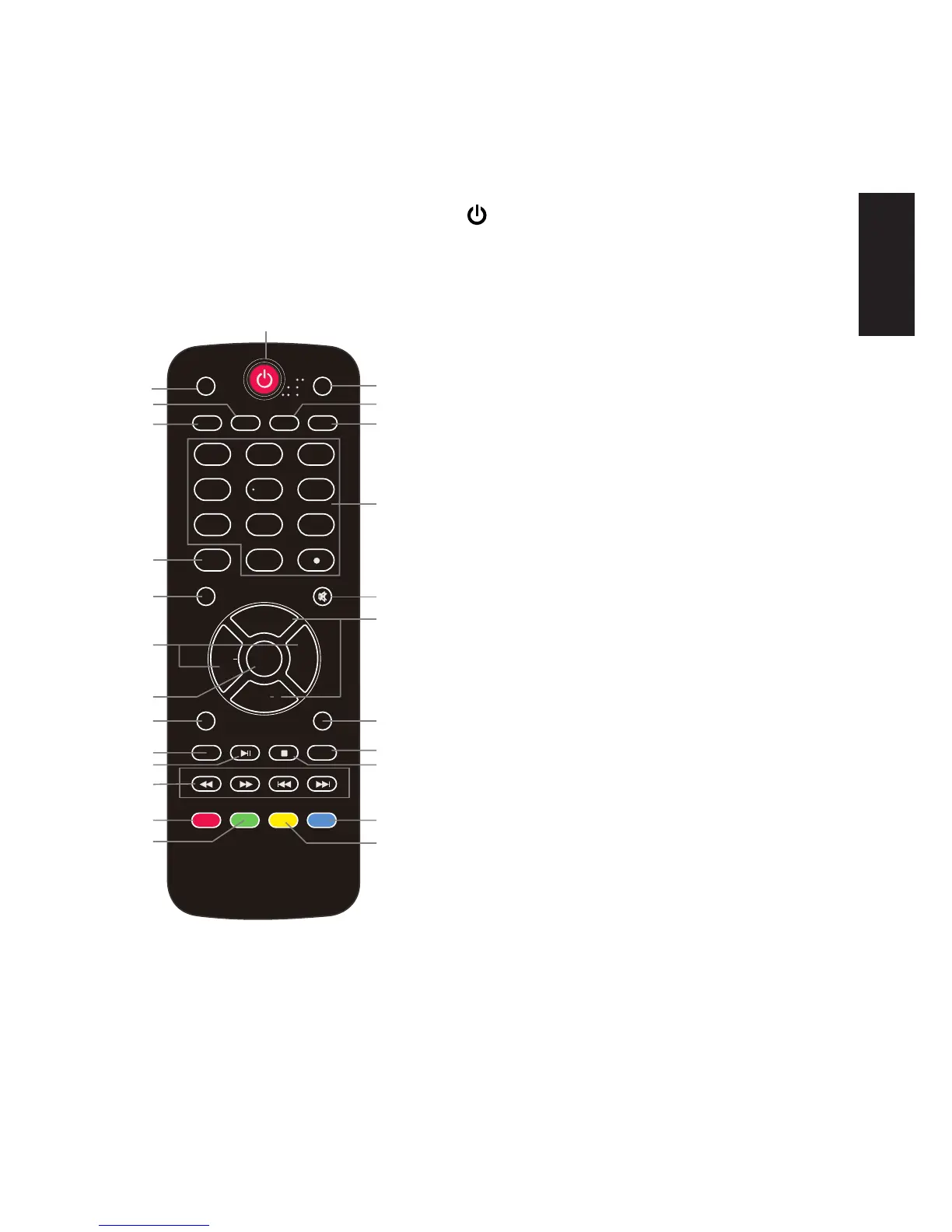
The remote control is using infrared (IR) signals. Point it towards the front of
the TV. The remote control may not work correctly if it is operated out of range.
5
1
6
7
2
3
4
8
9
10
13
14
15
17
18
21
22
23
11
12
16
19
20
24
25
1 2
3
4
5
6
789
0
ENTER
PREV
DISPLAY
FAVORITE
CH.LIST
NEXT
VOL+
CH+
VOL
CH
PICTURE
AUDIO
ZOOM
CCD
MTS/SAP
SLEEP
INPUT
ETUMUNEM
EXIT
RECALL
USB
PLAY/PAUSE
STOP
REPEAT
REV FWD
FREEZE
1. POWER(red button): Turn the TV on/
off (standby).
2.
PICTURE: Press to switch the picture
mode.
3. CCD: Press to display the closed
captions.
4. ZOOM: Press to switch the display
mode: Normal, Zoom, Wide, Cinema, Auto.
5. AUDIO: Press to select the sound mode:
User, Standard, News, Music, Movie.
6.
MTS/SAP:
For analog TV, press to switch
the sound mode: Stereo, SAP or Mono. For
digital TV, press to switch the audio language if
the TV program provides an alternative.
7.
SLEEP
: Press to set the sleep timer: (off
/5/10/15/30/60/90/120/180/240 mins). The TV
will automatically turn off (standby mode) after
the selected period of time passes.
8.
Numercal Keys
: Press to enter a TV
channelnumber(Press"•"tochoosethesub-
channel).
9.
INPUT
: Press to show the input source list.
Use CH+ and CH- keys to select a source, and
then press the ENTER key.
10.
MENU
: Press to open or exit the OSD (on
screen display) menu.
11.
MUTE:
Press to mute the sound. Press
again or press VOL+ to unmute.
12.
CH+/-
: Press to scan through the channels.
13.
VOL+/-
: Press to adjust the volume.



 To Next Page