47
7. Adjustment
7.1 WB Adjustment
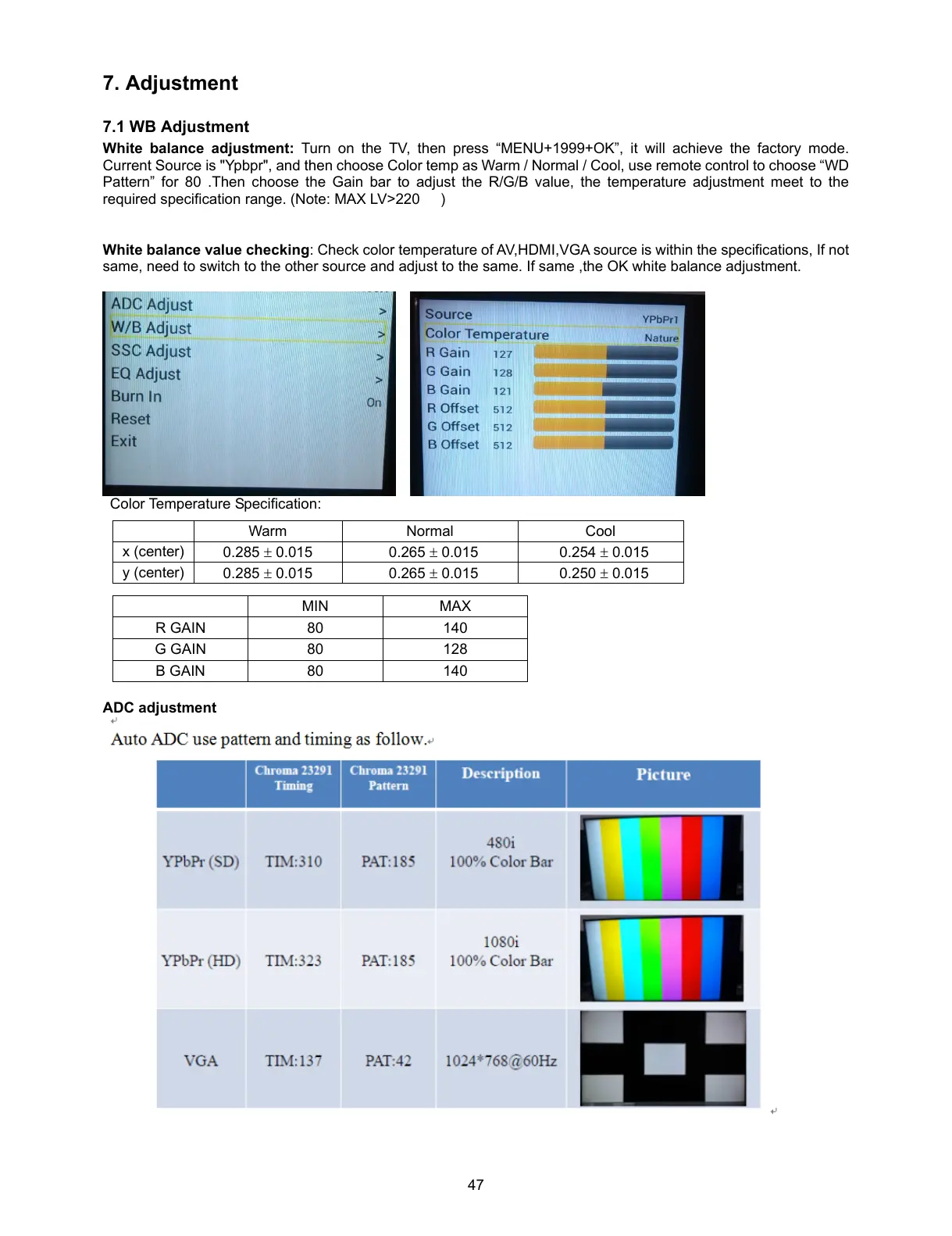
White balance adjustment: Turn on the TV, then press “MENU+1999+OK”, it will achieve the factory mode.
Current Source is "Ypbpr", and then choose Color temp as Warm / Normal / Cool, use remote control to choose “WD
Pattern” for 80 .Then choose the Gain bar to adjust the R/G/B value, the temperature adjustment meet to the
required specification range. (Note: MAX LV>220 )
White balance value checking: Check color temperature of AV,HDMI,VGA source is within the specifications, If not
same, need to switch to the other source and adjust to the same. If same ,the OK white balance adjustment.
Color Temperature Specification:
MIN MAX
R GAIN 80 140
G GAIN 80 128
B GAIN 80 140
ADC adjustment
Warm Normal Cool
x (center)
0.285 0.015 0.265 0.015 0.254 0.015
y (center)
0.285 0.015 0.265 0.015 0.250 0.015



 To Next Page