WALL MOUNT TECHNICAL OVERVIEW
C-6
ENGLISH
Testing
If The Indoor Fan Motor Does Not Run:
1. Remove the front cover and access the circuit board fan motor
connection.
2. Reset power and turn the remote control fan command to Fan
On mode.
1. Disconnect the power.
2. With the indoor unit cover removed, remove the two
screws on the left plastic evaporator coil bracket.
Motor Test:
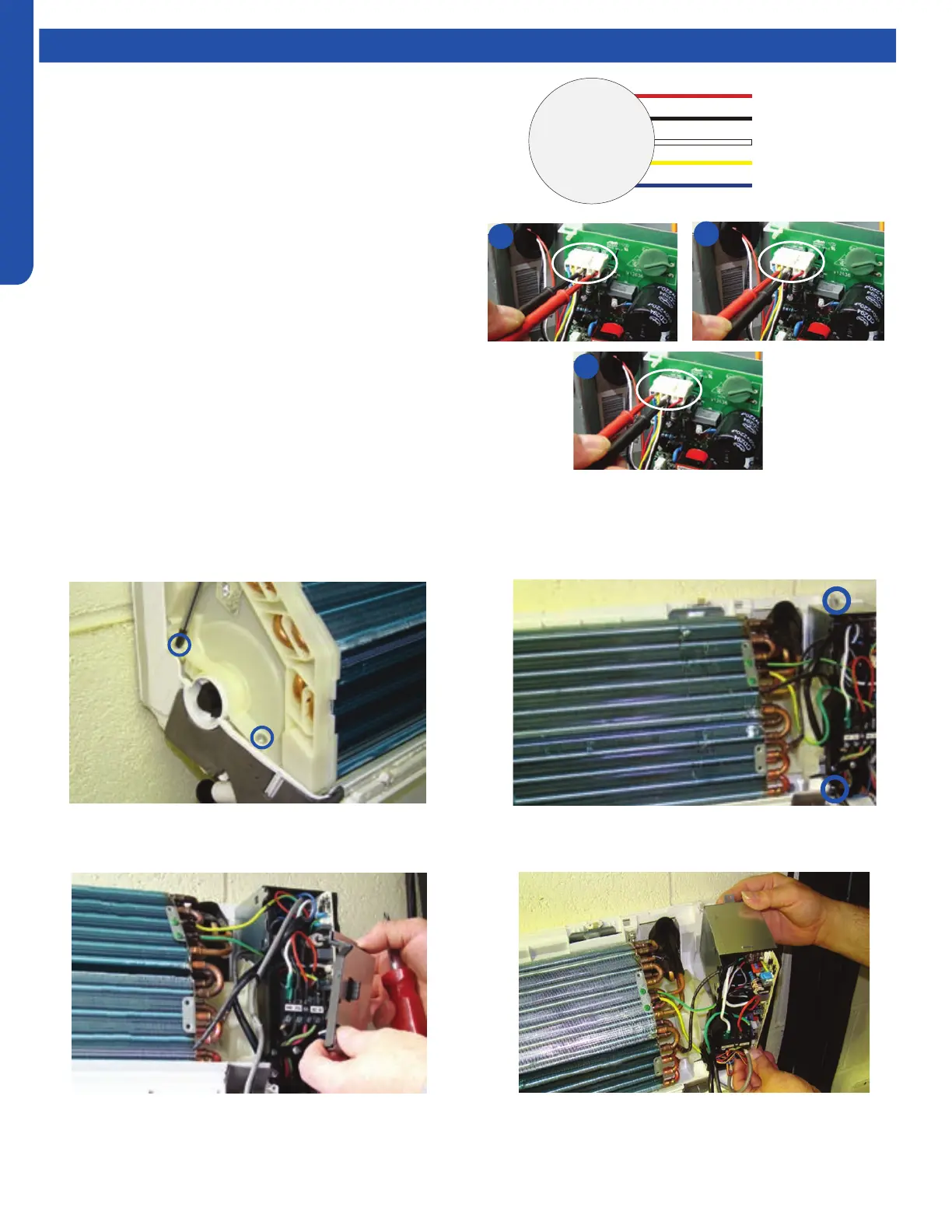
1. If the motor doesn’t run, check for 310VDC between Pins 1
and 3. If it is not present, the indoor board is bad. If voltage
is present, continue on.
2. Check the voltage between Pins 3 and 4. The voltage
should be +15VDC. If it is not present, the board is bad. If
voltage is present, continue on.
3. Check for voltage between Pins 3 and 6. If no DC voltage is
present, the board is bad. If voltage is present, change the
motor.
3. Remove the cover from the electrical box on the right side
of the indoor unit.
4. Remove the two screws that hold the electrical box in
place.
5. Lift and swing the electrical box out of the way.
Indoor Fan Motor Voltage Check
Replacing the Blower Motor
1
2
3
DC Motor
+310 VDC
DC Ground
+15 VDC
Signal
Feedback
Red
Black
White
Yellow
Blue



 To Next Page