9
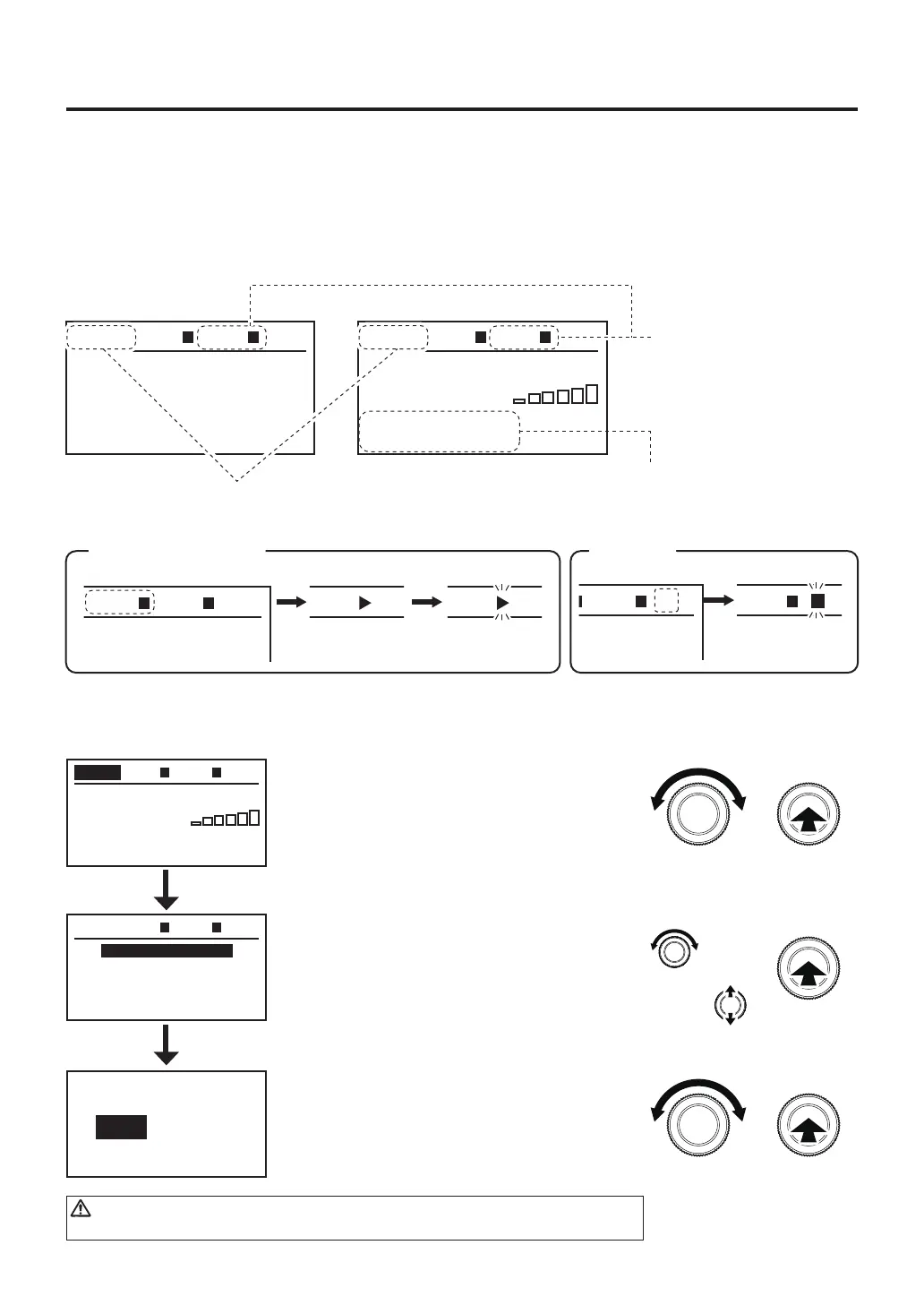
● Mode selection
①In the top screen, turn the control knob
to move the cursor to AUTO or MANU.
②After selecting, press the center of the
control knob.
③In the menu screen, turn the control knob
to move the cursor to MODE CHANGE
④After selecting, press the center of the
control knob.
⑤In the menu screen, turn the control knob
to select AUTO or MANUAL.
⑥After selecting, press the center of the
control knob. The display will return to
the menu screen.
TC P
TC B
---
º
F
---
º
F
200
º
F
AUTO
ZONE1
prof2
P12345600
OPENED
TOP BTM
AUTO
MODE CHANGE
TOP SET
USB MEMORY
Exit
TOP BTM
MODE CHANGE
MANUAL
AUTO
TC P
TC B
---
º
F
---
º
F
300
º
F
050
%
MANU TOP
TOP
100
S
TIME
AIR
00
BTM
OPENED
TC P
TC B
---
º
F
---
º
F
200
º
F
AUTO
ZONE1
prof2
P12345600
OPENED
TOP BTM
Check the mode
① ②
③ ④
⑤ ⑥
or
CAUTION
When the HAKKO FR-811 is operating, mode change can not be performed.
●
Display during operation
A. Mode selection
2 modes can be selected on the HAKKO FR-811 according to how it will be used.
The screens are different for the different modes.
Regarding settings, some settings can be performed directly from the top screen and some settings are
performed by opening the menu screen.
Example: MANUAL mode and AUTO mode display examples
MANUAL mode AUTO mode
Displayed in the bottom
heater is connected.
By connecting the thermocouple (refer to page 4),
the temperature will be displayed.
TC P
TC B
---
º
C
---
º
C
150
º
C
050
%
MANU TOP
TOP
100
S
TIME
AIR
00
BTM
OPENED
TC P
TC B
---
º
C
---
º
C
150
º
C
050
%
MANU TOP
TOP
100
S
TIME
AIR
00
BTM V
OPENED
Vacuum
Flashing
TC P
TC B
---
º
C
---
º
C
150
º
C
050
%
MANU TOP
TOP
100
S
TIME
AIR
00
BTM
OPENED
TC P
TC B
---
º
C
---
º
C
150
º
C
050
%
MANU TOP
TOP
100
S
TIME
AIR
00
BTM
OPENED
TC P
TC B
---
º
C
---
º
C
150
º
C
050
%
MANU TOP
TOP
100
S
TIME
AIR
00
BTM
OPENED
Heating Cooling
Flashing
Hot air (Handpiece) Vacuum
Duringbottomheateroperation,[■]willbedisplayedtotherightofBTMinthesameway.



 To Next Page