21
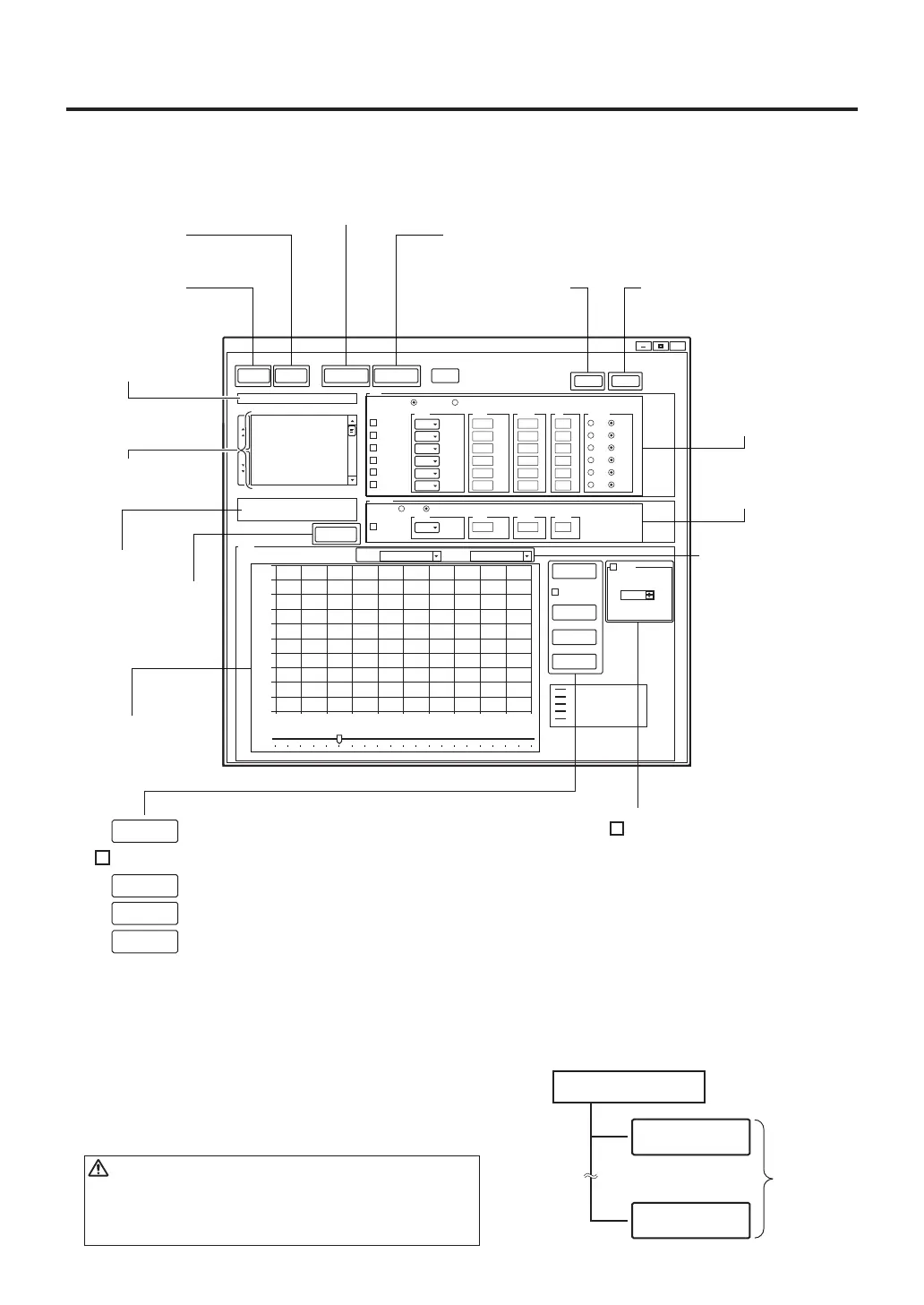
②Create
new file
(P.22)
③Input file
name (P.22)
⑧Deleting selected
profile data
(P.23)
⑨Reading demo mode(P.23)
⑩Zone settings
(handpiece heater)
(P.23)
⑥Upload to the
HAKKO FR-811
(P.23)
⑦Download to the PC
(P.23)
①Reading
existing files
(P.21)
Saving
File
Setting of
X / Y-axis
● Setting and operation screen
A. Setting
csv capture
✓
File Profile Access Graph Options Help
--
--
--
--
--
--
Ramp VacuumTemp Timer Air
TOP
BOTTOM
✓
ZONE1
✓
ZONE2
✓
ZONE3
✓
ZONE4
✓
ZONE5
✓
ZONE6
PREZONE
csv capture
Guide
100
200
300
400
500
600
10
10
10
10
10
10
50
50
50
50
50
50
Timer Type
Opened Closed
POWERTCMode
Span Time
File
Profile
Comment
℃/s
℃/s
℃/s
℃/s
℃/s
℃/s
s
s
s
s
s
s
%
%
%
%
%
%
℃
℃
℃
℃
℃
℃
--
Ramp Temp Power Timer
150 50 150
℃/s
%
s℃
ON
ON
ON
ON
ON
ON
OFF
OFF
OFF
OFF
OFF
OFF
Delete Demo
NewFile
Save
FIRMOpenFile PC->Station PC<-Station
1 (NO DATA)
2 (NO DATA)
3 (NO DATA)
4 (NO DATA)
5 (NO DATA)
6 (NO DATA)
7 (NO DATA)
8 (NO DATA)
9 (NO DATA)
10 (NO DATA)
11 (NO DATA)
FR-811 PCsoftware
X
0
0
100
200
300
400
500
600
700
800
900
1000
5 15 20 25 30 35 40 45 5010
[℃]
Refresh
Capture
Start
Stop
Graph
[sec]
Top Horizontal offset
(0.0 min)
0.0 sec
0-1000℃ 5s/ div
Sensor
TOP 0℃
0℃
0℃
PART
GUIDE TOP
GUIDE BOTTOM
BOARD
④Select profile
(50) (P.22)
⑤Input
comment
(P.22)
⑫Displaying graph
(P.24)
⑬Clearing graph (P.24)
⑮Starting graph charting (P.24)
⑯Stopping graph charting (P.24)
⑰Saving graph image(BMP) (P.24)
⑭Saving graph (CSV) (P.24)
⑪Zone settings
(bottom heater)
(P.24)
Refresh
Start
Stop
Capture
Guide
✓
⑱Showing guide line
(P.24)
⑲Sliding guide line
(P.24)
Top Horizonal offset
①Reading existing files
Files stored on a PC can be opened. A single file can
contain up to a maximum of 50 profiles.
CAUTION
All currently open profile data on the PC will be
overwritten. Be careful not to delete profiles that
you need.
Max. 50
File data
Profile1
Profile50
〜



 To Next Page