HALNy HL-4GQV Quick Installation Guide
7
Note:
The ONU applies to installation at home or in the corridor. Because installation and
cabling in the corridor are relatively complex, let the professional engineers deploy
according to the actual situation. This manual describes the procedure for installing the
device at home, and is for reference only.
3.2 Installation Preparations
The Ethernet interface of your computer connects to the Ethernet interface of the
ONU. Before installing it, ensure that an Ethernet adapter is already installed in your
computer.
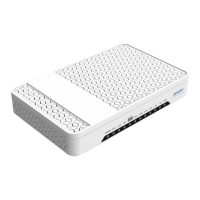
3.3 Connecting ONU
3.3.1 Connecting the Network Cable
Step 1 Use the one end of the network cable to connect the Ethernet interface of
the computer.
Step 2 Use other end of a network cable to connect the Ethernet interface on the
rear panel of the HALNy HL-4GQV.
3.3.2 Connecting the Fiber


 To Next Page