Battery Connections
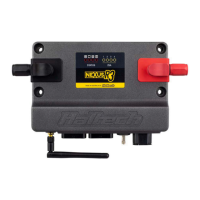
The following cables will connect directly to the battery on the vehicle:
RED / WHITE
TO BATTERY +12V
RED/GREEN
RED
TO BATTERY +12V
TO BATTERY +12V
BLACK
TO BATTERY -VE / GROUND
Figure 7 - Battery Wiring
Termination Descriptions
Analogue Voltage Inputs (TPS, MAP, Fuel-P, Oil-P)
The Analogue Voltage Inputs can accept variable voltage inputs from 0V to 5V. These
inputs can also accept switch inputs that change between two different voltage levels.
The on voltage and off voltage define what the thresholds are between the on and off
states. The voltage can be viewed as a channel within Haltech ESP Software to
determine thresholds for a switched input.
Fuel Pressure Sensor (Fuel-P, AVI 3)
The Fuel-P labeled connector connects directly to the fuel pressure sensor on the
engine. This will enable the user to know the current fuel pressure of the vehicle.
Oil Pressure Sensor (Oil-P, AVI 4)
The Oil-P labeled connector connects directly to the oil pressure sensor on the engine.
This will enable the user to know the current oil pressure of the vehicle.
Throttle Position Sensor (TPS, AVI 10)
The TPS labeled connector connects directly to the throttle sensor on the engine. This
will enable the user to know the current throttle position of the engine.
Spare Analog Voltage Input (AVI 5, In Engine Bay)
The AVI 5 labeled connector is a spare Analogue Voltage Input (AVI 5).
The 4 pin connector has the following terminations,
Please isolate all unused terminations.
Pin # 1 – Blk/Wht : Sensor Ground
Pin # 2 – Org : +5V Sensor Power
Pin # 3 – Org/Grn : Sensor Signal (AVI 5)
This input can be programmed within the ESP Software to read inputs such as:
• O2 Sensors
• Pressure Sensors
• Temperature Sensors
• Various Switches
• Trim Module
For a full list of input options and explanations please go to the help within the
ESP Software.



 To Next Page