2. Introduction
Turning the phone on/off
Attention:
Do not switch the phone on in places which are prohibited
from using cell phones, or when it may cause interference or danger.
To turn the phone on/off press and hold the <red handset> button. If
directly after turning the phone on you will see the code request, (in form
of “****”) type the code and press <OK>.
Installation of the SIM card, memory card and battery
If the phone is switched on - switch it
off. Take off the back lid of the cover
– unscrew the screw fixing the lid by
using a flat screwdriver or the tool
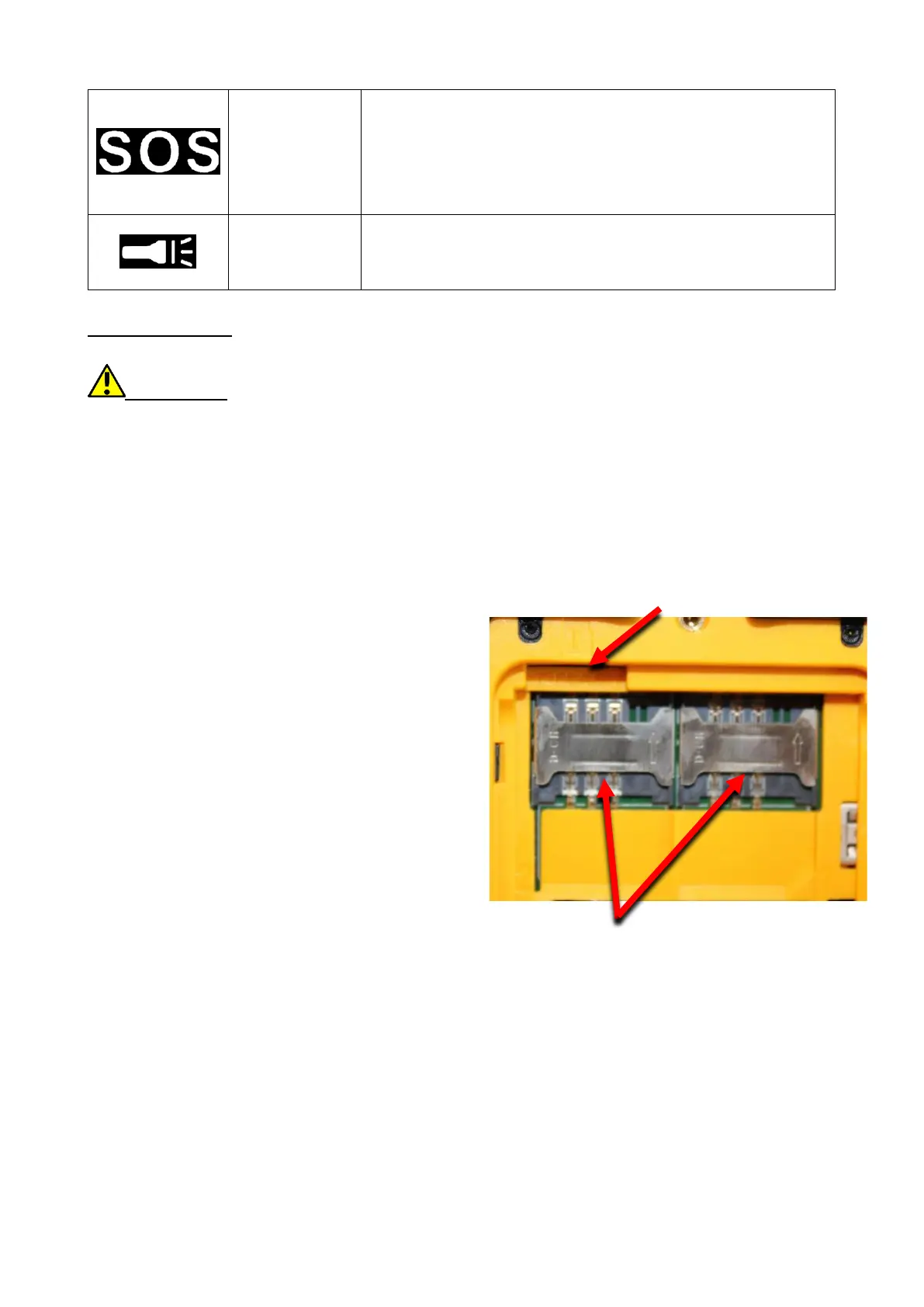
attached. Insert the SIM card with its
gold contacts facing down, the way in
which the slot is embossed. Insert the
memory card with its gold contacts
facing down, the way in which the slot
is embossed (see the adjacent
illustration). The maximum supported
capacity of memory card is 32 GB.
Insert the battery - the battery
should be placed in such a way that
the gold contacts touch the connector
placed beneath the SIM card slot (see
the illustration above). Replace the
battery cover: put it back in place - pay attention to rubber gasket – and
tighten the screw.
Charging the battery
Through microUSB
To expose the telephone connectors on the side, pry the rubber plug on the
phone with your nail. Plug in the microUSB cable to microUSB connector in
the phone then connect USB connector to the adapter and that one to low
voltage grid.


 To Next Page