5.
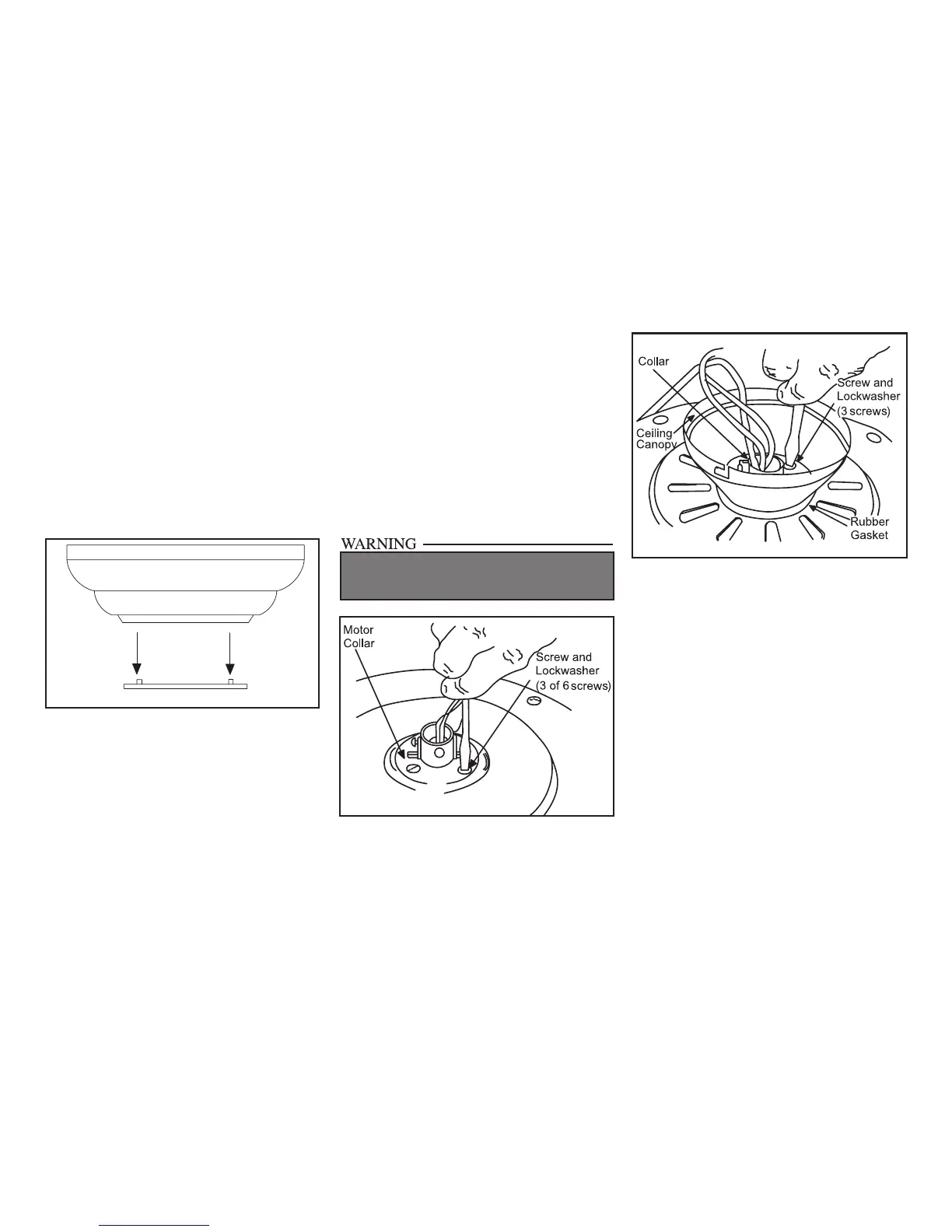
Figure 8
Figure 9
FAILURE TO COMPLETELY TIGHTEN THE
THREE SCREWS IN STEP 6 COULD RESULT IN
FAN LOOSENING AND POSSIBLY FALLING.
“Close-to-Ceiling” Mounting
1. Remove the mounting bracket from the
canopy by loosening the four screws on the
top of the canopy. Remove the two non-
slotted screws and loosen the slotted screws.
This will enable you to remove the hanger
bracket (Figure 5).
2. Remove the decorative canopy bottom cov-
er from the canopy by depressing the three
studs (Figure 7).
3. Remove three of the six screws and lock-
washers (every other one) securing the re-
inforcing plate to the top of the fan motor
housing (Figure 8).
4. Place the rubber gasket over the remaining
three screws, route the wires exiting the top
of the fan motor through the ceiling cano-
py over the collar at the top of the motor
(Figure 9).
5. Align the mounting holes with the holes
in the motor and fasten, using the three
screws and lock-washers removed in step 3
(Figure 9).
6. Tighten the mounting screws securely.
Figure 7
Canopy
Bottom
Cover



 To Next Page