EN
88
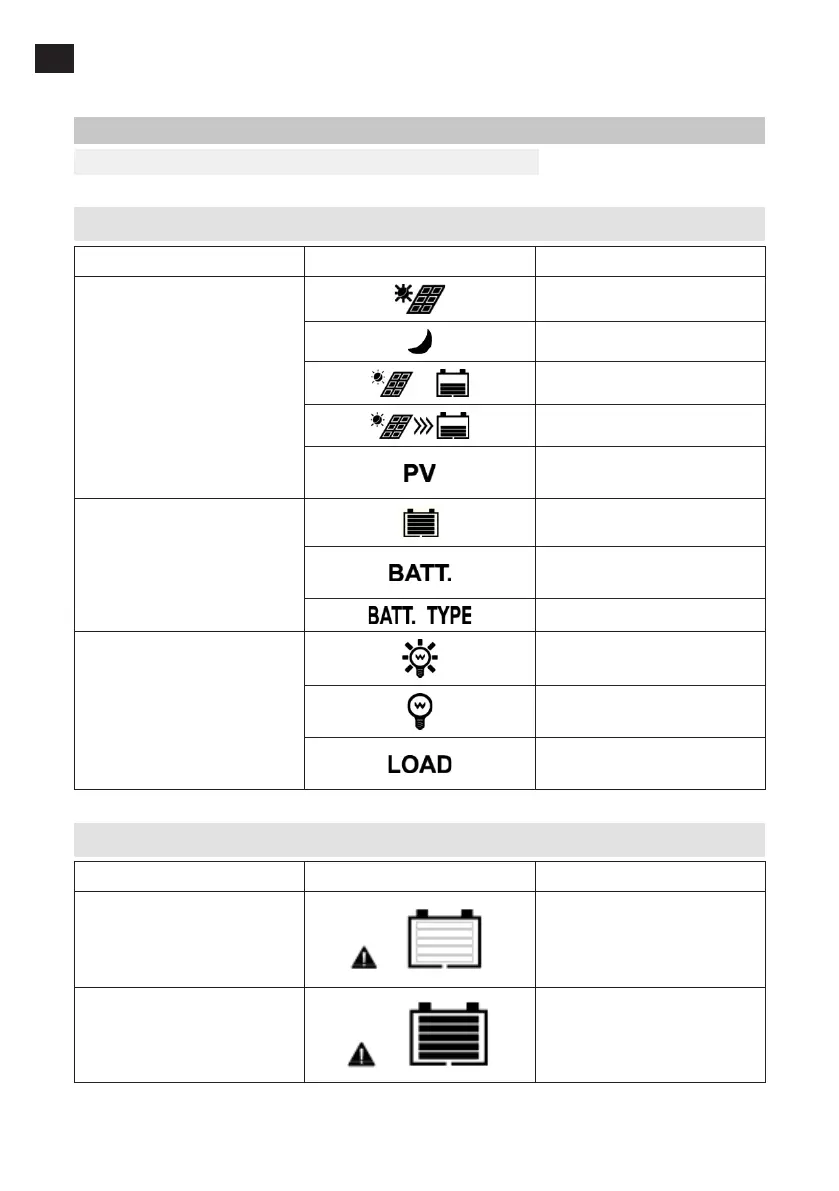
DISPLAY
FIG. 9
Status reading
Item Icon Status
Solar panel
Day
Night
No charging
Charging
Solar panel voltage, current,
power
Battery
Battery charge level
Battery voltage, current,
temperature
Battery type
Consumer/load
Consumer connected and
switched on
Consumer switched o/
disconnected
Current/Consumed energy/
Consumer mode
Error indicator
Status Icon Description
Undervoltage, battery
The battery charge indicator
shows an empty battery,
battery frame ashes, error
symbol ashes
Overvoltage, battery
The battery charge indicator
shows full battery, battery
frame ashes, error symbol
ashes


 To Next Page