HAMWORTHY HEATING LTD
27
FLEET V series
500001213/G
105
7
6
2 3 4
5 8
1
7494z31/0202
9
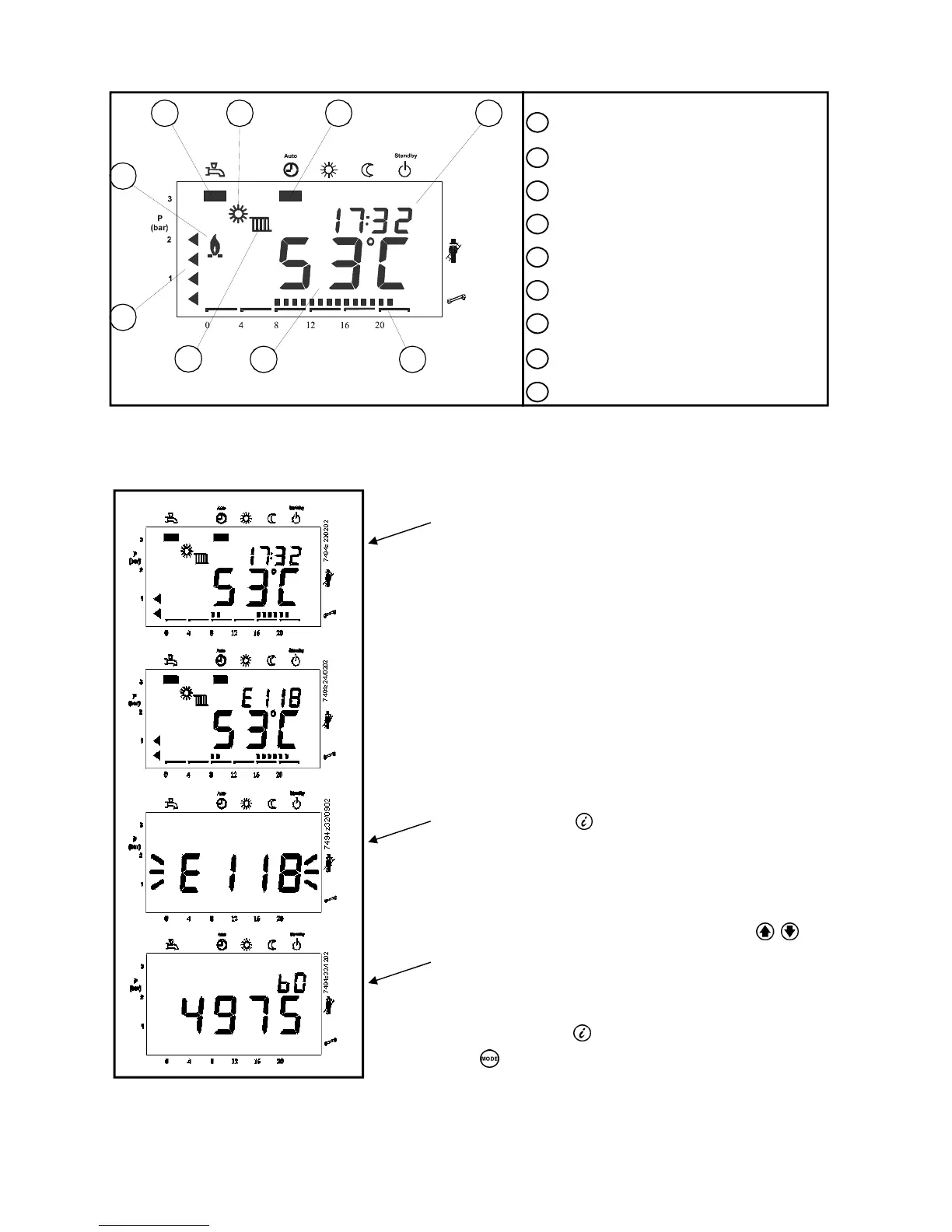
1 Operating mode of heating circuit
2 Operation of dhw circuit -
not used
3 Operational level of heating circuit
4 Time of day
5 Actual value of boiler temperature
6 Water pressure
7 Flame status
8 Time pointer
9 Operating mode of boiler
Figure 8.2.3.1 - Default display
If no button is pressed for about 8 minutes, the screen will automatically return to the default display.
Figure 8.2.3.2 - Display of Status Code
When a status code is displayed, the display (1) shows
alternatively the time of day and the error code.
Press the Info button for the display of the error code
Press simultaneously both line selection buttons
for 3 seconds. The internal error code will be displayed.
Example “4975”
Press the info button to return to the info display.
Press to return to the default display.
(1)
(2)
8.2.3 - Default Display


 To Next Page