Operating instructions
16
Switch of the scooter electrically
before you get in or out! This way
you will avoid that the scooter
starts to move when you
accidentally squeeze an operating
handle.
A
B
C
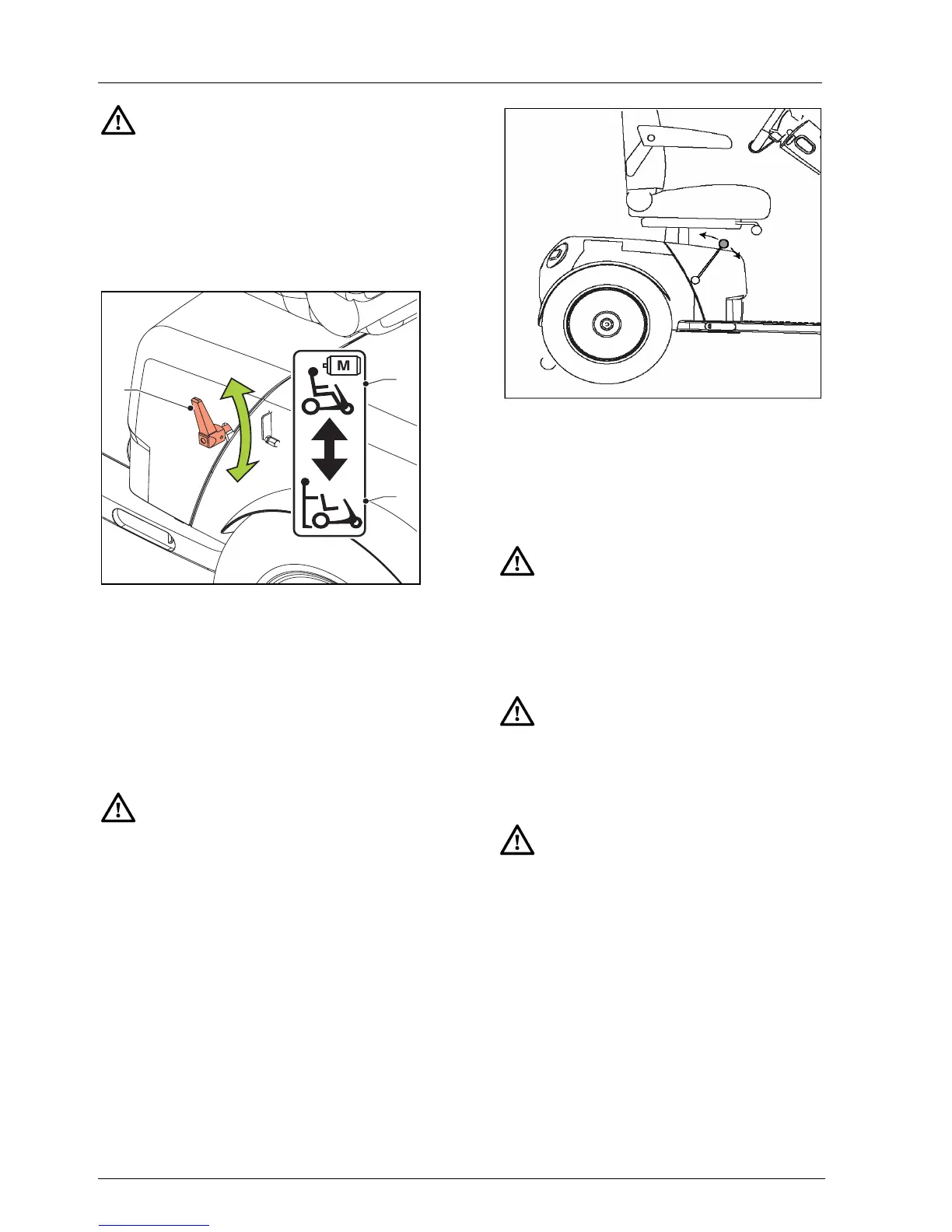
3.3 Free wheel lever
Put the free wheel lever in the DRIVE
position (B) to be able to drive the
scooter electrically.
To be able to push the scooter, put the
free wheel lever in the Push (C)
position.
• Never put the scooter in the
Drive position when you are
parked on a slope. When the
scooter is parked on a slope that
is too steep, it can start moving
down the slope.
• After pushing, the free wheel
lever should immediately be
returned to the Drive position.
• The free wheel lever should only
be put in the Push position if the
scooter is to be pushed. In the
Drive position the automatic
parking brake is activated.
3.4 Switching on the scooter
To switch on the scooter put the key in
the ignition and turn the key a quarter
of a turn.
When an electronics error is
detected, the battery indicator will
start flashing. The electronics are
blocked.
Make sure that the hand brake isn’t
still in its parking position when you
take off.
Make sure no other keys / key ring
are attached to the scooter’s key
ring while driving. This way you will
avoid that that the scooter is
accidentally switched off and
comes to a standstill.


 To Next Page