Easy Hotspot Kit
47
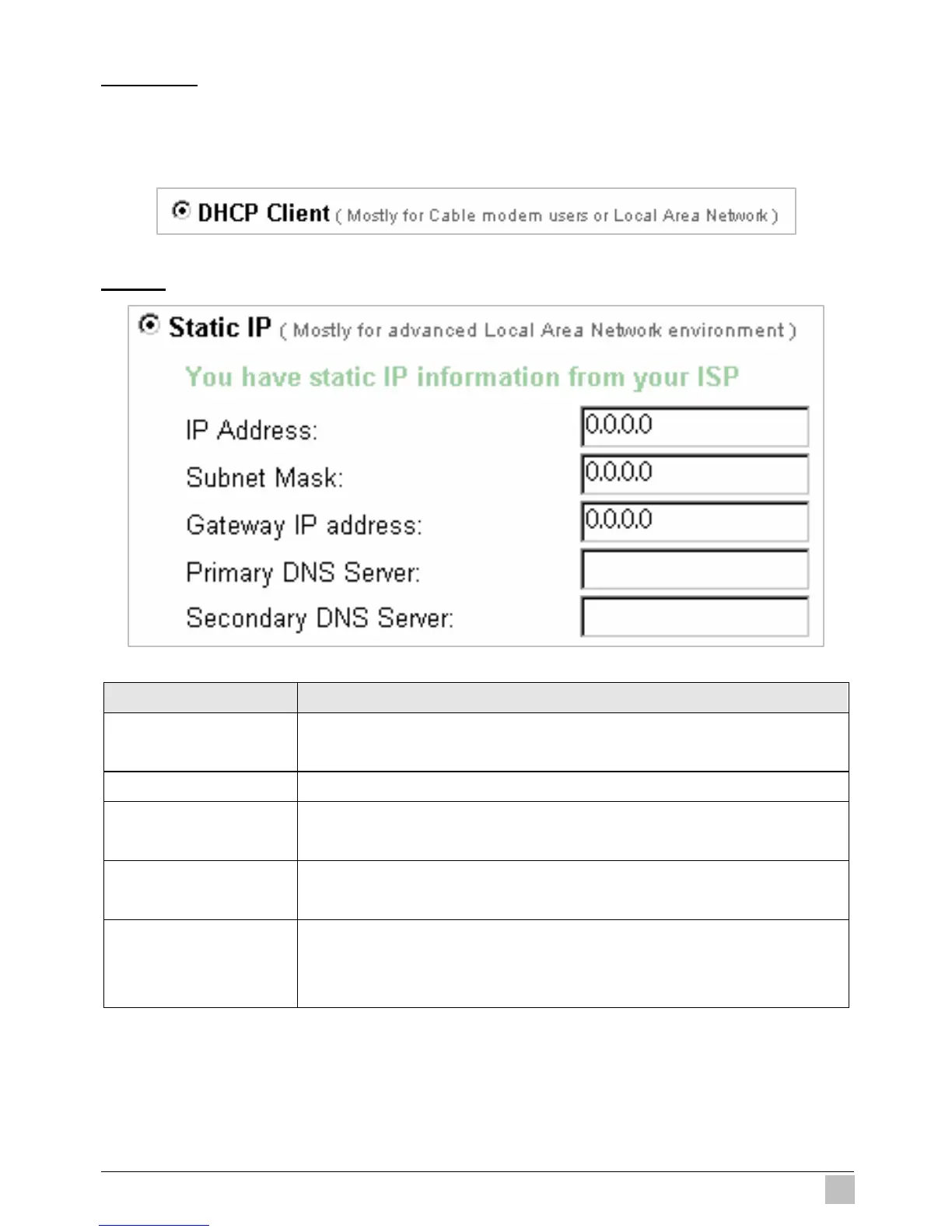
DHCP Client
The device can work as a DHCP client. This allows the device to obtain the IP address and other
TCP/IP settings from your ISP. If your xDSL/Cable comes with this feature, please enable Use DHCP
Client.
Figure 3-38 DHCP Client Setting Screen
Static IP
Figure 3-39 Static IP Setting Screen
Item Description
IP Address Enter the IP address for the xDSL/Cable connection (provided by your
ISP).
Subnet Mask Enter the subnet mask for the IP address.
Gateway IP Gateway Enter the Gateway IP address for the xDSL/Cable connection (provided by
your ISP).
Primary DNS Server A primary DNS server IP address for the xDSL/Cable connection (provided
by your ISP).
Secondary DNS Server A secondary DNS server IP address for the xDSL/Cable connection
(provided by your ISP). If the primary DNS Server IP were not available,
meanwhile, Secondary DNS Server IP would start in the same time.



 To Next Page