Need help?
Do you have a question about the Hannlomax HX-202Qi and is the answer not in the manual?
Details on device controls, including buttons for power, volume, functions, and alarms.
Explanation of the clock radio's LCD display, showing time, alarm, and temperature.
Instructions for connecting the unit to AC power and the function of the backup battery.
Guide to selecting and changing the device's time zone for accurate time display.
Step-by-step instructions for setting the 12/24 hour format, hour, minute, year, month, and day.
Procedure for setting alarm hours, minutes, and wake-up modes (USB, FM radio, buzzer).
How to temporarily suspend an active alarm using the snooze function.
Guide to selecting between Bluetooth, USB, Aux-in, and FM Radio modes.
Instructions for full scan, auto scan, manual tuning, and saving FM radio stations.
Steps to connect and play audio from external devices via the AUX-in jack.
Guide to pairing a Bluetooth device and playing audio wirelessly.
Information on automatic re-pairing and manually unpairing Bluetooth devices.
Instructions for playing MP3 files from a USB device.
Details on using USB ports for charging mobile phones and other devices.
How to set a sleep timer to automatically turn off music after a set duration.
Instructions for placing devices on the support for wireless charging and indicator status.
Adjusting the display brightness using the DIMMER/SNOOZE button.
Adjusting the brightness of the device's night light.
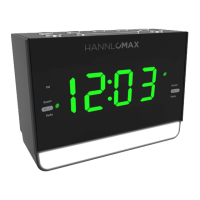
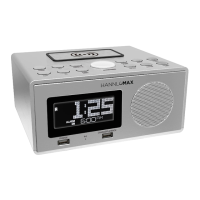
The HANNLOMAX HX-202Qi is a PLL alarm clock radio that combines multiple functionalities, including a wireless Qi charger, a USB port for charging and MP3 playback, and Bluetooth connectivity. This device is designed for convenience and versatility, serving as a bedside companion for timekeeping, audio entertainment, and device charging.
The core function of the HX-202Qi is an alarm clock radio, featuring a PLL (Phase-Locked Loop) tuner for stable FM radio reception. It allows users to set multiple alarms with various wake-up modes, including USB playback, FM radio, or a traditional buzzer. The device also includes a snooze function, temporarily suspending the alarm for 9 minutes, which can be repeated for up to an hour.
Beyond its alarm clock capabilities, the HX-202Qi integrates a wireless Qi charger, enabling convenient charging for compatible mobile devices by simply placing them on the designated phone support. A status indicator provides visual feedback on the charging process (RED for charging, WHITE for fully charged on some Android phones, and FLASHING for charging errors). It also features two USB ports, each providing 5V ~ 1A charging, allowing users to charge other devices via a USB cable. One of these USB ports doubles as an MP3 playback port, allowing users to play audio files directly from a USB device.
Audio entertainment is provided through its FM radio, Bluetooth connectivity, and an AUX-in jack. Users can tune into FM radio stations, save up to 20 presets, and perform both full scans and auto scans for available stations. The Bluetooth mode allows for wireless audio streaming from compatible devices, with easy pairing and unpairing functions. For wired connections, the AUX-in mode enables playback from external audio sources like MP3 players.
Additional features include a sleep-to-music function, which allows users to fall asleep to radio, Bluetooth, USB, or AUX-in audio for a set duration (from 10 to 90 minutes) before the unit automatically turns off. A dimmer function adjusts the brightness of the LCD display across seven levels, and a night light feature offers adjustable brightness for ambient lighting. The device also displays the current temperature, switchable between Celsius and Fahrenheit.
The HX-202Qi is designed for user-friendly operation with clearly labeled buttons for various functions. The front panel includes buttons for STANDBY, VOL+, TIME/M+/+10, FUNC, VOL-, ALARM ON/OFF, SNOOZE/DIMMER/NIGHT LIGHT, PLAY/PAUSE/FM SCAN/BT UNPAIR, PRESET/SKIP, SKIP+/TU+/LIGHT+, TIME ZONE, SLEEP/TEMPERATURE, and SKIP-/TU-/LIGHT-. The LCD display provides essential information such as current time, alarm time, temperature, and function mode.
Setting the clock and date is straightforward, allowing users to choose between 12-hour and 24-hour formats and adjust the hour, minute, year, month, and day. The device also supports multiple time zones, with seven programmed options, and automatically adjusts for AM/PM in 12-hour format. Alarms can be set with specific wake-up modes (USB, FM radio, or buzzer) and adjusted for desired hour and minute.
For radio operation, users can manually tune, auto scan, or full scan for FM stations and save up to 20 presets for quick access. Bluetooth pairing is initiated by selecting the Bluetooth mode and searching for "HX-202Qi HANNLOMAX" on the external device. Once paired, the unit will automatically reconnect in the future. USB MP3 playback is activated by plugging a USB device into the designated port, and the unit will automatically read and play MP3 files.
The wireless charging feature is activated by placing a Qi-compatible device on the phone support. The USB charging ports are used by connecting a standard USB cable from the device to the unit. The sleep timer can be set by repeatedly pressing the SLEEP/TEMPERATURE button to cycle through various durations. The display brightness and night light brightness are adjustable using dedicated buttons.
The device is designed for minimal maintenance. Cleaning should be done with a dry cloth, and ventilation openings should not be blocked to ensure proper airflow. It is important to avoid placing the apparatus near heat sources.
The HX-202Qi includes a pre-installed CR-2032 lithium battery for backup, which preserves the current time, alarm time, and stored radio stations in the event of a power failure or interruption. This ensures that settings are retained without needing to be reconfigured after a power outage.
For wireless charging, it is advised not to place foreign materials such as metal objects, magnets, or magnetic stripe cards between the mobile device and the wireless charger, as this may damage the device or prevent proper charging. Thick phone cases may also interfere with wireless charging and should be removed if issues arise. The mobile device should be placed properly on the charging surface to ensure optimal contact with the wireless charging coil.
In case of any damage or malfunction, servicing should be referred to qualified service personnel. The device complies with FCC rules, and users should be aware that any changes or modifications not expressly approved by the party responsible for compliance could void their authority to operate the equipment.
 General
| Display Type | LED |
|---|---|
| Wireless Charging | Yes |
| Alarm Function | Yes |
| Snooze Function | Yes |
| Power Source | AC Adapter |
| Backup Battery | Yes |

 To Next Page