EasyManua.ls Logo

Harbinger HP112 - Page 14

Harbinger HP112
20 pages
Print Icon
To Next Page IconTo Next Page
To Previous Page IconTo Previous Page
Loading...
Owners Manual for models HP112 HP115 HP215 HP118S
12
Checklist
Make certain loudspeakers are Powered
OFF
and Levels
turned down.
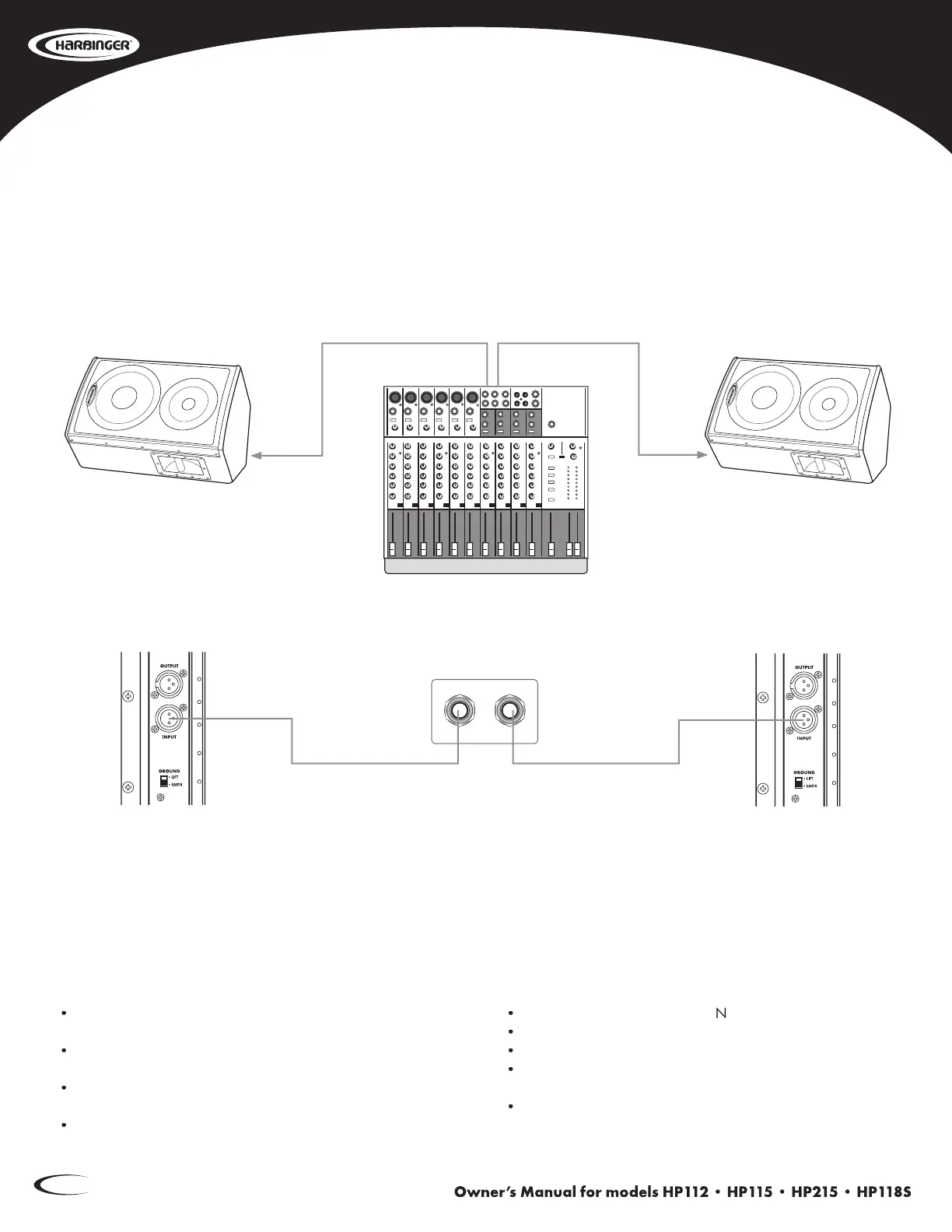
Connect the Mixer’s Aux 1 Output to the Input of the first
Monitor speaker.
Connect the Mixer’s Aux 2 Output to the Input of the second
monitor speaker.
Turn down the Mixer’s volume and Aux Send Master.
Power
ON
Mixer, then Power
O
N
speakers.
Bring the Mixer’s Aux Masters up to normal operating level.
Adjust the Level controls on the HP112 loudspeakers.
Do not adjust the Level so high that the Red LIMIT LED is
constantly lit.
Set the Low Cut switch to ON if you want less bass response
and greater vocal clarity.
Two-channel HP112 Stage Monitors
AUX SEND
12

Related product manuals