14
15
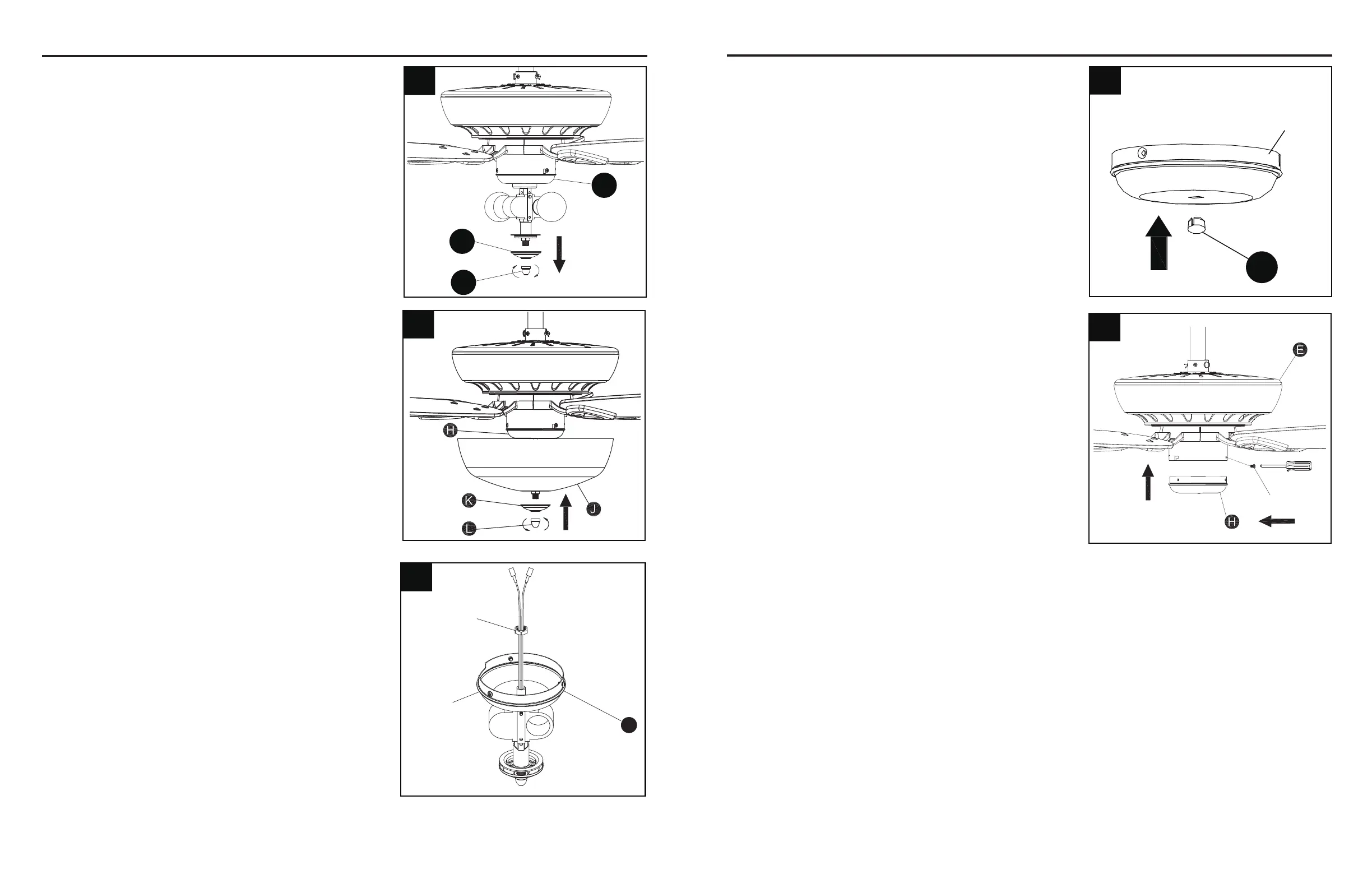
11. Place glass (J) on the preassembled pipe on light kit
(H)untilitisushwiththepreassembledmetaldisk.
Securewithpreviouslyremovedbowlcap(K)andnial
(L). Tighten securely.
Screw
14
13. Place the plug (EE) into the center hole of the
switch housing cover.
14. Remove and save the three preassembled screws
from the switch housing cover. Align the holes in the
switch housing cover and the motor assembly (E),
re-installing the previously removed screws to attach
the two parts. Tighten securely.
FINAL INSTALLATION
FINAL INSTALLATION
10.Removethepreassemblednial(L)andbowlcap
(K) from the light kit (H).
13
12. To install the fan WITHOUT the light, remove the
hex nut preassembled inside the switch housing
cover of the light kit (H) and detach the switch
housing cover.
11
12
Hex Nut
Switch
housing
cover
H
I
EE
Switch
housing
cover
10
L
K
H



 To Next Page