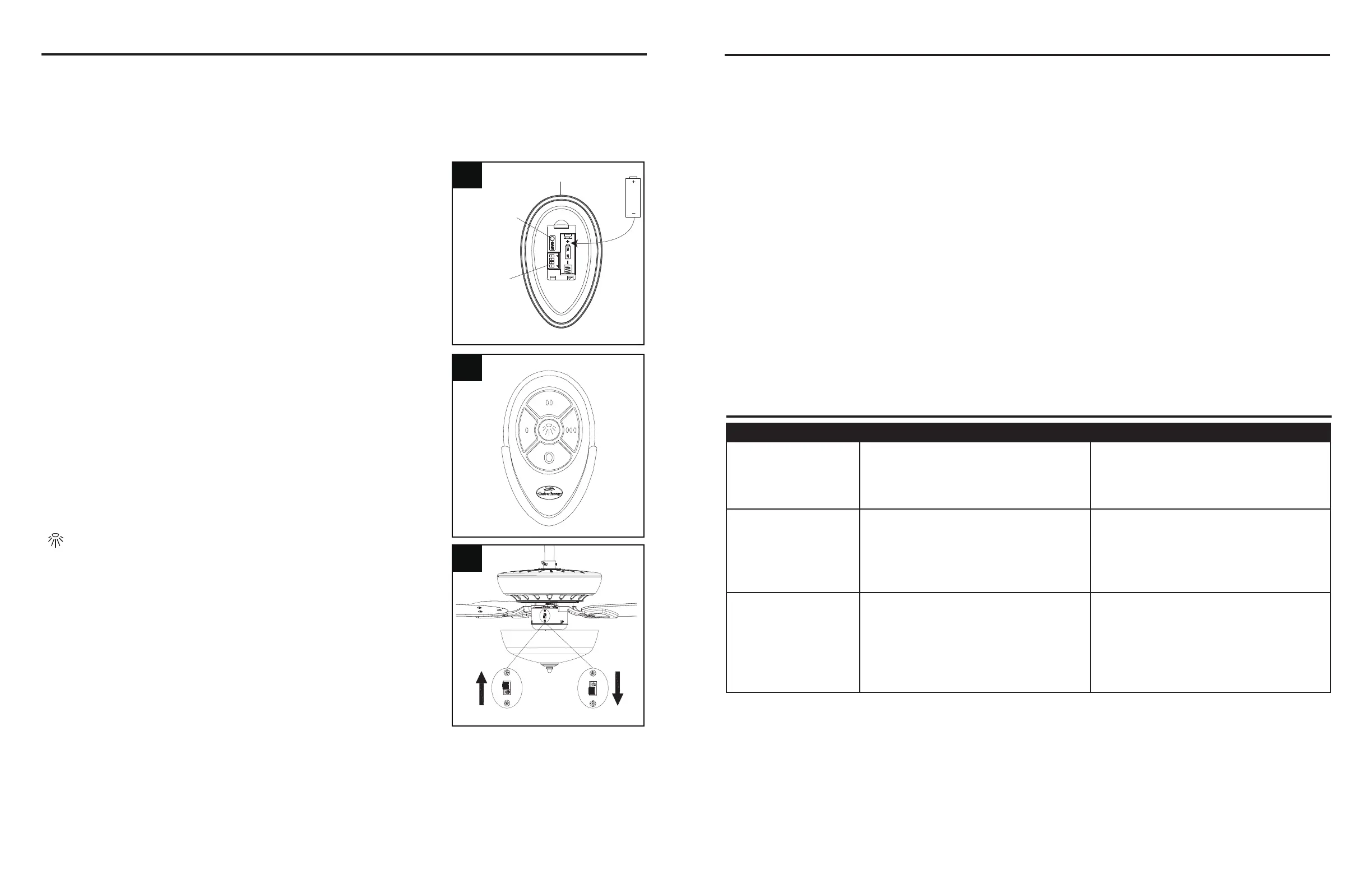
3. Reverse Switch:
When the season changes, you may want to change the
direction your fan spins. To switch between clockwise and
counterclockwiserotations,ipthefanreversalswitch.
WARNING: Wait for fan to stop before reversing the switch.
A. Incoolerweather,clockwiserotationcreatesanupwardairow,whichmoveshotairfromthe
ceiling into the room. Push the switch UP.
B. Inwarmerweather,counterclockwiserotationcreatesadownwardairow,whichcoolstheair.
Push the switch DOWN.
OPERATING INSTRUCTIONS
PROBLEM POSSIBLE CAUSE CORRECTIVE ACTION
Fan does not move. 1. Faulty wire connection.
2. Reverse switch not engaged.
1. Turn power off. Loosen canopy,
check all connections.
2. Pushswitchrmlyeitherway.
Noisy operation. 1. Blades are loose.
2. Cracked blade.
3. Unapproved speed control.
1. Tighten all blade screws.
2. Replace blades (call customer
service).
3. Replace with an approved speed
control device.
Excessive wobbling. 1. The blades are loose.
2. Blade brackets incorrectly
attached.
3. The fan is not securely mounted.
4. Fan too close to vaulted ceiling.
1. Tighten all blade screws.
2. Reinstall blade brackets.
3. Turn power off. Carefully loosen
the canopy and remount securely.
4. Lower fan or move it to another
location.
TROUBLESHOOTING
CARE AND MAINTENANCE
• Important: Shut off main power supply before beginning any maintenance.
• Do not use water or detergents when cleaning the fan or fan blades. A dry dust cloth or lightly
dampened cloth will be suitable for most cleaning.
• Cleanfanhousingwithonlyasoftbrushorlint-freeclothtoavoidscratchingthenish.Clean
blades with a lint-free cloth. You may occasionally apply a light coat of furniture polish to blades
for added protection.
• At least twice a year, tighten all screws and lower canopy to check mounting bracket screws and
downrod assembly.
• Bulb replacement: Use 6.5 watt max. medium-base E26-type LED bulbs.
• Battery replacement: Use an A23 12-volt alkaline battery for the remote control.
17
16
REMOTE CONTROL:
NOTE: If you have more than one remote-controlled fan installed in the same location, you may
want to change the frequency of the remote control to avoid any possible interference between
remote controls. To change the frequency of the remote control, change the dip switch settings as
described below:
1. Install Battery/Learning Process:
Remove the battery cover from the back of the remote found
in remote pack (M). Insert the battery from the remote pack
(M) into the remote; ensure polarity of battery matches the
polarity indicated in the battery compartment; positive (+)
to positive (+) and negative (-) to negative (-). Replace the
battery cover.
If you need to change the dip switches in the remote control
due to a potential interference issue, slide the dip switches to
your choice of either up or down -- the factory setting is up.
Within 30 seconds of turning the fan’s power on, press and
hold the “Learn” button on the remote control for 1 second.
Once the receiver has detected the set frequency, the
downlight of the fan, if applicable, will blink twice. Replace the
batterycover.Toconrmtheremotecontrolandreceiverhave
paired successfully, press any of the fan speed control buttons
on the remote control.
Snowflake icon
Sun icon
Learn key
Dip switch
M
1
2
3
2. Fan Speed Control / Dimmer:
0 Low speed
0 0 Medium speed
0 0 0 High speed
O Turns fan off
Turns light on or off
NOTE: For the dimmer function, press and hold the
light button. Light will dim. Release the light button
when light is at desired level.
NOTE: This remote control has a memory function.
The receiver stores the fan speed and light setting
when the fan is turned off. When the fan is turned on
again, it will start with the most recent settings.



 To Next Page