12 13
FINAL INSTALLATION
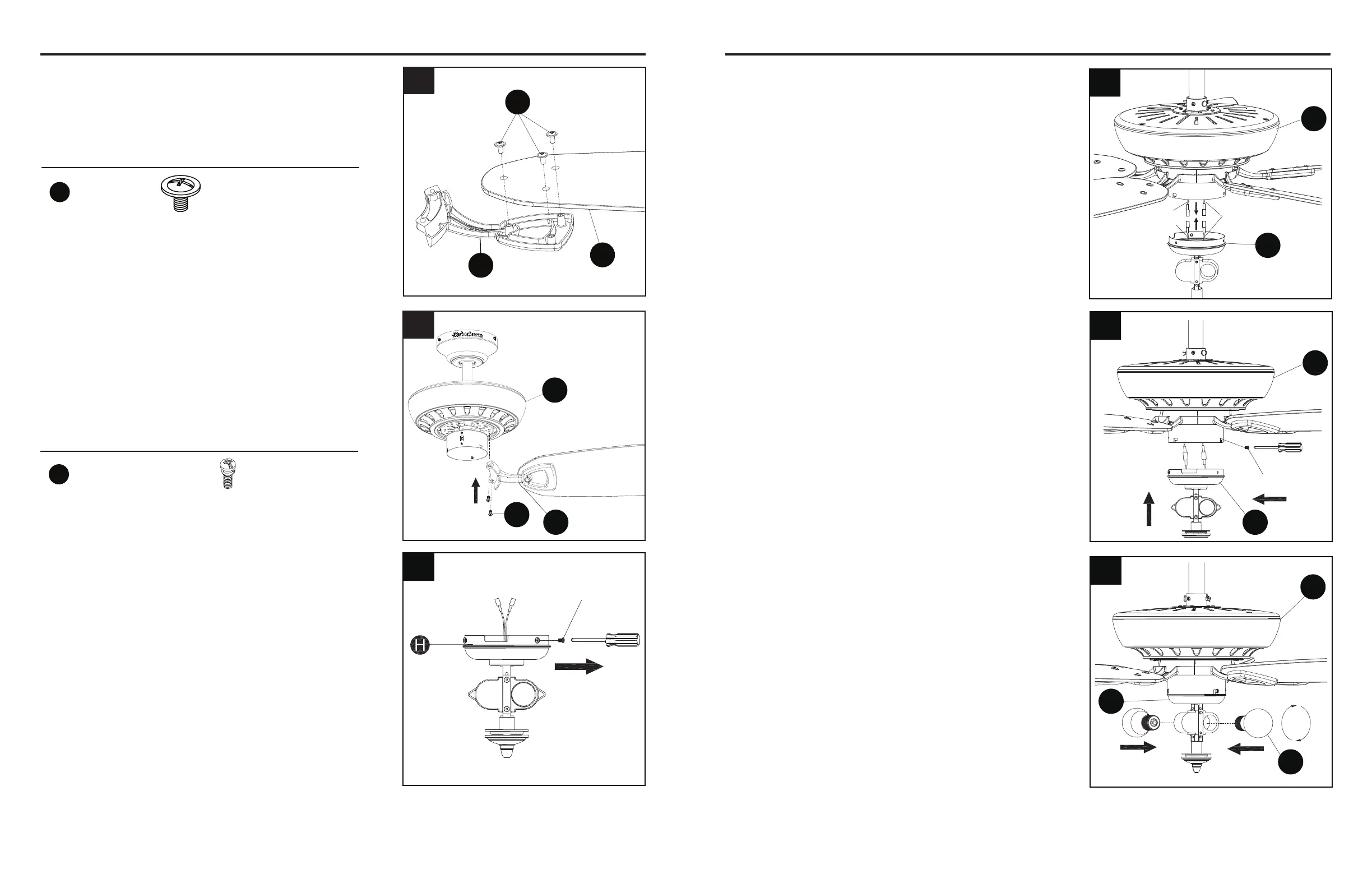
5. Align the holes of the blade bracket (F) and motor
assembly (E). Install the blade assembly to the
motor assembly (E) using blade bracket screws
(CC). Tighten each blade bracket screw securely.
Repeat this step for the remaining blade assemblies.
8. Attach light kit (H) to the bottom of the motor
assembly (E) by aligning the holes in each part and
re-installing the previously removed screws (Step
6, page 12). Tighten securely.
9. Install bulbs (I) into the sockets in light kit (H).
FINAL INSTALLATION
7. Connect the adapter plug of the BLUE wire from the
fan motor assembly (E) to the adapter plug of the
BLACK wire from the light kit (H) and connect the
adapter plug of the WHITE wire from the fan motor
assembly (E) to the adapter plug of the WHITE wire
from the light kit (H).
WARNING:Toavoidpossiblereorshock,power
should be turned off prior to any removal of the light
kit.
6. To install the fan WITH the light kit (H), remove
and save the three preassembled screws from
the switch cover preassembled on the light kit
(H).
Hardware Used
F
CC
E
5
4. Attach blade (G) to a blade bracket (F) using three
blade screws (BB).
Repeat for remaining blade assemblies.
Hardware Used
G
F
BB
4
7
E
H
Blue
Black
White
9
E
I
H
To install this fan WITH the light kit (H), continue
to step 6. To install the fan WITHOUT the light kit,
proceed to step 12.
6
Screw
8
E
H
Screw
BB
Blade Screw x 15
CC
Blade Bracket Screw x 10



 To Next Page