10
WIRING
Hardware Used
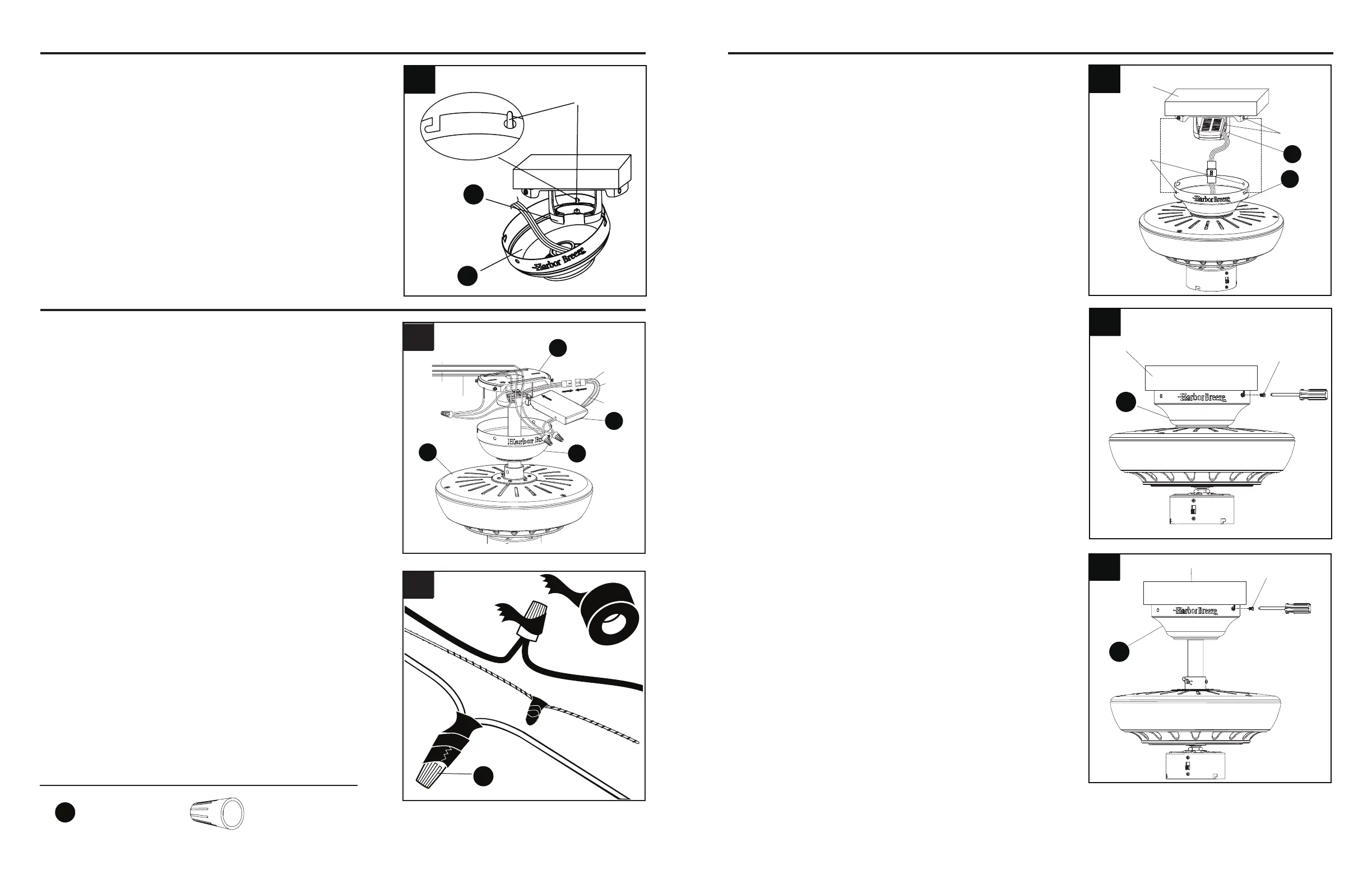
1. Insert receiver from the remote pack (M) into
mountingbracket(A)withtheatsidetowardthe
ceiling. Connect the GREEN/GROUND wire from
fan to the BARE/GREEN supply wire. Connect the
BLACK wire (AC IN L) from the receiver to the supply
BLACK wire. Connect the WHITE wire (AC IN N)
from receiver to the supply WHITE WIRE. Connect
FEMALE plug from the receiver to the MALE plug
from the top of motor assembly (E) or to the MALE
plug of lead wire (N) if previously installed.
NOTE: BLACK wire is hot power for fan. WHITE wire
is common for fan and light kit. GREEN wire is ground
wire. If house wires are different colors than referred to
above, stop immediately. Consult a licensed electrician
to determine proper wiring.
2. Twist wire ends together and screw wire connectors
(AA) on in a clockwise direction. Tape wire
connectors (AA) and wires together with electrical
tape (not included).
WARNING: Be sure no bare wire or wire strands are
visible after making connection. Place GREEN and
WHITE connections on opposite side of box from
the BLACK and BLUE (if applicable) connections.
The splices should be turned upward and pushed
carefully up into the outlet box.
1
2
Page 10 Page 11
You may now proceed to Step 4.
3. Directly align the locking slots of the canopy (B)
with the two screws previously loosened (step
3, page 6) in the mounting bracket (A). Push up
to engage the slots and turn clockwise to lock in
place.Immediatelytightenthetwoscrewsrmly,
then re-install the two screws that were previously
removed (step 3, page 6) to fully secure the canopy
(B) to the mounting bracket (A).
11
2. Re-install the two screws that were previously
removed (step 3, page 6) to fully secure the canopy
(B) to the mounting bracket (A).
AA
FINAL INSTALLATION
If you installed the fan with “Closemount Style Fan
Mounting”, continue to Steps 1 and 2. If you installed
the fan with “Downrod Style Fan Mounting”, skip to
Step 3.
1. Remove the fan from the hook on the mounting
bracket (A). Align the locking slots of the canopy
(B) with the two screws previously loosened (step
3, page 6) in the mounting bracket (A). Push up
to engage the slots and turn clockwise to lock in
place.Immediatelytightenthetwoscrewsrmly.
4. Temporarily hang the canopy (B) onto the hook
on the mounting bracket (A) using one of the
non-slotted holes in the canopy (B). This will
allow for hands-free wiring.
CLOSEMOUNT STYLE FAN MOUNTING
Black
White
Ground/Green
E
B
M
B
Ground/Green
White
Blue
Black
1
Screws
Outlet
box
Locking
slots
A
B
2
Screw
B
Outlet box
3
B
Screw
Outlet box
4
B
A
Hook
x 3
Wire Connector
AA



 To Next Page