8
Lowes.com/harborbreeze
INITIAL INSTALLATION
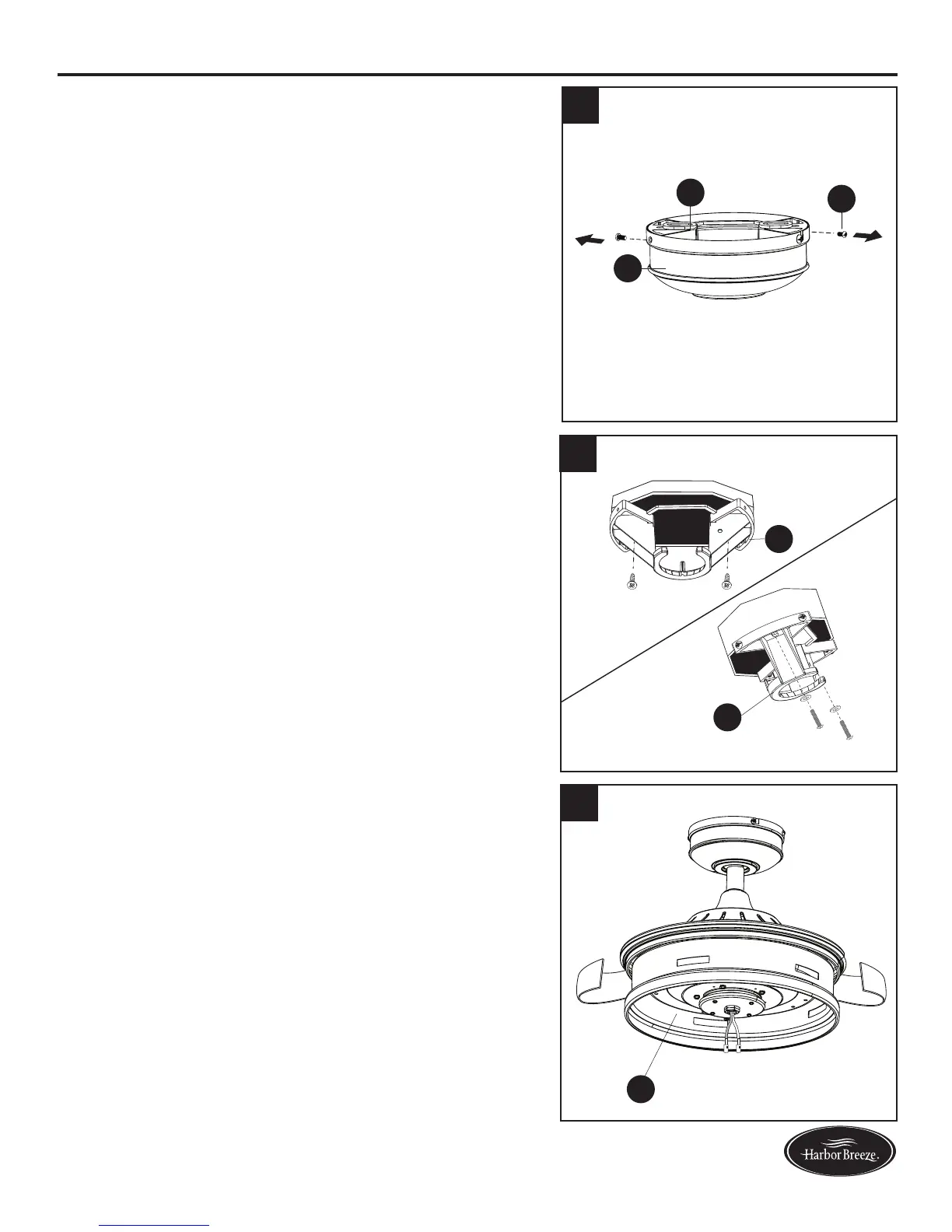
4. Loosen all four preassembled mounting bracket screws
(R), then completely remove the two mounting bracket
screws (R) from the round holes of canopy (E). Set
aside for later use. Detach mounting bracket (D) from
canopy (E).
5. Attach mounting bracket (D) to outlet box (not
included) using screws and washers provided with
the outlet box.
Note: It is very important you use the proper hardware
when installing the mounting bracket (D) as this will
support the fan.
Important: If using the angle mount, ensure the open
end of the mounting bracket (D) is installed facing the
higher point of the ceiling.
5. Remove and discard the cardboard shipping material
from the motor assembly (H).
4
R
E
D
D
D
5
6
H
Standard or
Closemount
Angle
Mount




 To Next Page