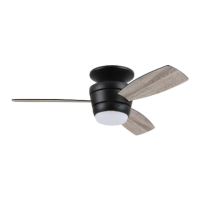
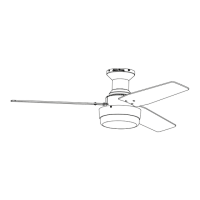
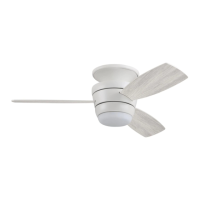
The HARBOR BREEZE MAZON CEILING FAN is a flush-mount ceiling fan designed for indoor use, offering both air circulation and integrated LED lighting. It is available in three models: MZ44BNK3LR, MZ44WW3LR, and MZ44MBLK3LR, corresponding to different finishes. The fan is controlled via a remote pack (L) which includes a transmitter and a bracket for wall mounting.
Function Description:
The primary function of the HARBOR BREEZE MAZON CEILING FAN is to provide air circulation and ambient lighting in a room. It features three blades (G) that can operate at three different speeds (HIGH, MEDIUM, LOW) to optimize comfort. The fan also includes a reversible motor function, allowing for seasonal adjustment of airflow. In warmer weather, setting the reverse switch to the LEFT position creates a downward airflow, producing a wind chill effect. In cooler weather, setting the reverse switch to the RIGHT position generates an upward airflow, helping to move stagnant, hot air off the ceiling area. The fan's integrated LED light kit (H) provides illumination and is dimmable to 10%. The light can be turned ON or OFF quickly, and holding the light button on the remote allows for dimming or brightening, with an auto-resume function that recalls the last brightness setting.
Important Technical Specifications:
- Mounting Type: Flushmount on a regular (no-slope) ceiling only.
- Minimum Clearance (Blades to Floor): 7 ft.
- Minimum Clearance (Blades to Obstruction): 30 in. from the end of the blades.
- Net Weight (including light kit): 14.77 lbs.
- Outlet Box Support: Must be marked "ACCEPTABLE FOR FAN SUPPORT OF 35 LBS. (15.9 KG) OR LESS" and use mounting screws provided with the outlet box. A METAL octagonal outlet box is required; plastic outlet boxes are not acceptable.
- Electrical Connections: Designed to accept one 12-gauge house wire and two lead wires from the fan. Consult an electrician if house wire is larger than 12-gauge or if there is more than one house wire.
- Power Supply: 120 V.
- Speed Control: Controlled by the included remote transmitter. Not compatible with solid-state speed control devices or full-range dimmer switches for fan speed control, as this can cause humming noise and risk of fire/electrical shock.
- Light Kit Wattage: 18 watts (LED). LEDs are not user-replaceable.
- Battery for Remote: Requires a battery (included in remote pack L) to be installed with correct polarity. Batteries are not rechargeable.
- FCC Compliance: The device complies with Part 15 of the FCC Rules, subject to two conditions: (1) it may not cause harmful interference, and (2) it must accept any interference received. Modifications not approved by the responsible party could void user authority to operate the equipment.
Usage Features:
- Remote Control Operation: The fan's functions (fan speed, light ON/OFF, dimming) are controlled via a handheld remote transmitter.
- Fan Speed Settings: Three distinct fan speeds: HIGH, MEDIUM, and LOW.
- Light Control: The LED light kit can be turned on or off and dimmed using the remote. The light has an auto-resume function, retaining the last brightness setting.
- Seasonal Reverse Function: A reverse switch on the fitter plate (D) allows users to change the direction of blade rotation to optimize airflow for different seasons. The switch must be set completely LEFT or completely RIGHT for the fan to operate.
- Easy Installation: The manual provides detailed steps for installation, including hanging the motor assembly (C) on a j-hook during wiring to free up hands.
- Canopy Ring: The canopy ring (B) snaps into grooves on the motor assembly (C) for a flush fit to the ceiling.
- Blade Attachment: Blades (G) are attached to the motor assembly (C) using blade screws (AA) and fiber blade washers (BB). Power tools should not be used for blade assembly to prevent damage.
- Shade Installation: The shade (E) aligns with protrusions on the fitter plate (D) and turns clockwise to secure.
Maintenance Features:
- Regular Screw Checks: At least twice a year, all mounting plate screws (J) and other fan screws should be checked and tightened to ensure stability.
- Cleaning: The motor assembly (C) should be cleaned with a soft brush or lint-free cloth to avoid scratching the finish. Blades (G) should also be cleaned with a lint-free cloth.
- Power Disconnection for Maintenance: Always shut off the main power supply before performing any maintenance on the fan.
- Cleaning Restrictions: Do not use water or a damp cloth to clean the ceiling fan.
- LED Light Kit: The integrated LED light kit is not designed for user replacement.
- Remote Battery Management: Remove the battery from the remote control transmitter if it will not be used for long periods to prevent damage. Dispose of low or no-charge batteries properly, checking local recycling guidelines. Do not dispose of batteries in fire.
Warranty:
The HARBOR BREEZE MAZON CEILING FAN comes with a Limited Lifetime Warranty from the date of purchase, covering defects in workmanship and materials for the original purchaser. The distributor will correct defects or replace the fan. The warranty does not cover damage from accident, misuse, improper installation, or use of non-manufacturer parts. It also excludes changes in brass finish, rusting, pitting, tarnishing, corroding, or peeling due to climatic conditions, and glass components. Replacement of defective parts within the first year is covered, with customer service contact for return authorization and shipping instructions.



 To Next Page
 General