INITIAL INSTALLATION
1
ON
OFF
ON
OFF
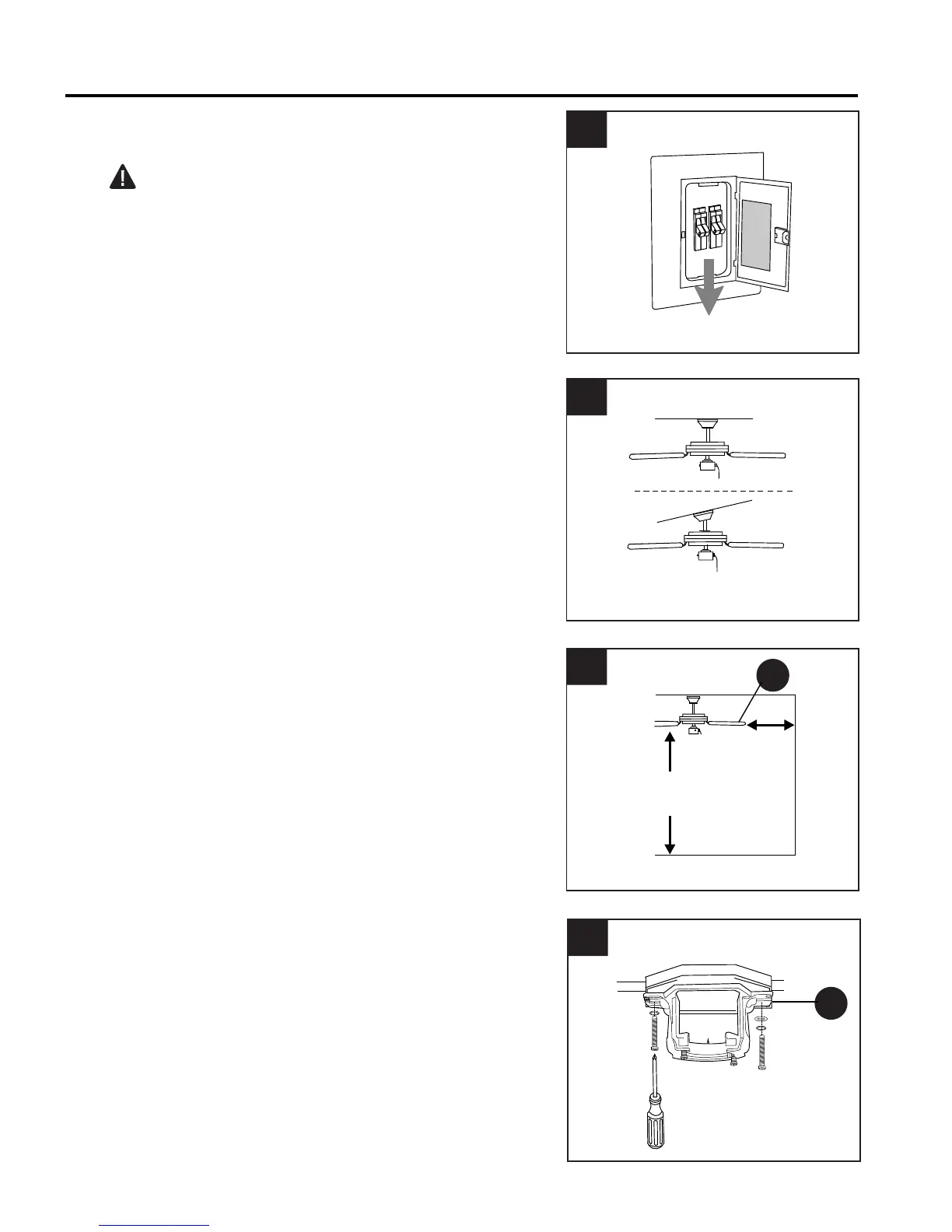
Turn off circuit breakers and wall switch to the fan
supply line leads. (Fig. 1)
DANGER: Failure to disconnect power supply
prior to installation may result in serious injury or
death.
1.
Determine mounting method to use. (Fig. 2)
A. Normal mount
B. Angle mount
Important: If using the angle mount, check to
make sure the ceiling angle is not steeper than 19°.
A
B
2.
2
Check to make sure blades (H) are at least 30 in.
from any obstruction. Check downrod (A) length to
ensure blades (H) are at least 7 ft. above the floor.
(Fig. 3)
3
H
3.
4
C
Secure mounting bracket (C) to outlet box using
screws, spring washers, and flat washers
provided with the outlet box. (Fig. 4)
*NOTE: It is very important that you use the
proper hardware when installing the mounting
bracket (C) as this will support the fan.
IMPORTANT: If using the angle mount, make
sure open end of mounting bracket (C) is installed
facing the higher point of the ceiling.
4.
7 ft.
min.
30 in.
min.
6






 To Next Page