AVR 140 QUICK-START GUIDE
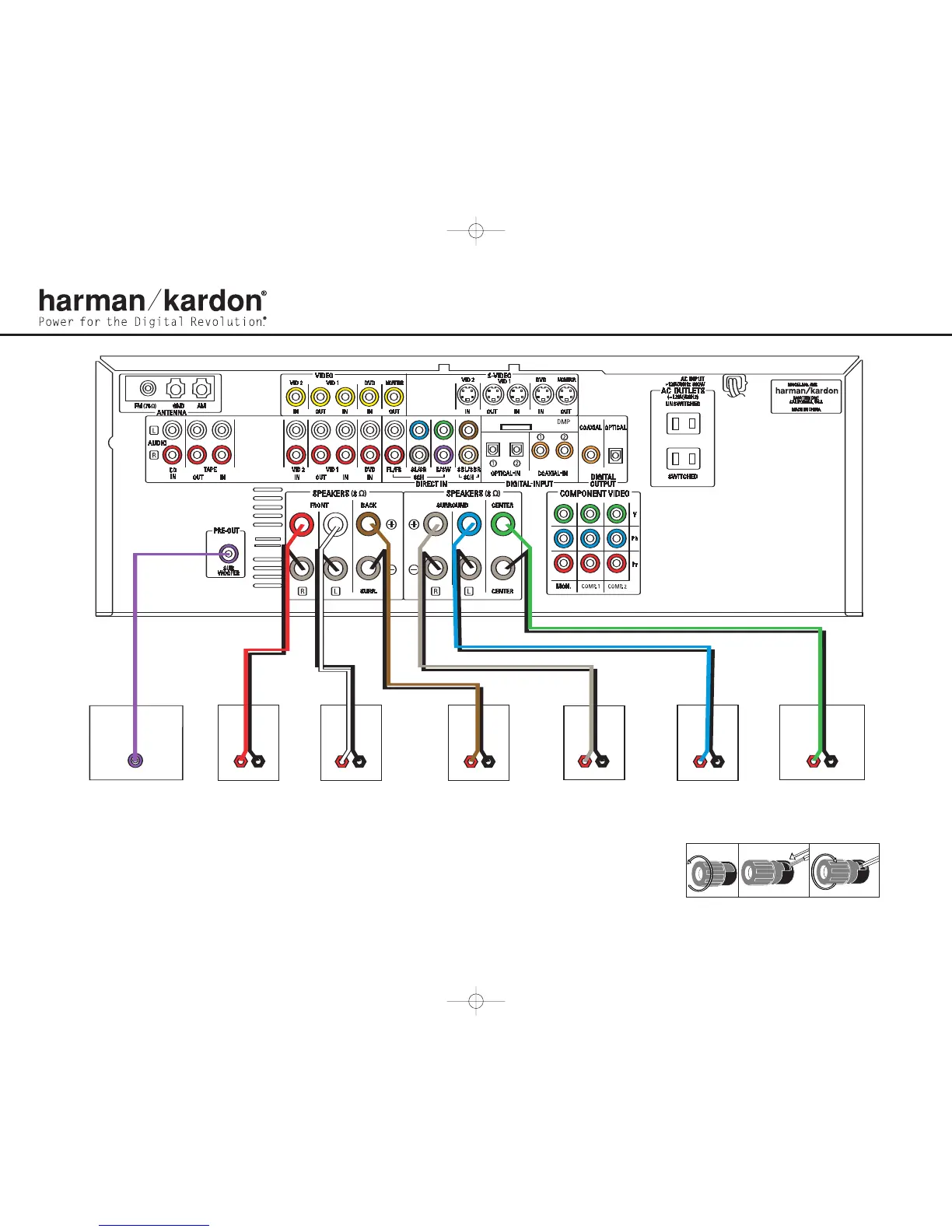
Figure 2 – Speaker Connections
Step 2. Connect the speakers to the receiver: red (+)
on speaker to colored (+) on receiver and
black (–) to black (–) (see page 12).
Step 3. Connect the Subwoofer Pre-Out jack to
the Line-In jack on your subwoofer (see
page 12).You may adjust the settings on
the subwoofer later as needed.
Figure 3 – How to Use the Binding-Post
Speaker Terminal
SURROUND BACK
SPEAKER
FRONT RIGHT
SPEAKER
FRONT LEFT
SPEAKER
CENTER SPEAKER
SUBWOOFER
LINE IN/SUB/LFE
SURROUND
RIGHT SPEAKER
+
_
+
_
+
_
+
_
SURROUND
LEFT SPEAKER
+
_
+
_
140140
(100W, 1A MAX)(100W, 1A MAX)
(
50W, 0.5A MAX)(50W, 0.5A MAX)
T
he Bridge



 To Next Page
 Loading...