15
ZonePRO
TM
4.2 ZC Wiring
The installation of the Zone Controllers MUST be accomplished with the use of cable which is
rated VW-1 or higher. Common NEC designations which meet this rating include: CMP, CMR,
CMG, CM and CMX.
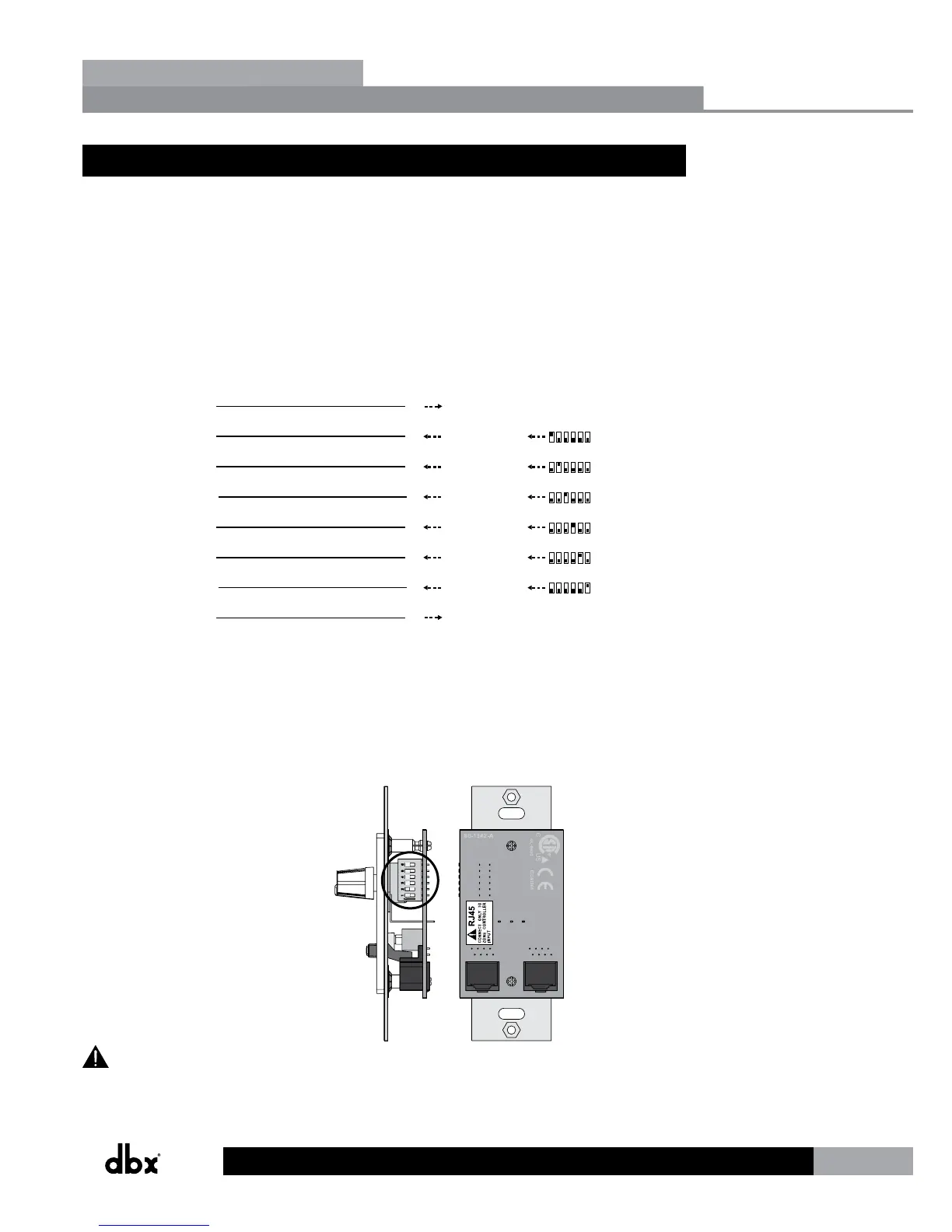
The below diagram shows the internal color coding of a compatible straight-through, 568B
standard Cat 5 cable. It also illustrates which DIP switch settings and controller ID numbers
correspond with each wire inside the Cat 5 cable.
Zone Controller Cable Specications:
Cat 5 Cable / 4-Twisted Pairs of 24 AWG Wire / 568B Standard
RJ-45
RJ-45
(8-Position)
ON
1 2 3 4 5 6
ON
1 2 3 4 5 6
ON
1 2 3 4 5 6
ON
1 2 3 4 5 6
ON
1 2 3 4 5 6
ON
1 2 3 4 5 6
Brown
Ground
1 1
White / Orange
Voltage Reference
2 2
Orange
Controller 1/7
3 3
White / Green
Controller 2/8
4 4
Blue
Controller 3/9
5 5
White / Blue
Controller 4/10
6 6
Green
Controller 5/11
7 7
White / Brown
Controller 6/12
All Zone Controllers can be wired serially or in parallel. Whether using serial or parallel
cabling, each Zone Controller must have a unique identification number chosen using the DIP
switches on the side of the controller (see Diagram A), although there may be multiple Zone
Controllers controlling a single zone or a single Zone Controller that controls multiple zones.
This is explained in further detail in “Section 4.4 ZC DIP Switches & Programming”.
Diagram A
RJ45
CONNECT ONLY TO
ZON E CONTRO LLE
R
INPUT
.
IEC60065
UL-6500
80-1342-A
RJ45
CONNECT ONLY TO
ZON E CONTRO LLE
R
INPU
T
.
IEC60065
UL-6500
80-1342-A
ID# 1 ID# 4
Diagram B
Diagram C
RS-232
RS-232
Two Zone Controllers cannot be used to control the same parameter within the ZonePRO
device!
Section 4
Zone Controllers


 To Next Page