Removing the Battery and System Card
8
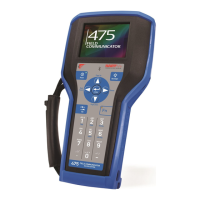
REMOVING THE BATTERY AND SYSTEM CARD
1. Remove the protective rubber boot, if attached.
2. With the 475 Field Communicator off, place it face down on a level, secure surface.
3. Loosen the two battery retaining screws until the top of each screw is above the top
of the 475 Field Communicator.
4. Slide the battery off the 475 Field Communicator.
CAUTION
The connector pins may be damaged if you pull the battery up rather than slide it off
the 475 Field Communicator.
5. Push the System Card into the System Card socket until it clicks and releases.
6. Slide the System Card out of the System Card socket.
STARTING THE 475 FIELD COMMUNICATOR
Before startup, ensure the 475 Field Communicator is not damaged, the battery is fully
seated, all screws are sufficiently tightened, and the communication terminals are free
of dirt and debris.
To start the 475 Field Communicator:
1. Press and hold the Power key on the keypad until the green light on that key blinks
(approximately two seconds). During startup, the 475 Field Communicator notifies
you if an upgrade on the System Card needs to be installed. The Field
Communicator Main Menu displays.
2. Use the touch screen or up and down arrow keys to select menu items. To open a
selected menu item, double-tap it or use the right arrow key.
3. To shut down, press the Power key and tap Shut down from the Power Switch
screen. Tap OK.
COMMUNICATING WITH PC APPLICATIONS
The IrDA interface, Bluetooth interface (if licensed), and a supported card reader let
the 475 Field Communicator or its System Card communicate with a PC. See Figure 1
for the location of the IrDA interface and the System Card. A card reader can only be
used with the Easy Upgrade Utility. See the 475 Field Communicator User’s Manual for
more information.


 To Next Page