Connecting to a Device
9
CONNECTING TO A DEVICE
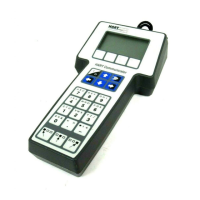
Use the provided lead set to connect the 475 Field Communicator to the loop,
segment, or device. Three communication terminals for the lead set are on the top of
the 475 Field Communicator. Each red terminal is a positive connection for its protocol,
and the black terminal is a common terminal shared by both protocols. An access door
ensures that only one pair of terminals is exposed at any one time. Several markings
indicate which pair of terminals is for which protocol.
Only connections to a HART loop and F
OUNDATION fieldbus segment are allowed. After
the device is connected, double-tap HART Application or F
OUNDATION Fieldbus
Application from the Field Communicator Main Menu. The appropriate device
description is also required. Refer to the latest version of the 475 Field Communicator
User’s Manual for details.
CAUTION
The 475 Field Communicator draws approximately 12 mA from the fieldbus segment.
Ensure the power supply or barrier on the fieldbus segment has the capacity to provide
this additional current. If a fieldbus segment is drawing near the capacity of the
segment’s power supply, connecting the 475 Field Communicator may result in loss of
communication.
TECHNICAL SUPPORT
Contact your supplier or go to http://www.fieldcommunicator.com/supp.htm for
Technical Support contact information.
MAINTENANCE AND REPAIR
Any maintenance, repair, or replacement of components not listed below must be
performed by specially trained personnel at an authorized service center. You can
perform common maintenance procedures listed below:
• Cleaning the exterior. Use only a dry, lint-free towel or dampen the towel with a mild
soap and water solution.
• Charging, removing, and replacing the battery.
• Removing and replacing the System Card.
• Removing and replacing the stand.
• Ensuring that all exterior screws are sufficiently tightened.
• Ensuring that the communication terminal recess is free of dirt and debris.



 To Next Page