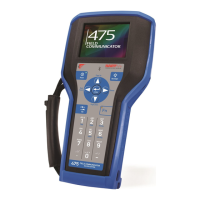
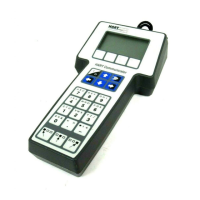
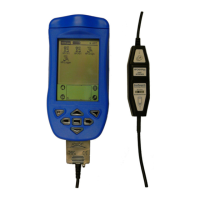
The Smar HPC401Plus HART Field Communicator is a comprehensive and versatile solution for configuring and monitoring HART devices. It integrates a Palm handheld, the HPC401Plus HART interface hardware, and the HPC Suite of Palm applications into a single, portable, and powerful tool.
Function Description:
The HPC401Plus serves as a complete HART field communicator, enabling users to interact with HART devices for various tasks, including:
- Configuration: Adjusting device parameters and settings according to manufacturer specifications.
- Monitoring: Observing real-time data and operational status of HART devices.
- Data Logging: Recording device variable values over time for later analysis.
- Graphical Trending: Visualizing device variables graphically to identify trends and anomalies.
The system leverages the familiar Palm operating system, providing a user-friendly graphical interface that simplifies the configuration of even complex transmitters. The HPC401Plus is designed to be ready for use "out of the box," with the HPC Suite software pre-installed on the Palm handheld. Users only need to attach the HART interface, connect to the HART network, and launch the HPC401 application.
The HPC Suite comprises four distinct applications:
- HPC401: This is the primary application for communication, monitoring, and configuration of HART devices. It is based on manufacturer Device Description Language (DDL) files, ensuring access to all menus, variables, and methods as defined by the manufacturer. This allows for accurate and comprehensive device interaction.
- HPCGraph: This application facilitates graphical trending of up to four device variables simultaneously over time. It offers an easy-to-view graphical format with customizable colors for easy identification of different parameters. Graphs can be saved for offline viewing and analysis.
- HPCLogger: This software enables the logging of device variable values over time. Users can choose to log variables automatically at a selectable sample time or manually. Logged data can be saved and transferred to a PC for further processing and analysis.
- HPC301: As the predecessor to HPC401, this application is included for users accustomed to its layout and structure, particularly for Smar transmitters. It allows for configuration and monitoring of HART devices and can also access devices in generic mode, even if a specific DDL driver is not loaded in HPC401.
Important Technical Specifications:
- Interface: The HPC401Plus HART interface connects to the Palm multi-connector at the bottom of the handheld.
- Power: The HART interface requires no batteries, drawing power directly from the Palm handheld's internal power supply. The Palm can be charged even with the HART interface connected, using a passthrough power supply connector on the interface.
- HART Network Connection: Pinch connectors are used to easily connect to any HART network.
- Communication Requirement: A minimum load of 250 Ohms is required on the HART line for communication.
- Device Drivers: HPC401 utilizes Device Description Language (DDL) files, which are standardized files detailing device variables, commands, and parameters. The software comes preloaded with drivers for a range of manufacturers. New device drivers can be downloaded from the Smar Research website and added to the HPC401. Device driver files follow a naming convention: "mmddrr.prc" (mm = HART Manufacturer Code, dd = Device Code, rr = Hardware Revision Code).
- Data Storage: Logged data and offline graphs are automatically stored on the Palm and can be transferred to a PC for further analysis. Log files are named "dMMDDXXXXXX.txt" (MM = manufacturer code, DD = device type code, XXXXXX = device serial number, all in hexadecimal). Graph files are named "dMMDDXXXXXXgf" using the same hexadecimal naming convention.
Usage Features:
- Ease of Use: The familiar Palm operating system and graphical interface make the HPC401Plus intuitive to use, especially for those already familiar with Palm devices.
- Portability and Durability: Its compact size, low power consumption, and rugged industrial exterior make it an ideal tool for use in various plant or factory environments.
- Device Polling: HPC401 allows polling for HART devices by device address (0-15), address range, or by tag.
- Device Parameter Navigation: Device menus, parameters, and methods are accessed via buttons. Editable fields for parameters can be text fields or drop-down lists. Changes are sent to the device using a "Send" button.
- Customizable Logging and Graphing:
- HPCLogger: By default, it logs PV, PV%, Out (mA), and SV. If the device supports HART command 33, users can select different variables to log. Logging can be automatic (at user-defined intervals) or manual.
- HPCGraph: By default, it graphs Current, PV, SV, and TV. If the device supports HART command 33, users can select different variables to graph. Graph scales (Ymax, Ymin, Xmax, Xmin) are adjustable via a "Settings" button. The X-axis can be scrolled for large datasets.
- Offline Capabilities: Previously graphed data is stored on the Palm and can be reviewed offline using the "Offline Graphics" feature in HPCGraph.
- Generic Mode Access: The HPC301 application allows access to HART devices in generic mode, useful for devices without a loaded DDL driver in HPC401.
Maintenance Features:
- Software Reinstallation and Backup:
- The HPC Suite software is pre-loaded on the Palm. It is recommended to install the Palm software on a PC to enable Hotsyncing and back up files.
- If the Palm loses memory or the battery is fully drained, Hotsync can restore the HPC Suite software if a backup exists on the PC.
- If no Hotsync backup exists, the included Smar Research Product CD can be used to reinstall the HPC Suite applications by selecting "MEZ1000 Setup."
- Device Driver Management: New device drivers can be easily added by downloading the ".prc" file from the Smar Research website, double-clicking it to add to the Palm Hotsync list, and then Hotsyncing the Palm.
- Troubleshooting Guide: The manual includes a troubleshooting section to address common issues such as no communication, intermittent communication, Palm battery discharge, and issues with device addressing. Solutions include verifying wiring, adding resistors, recharging the Palm, and adjusting polling methods.
- Registration: The HPC401 software requires registration. A registration screen appears upon launch until a valid code is entered. The software can function in "Skip" mode while awaiting registration.


 To Next Page
 General