24
www.coreservice.co.uk
Hotline: +44 01904 947568
Email support@coreservice.co.uk
Extending the cutting line
1) Before starting the line trimmer for the first time, check the length of the nylon cutting line. Make
sure that it touches or passes over the line blade (18). Extend the cutting line if it is not long
enough as follows:
a. Remove the battery pack from line trimmer.
b. Press the spool button (20).
c. Pull nylon cutting line out, so that it touches or passes over the line blade (18).
d. Replace the battery back.
2) The nylon cutting line will be cut automatically to the suitable length by the line blade once the
line trimmer is turned on.
3) The nylon line will become worn and shortened during operation. Tap the spool button (20) lightly
on ground (while the line trimmer is running) to extend the cutting line.
Switching the line trimmer On / Off
1) Press the lock-off button (1), then press and hold the on/off switch (3) on the operating handle to
switch on the line trimmer.
2) Releasing the on/off switch (3) will switch off the line trimmer.
Cutting grass
WARNING! Always wear eye protection. Rocks or debris can ricochet into eyes and
face causing serious injury.
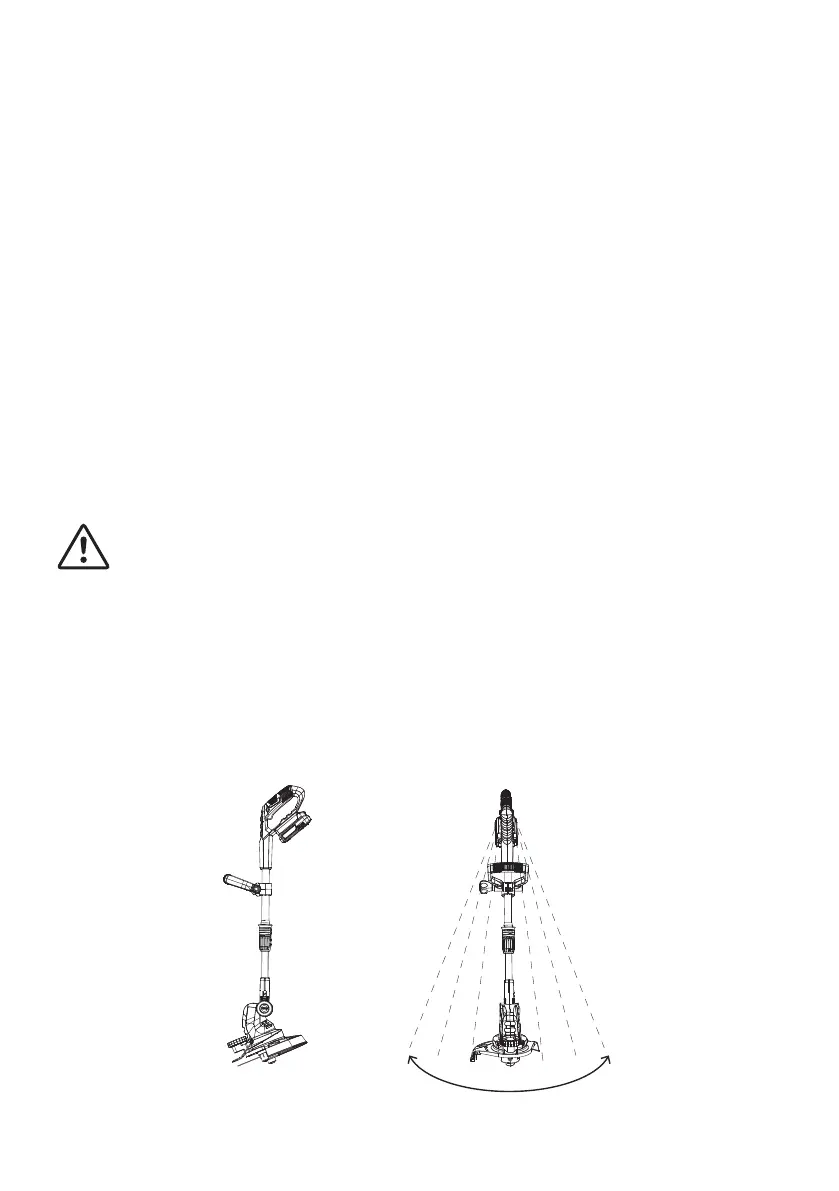
1) Hold operating handle and the auxiliary handle with both hands.
2) Keep the line trimmer below waist level.
3) Do not switch the line trimmer on until the cutting head is on or near the grass to be cut.
4) Let the trimmer run for a few seconds so that the line cutter can cut the extra length of the nylon
cutting line.
5) Ensure the cutting line is at full speed before moving the line trimmer to the grass and start
trimming.
6) Keep the line trimmer at an angle of approximately 15 degrees to the working area.
7) Swing the line trimmer from side to side.


 To Next Page