USE ONLY HAYWARD GENUINE REPLACEMENT PARTS
1
Introduction
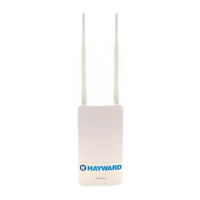
The HLWLAN is a 802.11b/g/n Transceiver kit that can make a wireless connection from the Om-
niLogic up to 250ft to the home’s router/access point preventing the need to run ethernet cable for
web access. Connection to the web is necessary for remote access to the OmniLogic using web
enabled devices.
Compatibility
Refer to this manual when using OmniLogic controls operating with MSP version R1.4.3 and
greater. For earlier OmniLogic MSP revisions, refer to previous HLWLAN manual versions. To
determine your OmniLogic’s MSP version, select the “config” icon on the home screen and then
select “system info” (see diagram on page 8).
Survey the location near the OmniLogic to locate the best mounting location. The HLWLAN has
a 15ft ethernet cable that connects to the OmniLogic. When determining the best mounting
location for the HLWLAN, note that it can be mounted on the two provided screws or strapped
to an object using the two included zip ties. To help determine if the mounting location is in
range of the router/access point, test the connection of other devices (phone, tablet, laptop,
etc.) at that same location.
If a reliable wireless connection can’t be made in the intended location, consider moving the
router/access point closer to the OmniLogic or using a longer outdoor rated ethernet cable to
move the HLWLAN closer to the router/access point.
Before You Begin
The HLWLAN kit contains the following:
• HLWLAN 802.11b/g/n Transceiver
• Power Injector
• OmniLogic power supply cable for
Power over Ethernet (PoE) Injector
• 2 Ethernet Cables
• Miscellaneous mounting hardware
Installation of the HLWLAN requires that
you have an existing wireless home net-
work in range of the intended HLWLAN
mounting location. The HLWLAN has a
radio range of about 250ft. To connect
the HLWLAN to your home network, you
will need to know the home network’s
SSID, security type and password.


 To Next Page
 Loading...