Connecting Power to the HydraPure Unit
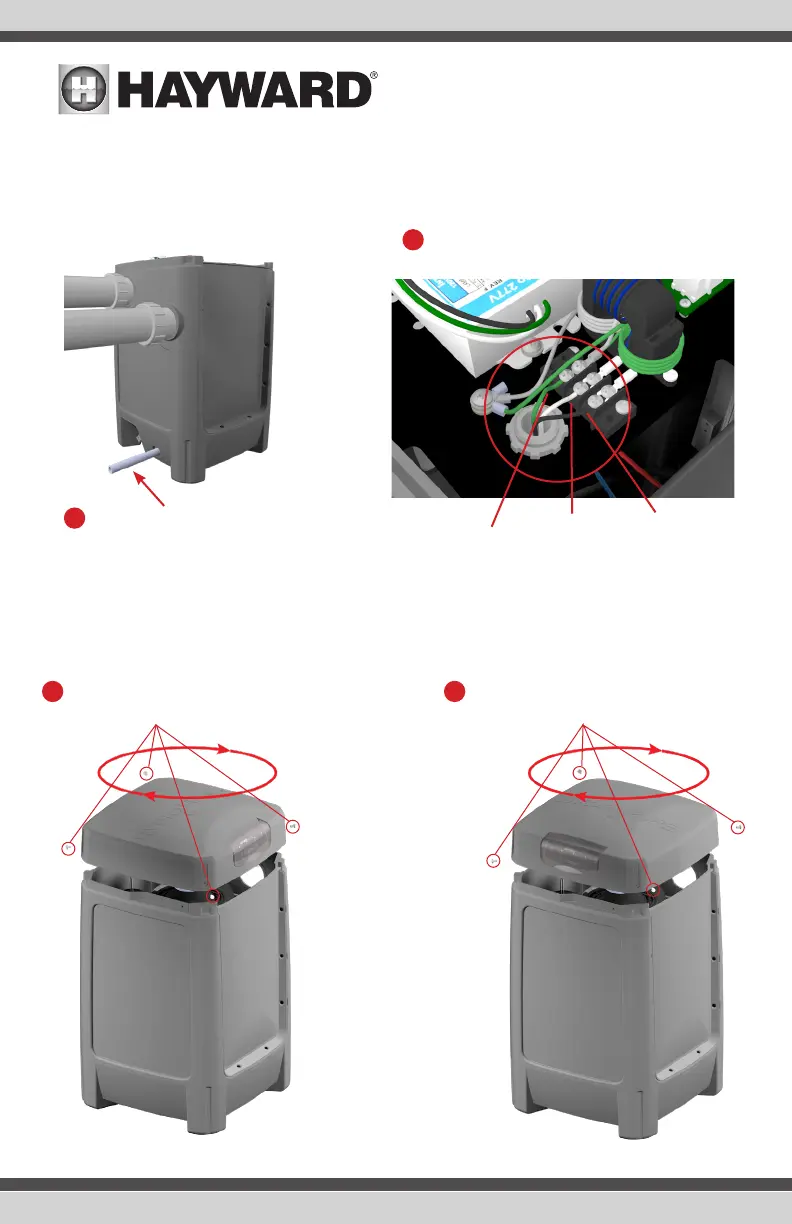
Corded 120V Hydrapure unit: Plug into GFCI outlet.
Hardwired 120V or 240V Hydrapure unit: Follow steps 1 & 2 below.
Position the Hydrapure Lid
The lid can be positioned in any four directions for better view of the control panel.
1
Thread L1, L2 (240V) or N (120V)
and ground wire through conduit.
2
Attach wires to connections according to
diagram below.
1
Remove the 4 screws and then care-
fully lift the lid.
2
Rotate the lid and replace it in the desired
position. Replace the 4 screws.
L1
L2 if 240V,
N if 120V
Ground
CAUTION: Be aware
that there is a delicate
control ribbon cable
under the lid. Take
care when handling.
USE ONLY HAYWARD GENUINE REPLACEMENT PARTS
6
USE ONLY HAYWARD GENUINE REPLACEMENT PARTS


 To Next Page