19"W LCD Color Monitor HCL HCM9LWAN21
7
power button to turn the monitor on. To un-lock the OSD - press and hold the MENU button while the monitor is off
and then press power button to turn the monitor on.
3.3 Adjusting the Picture
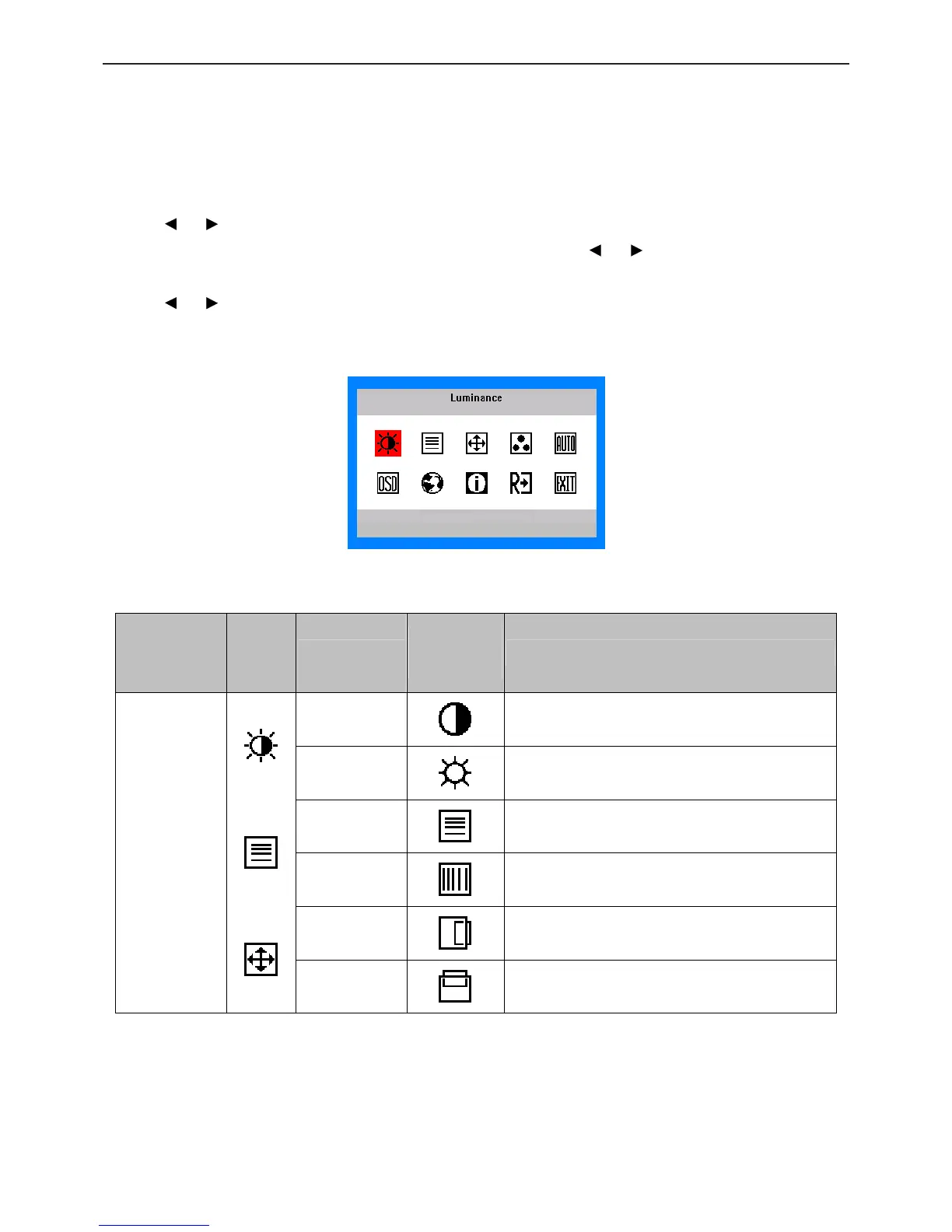
• OSD Settings
1. Press the MENU-button to activate the OSD window.
2. Press
or to navigate through the functions. Once the desired function is highlighted, press the
MENU-button to activate it. If the function selected has a sub-menu, press
or again to navigate through the
sub-menu functions. Once the desired function is highlighted, press MENU-button to activate it.
3. Press
or to change the settings of the selected function.
4. To exit and save, select the exit function. If you want to adjust any other function, repeat steps 2-3.
The OSD Message
• OSD functions
Main Menu
Item
Main
Menu
Icon
Sub Menu Item
Sub Menu
Icon
Description
Contrast
Contrast from Digital-register.
Luminance
Brightness
Backlight Adjustment.
Focus
Adjust Picture Phase to reduce Horizontal-Line
noise.
Image Setup
Clock
Adjust picture Clock to reduce Vertical-Line noise.
H. Position
Adjust the horizontal position of the picture.
Image Position
V. Position
Adjust the vertical position of the picture.



 To Next Page