VER1.0B1 HeartCheck HANDHELD ECG MONITOR
- 14 -
or the connection of the unit and lead cable.
Wrong Operation Methods:
A. Cables are mounted incorrectly.
B. Electrode patches have been placed on the body incorrectly
.
4.3 Measurement Mode:
There are two measurement modes for your selection easy mode and continuous mode.
4.3.1 Measuring in Easy Mode:
Press the
/ Power button for about 3 seconds to turn on the device.
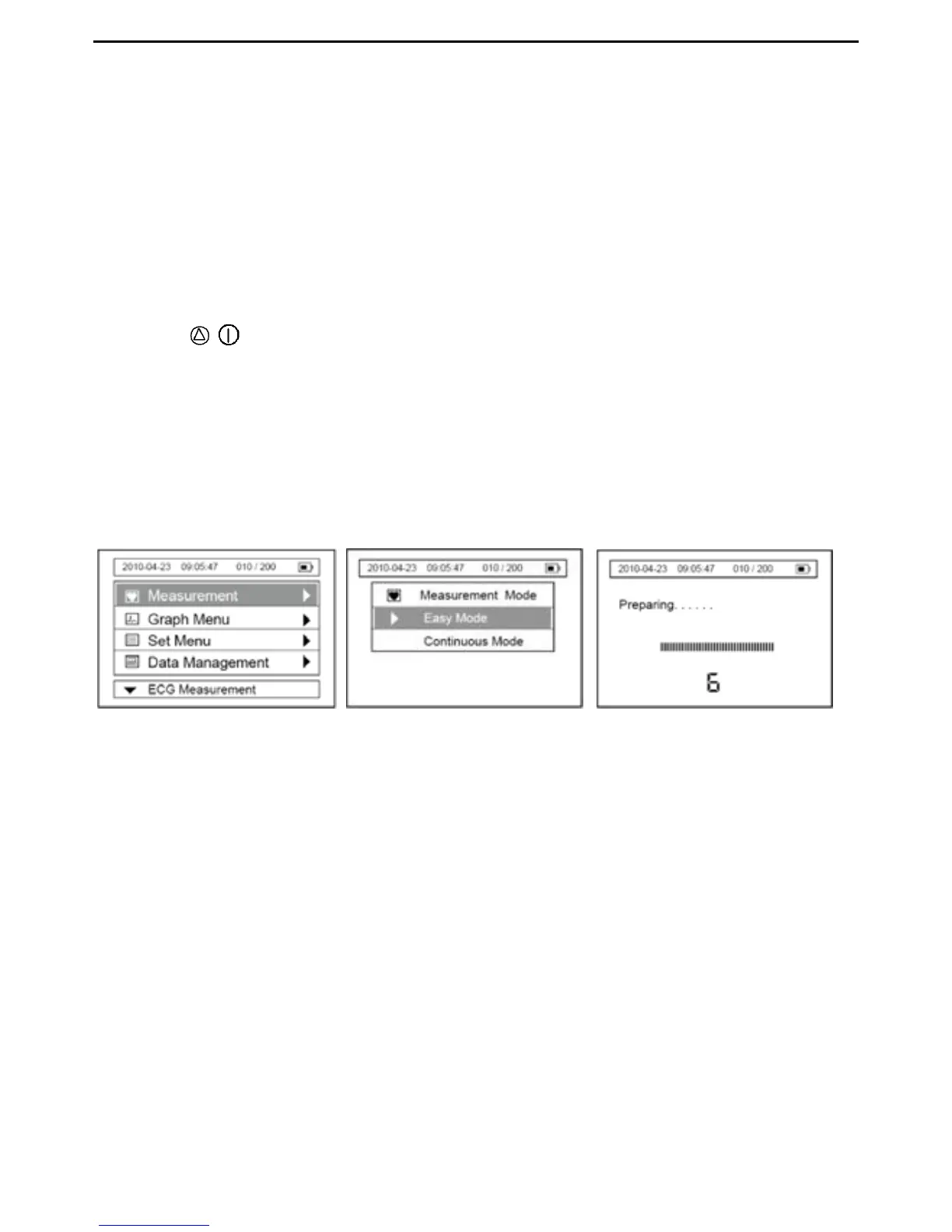
Enter the menu interface as shown in Picture
4-6 and select the “Measurement” item, the
interface switches to the one as shown in Picture
4-7. Measurement Modes include Easy
Mode and Continuous Mode. Choose the “Easy Mode” item, and click the “OK” button.
The interface will appear as shown in Picture
4-8. After the count down from six to zero,
the measurement will start.
Picture 4-6 Picture 4-7 Picture 4-8
Additionally, you can press the START button to quickly start a measurement, based on
the measuring mode selected in the “Measurement” Menu. Before measuring, make
sure that you are in a relaxed position.
Measuring interface in Easy Mode:
It takes about 30 seconds to complete the ECG measurement. During the measurement,
the device will beep synchronously along with the heart beat.


 To Next Page