EasyManua.ls Logo

Heath Zenith DUAL BRITE SL-5597 - User Manual

Heath Zenith DUAL BRITE SL-5597
12 pages
Print Icon
To Next Page IconTo Next Page
Loading...
© 2001 DESA International 595-5679-05
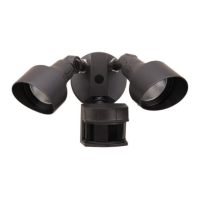
Dual Brite
Motion Sensor
Light Control
Model SL-5597
Features
• Turns on lighting when motion is detected.
• Automatically turns lighting off.
• Dual Brite™ Timer.
Photocell keeps the lighting off during daylight hours.
• LED indicates motion was sensed (day or night).
This package includes:
2 Wire
Connectors
Gasket
6 Screws
(3 sizes included)
Light Control
Requirements
The Light Control requires 120-volts AC.
If you want to use Manual Override, the control
must be wired through a switch.
Some codes require installation by a qualified
electrician.
This product is intended for use with a junction box
marked for use in wet locations.
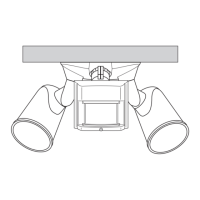
Mounting Strap
Mounting Bolt
2 Lamps
(installed)
OPERATION
* resets to Auto Mode at dawn.
TEST
TEST 1 5 20
ON-TIME
Off 3 6 Dusk to
Dawn
DUAL BRITE™
Put ON-TIME switch
on the sensor bottom
to TEST and the Dual
Brite™ switch OFF.
MANUAL MODE
ON-TIME
TEST 1 5 20
... back on.
AUTO
1 Second OFF
then
...
Put the ON-TIME switch in the 1, 5 or
20 minute position.
Dual Brite™ TIMER
Light comes on half bright for selected time after dusk
(Off, 3 hr., 6 hr., until dawn). If motion is sensed, the light
turns on full bright for the ON-TIME (1,5 or 20 minutes)
then returns to dim mode.
Move ON-TIME Switch
to 1, 5 or 20 minutes
Mode Switching Summary
Flip light switch
off for one second
then back on*
MANUAL MODE
AUTO
TEST
Note: When first turned on wait about 1
1
/
2
minutes for
the circuitry to calibrate.
Manual mode only works at night
because daylight returns the sensor
to AUTO.
Flip the light switch off for one second
then back on to toggle between AUTO
and MANUAL MODE.
Manual mode works only with the ON-
TIME switch in the 1, 5, or 20 position.
* If you get confused while switching modes, turn the
power off for one minute, then back on. After the
calibration time the control will be in the AUTO mode.
Test 5 Sec x x
Auto 1, 5, 20 min. x
Manual Until Dawn* x
Mode: On-Time: Works: Day Night
Rubber Plug
Plastic Hanger
Cover
Plate
Sensor
Lamp
Holders

Other manuals for Heath Zenith DUAL BRITE SL-5597

Questions and Answers

  • J
    Julie CastroJul 29, 2025
    What to do if Heath Zenith Accessories lights flash on and off?
    • B
      bethany21Jul 29, 2025
      If your Heath Zenith Accessories lights are flashing on and off, it could be due to a few reasons: * Heat or light from the lamps might be turning the light control on and off, so reposition the lamps away from the sensor. * Heat being reflected from other objects might be affecting the sensor, so reposition the sensor. * The light control might be in the Test mode and warming up; flashing is normal under these conditions, so turn Boost off.
  • C
    cochranreginaAug 2, 2025
    How to stop my Heath Zenith Accessories lights from coming on in daylight?
    • S
      Sarah WalkerAug 2, 2025
      If your Heath Zenith Accessories lights are activating during the day, it could be because the light control is installed in a relatively dark location, consider relocating the control. Also, check if the light control is in Test mode and set the control switch to an ON-TIME position.
  • G
    greennancyAug 7, 2025
    Why my Heath Zenith Accessories lights will not come on?
    • L
      Lori DoyleAug 7, 2025
      If your Heath Zenith Accessories lights aren't turning on, there are several potential causes. First, ensure the light switch is in the on position. Then, check the bulb to see if it's loose or burned out, and replace it if needed. Also, verify that the fuse hasn't blown or the circuit breaker hasn't been tripped. If it's daytime, the daylight turnoff feature might be active, so recheck after dark. For new installations, incorrect circuit wiring could be the issue, so inspect the wiring. Finally, try re-aiming the sensor to ensure it covers the desired area.
  • T
    Thomas BartonAug 11, 2025
    What to do if my Heath Zenith Accessories lights stay on continuously?
    • M
      michaelparrishAug 11, 2025
      If your Heath Zenith Accessories lights are staying on constantly, consider these possibilities: The lamp might be too close to the sensor, or pointed at reflective objects, causing heat to trigger it—reposition the lamp. The light control could be pointed toward a heat source like an air vent—reposition the sensor and reduce its range. Also, check if the light control is in Manual Mode and switch it to Auto.
  • D
    Desiree LaraAug 15, 2025
    Why do my Heath Zenith Accessories lights come on for no apparent reason?
    • M
      Michelle HarmonAug 15, 2025
      If your Heath Zenith Accessories lights are activating for no obvious reason, it could be due to several factors. The light control might be sensing small animals or automobile traffic, so try re-aiming the sensor. Also, the range might be set too high, so reduce the range setting. Finally, check if the Dual Brite™ Timer is on and turn it off if necessary.
  • K
    Kerry JosephAug 20, 2025
    Why Heath Zenith Accessories lights turn off too late in Dusk-to-Dawn setting?
    • R
      Regina KnightAug 20, 2025
      If your Heath Zenith Accessories lights are turning off too late in the Dusk-to-Dawn setting, it may be because the sensor is in a relatively dark location. Try relocating the sensor, or use the 3 hr or 6 hr setting.
  • S
    Stacey AdamsAug 25, 2025
    What to do if Heath Zenith Accessories lights flash once, then stay off in Manual Mode?
    • K
      Karen GarzaAug 25, 2025
      If your Heath Zenith Accessories lights flash once and then stay off in Manual Mode, it's possible that the sensor is detecting its own lights. Reposition the lamps to keep the area below the sensor relatively dark.

Summary

Operation

Operating Modes

Details the TEST, AUTO, and MANUAL operating modes and their settings.

Dual Brite Timer Function

Explains the dual brightness feature which provides dim light after dusk.

Package Contents

Lists all the components included in the product package.

System Requirements

Outlines electrical requirements and necessary wiring for installation.

Installation

Safety & Installation Precautions

Covers fire hazards, safe operating distances, and electrical safety during installation.

Sensor Head Adjustment for Eaves

Instructions for properly rotating the sensor head for under-eave installations.

Bulb Replacement Procedure

Step-by-step guide for safely removing and replacing the light bulb.

Wiring and Mounting Instructions

Guides for electrical connections, wiring the control, and mounting the unit.

Test and Adjustment

Test Mode Setup and Sensor Aiming

Steps for initial testing, setting controls to TEST, and aiming the sensor.

Range and Dual Brite Timing Configuration

How to set the detection range and the duration of the Dual Brite™™ dim light.

Technical Specifications

Details on sensing angle, electrical load, power requirements, and compatible lamps.

Troubleshooting Guide

Common Operational Issues and Solutions

Addresses frequent problems like lights not turning on or staying on continuously.

Ten-Year Limited Warranty Details

Outlines the warranty period, coverage, exclusions, and claims process.

Heath Zenith DUAL BRITE SL-5597 Specifications

General IconGeneral
TypeMotion Sensor Control Unit
Voltage120V
FeaturesAdjustable timer
TechnologyInfrared
Detection RangeUp to 70 feet

Related product manuals