EasyManua.ls Logo

Heathkit HW-12 - Page 26

Heathkit HW-12
67 pages
Print Icon
To Next Page IconTo Next Page
To Previous Page IconTo Previous Page
Loading...
HMATHKIT
BLK-WHT
S\orn-
-WHT
\
ee
=
ASS
SA.
\
GIDEA,
\
¢
sig
ge
|
NZ
RED
ae
VG
fee
><
ON
Xx
oa
>
yr
ap
WZ
P—SGOQ
Oh
oS
ale
Al
Se
NETS
i
6-172"
BLK-WHT
BRN-WHT
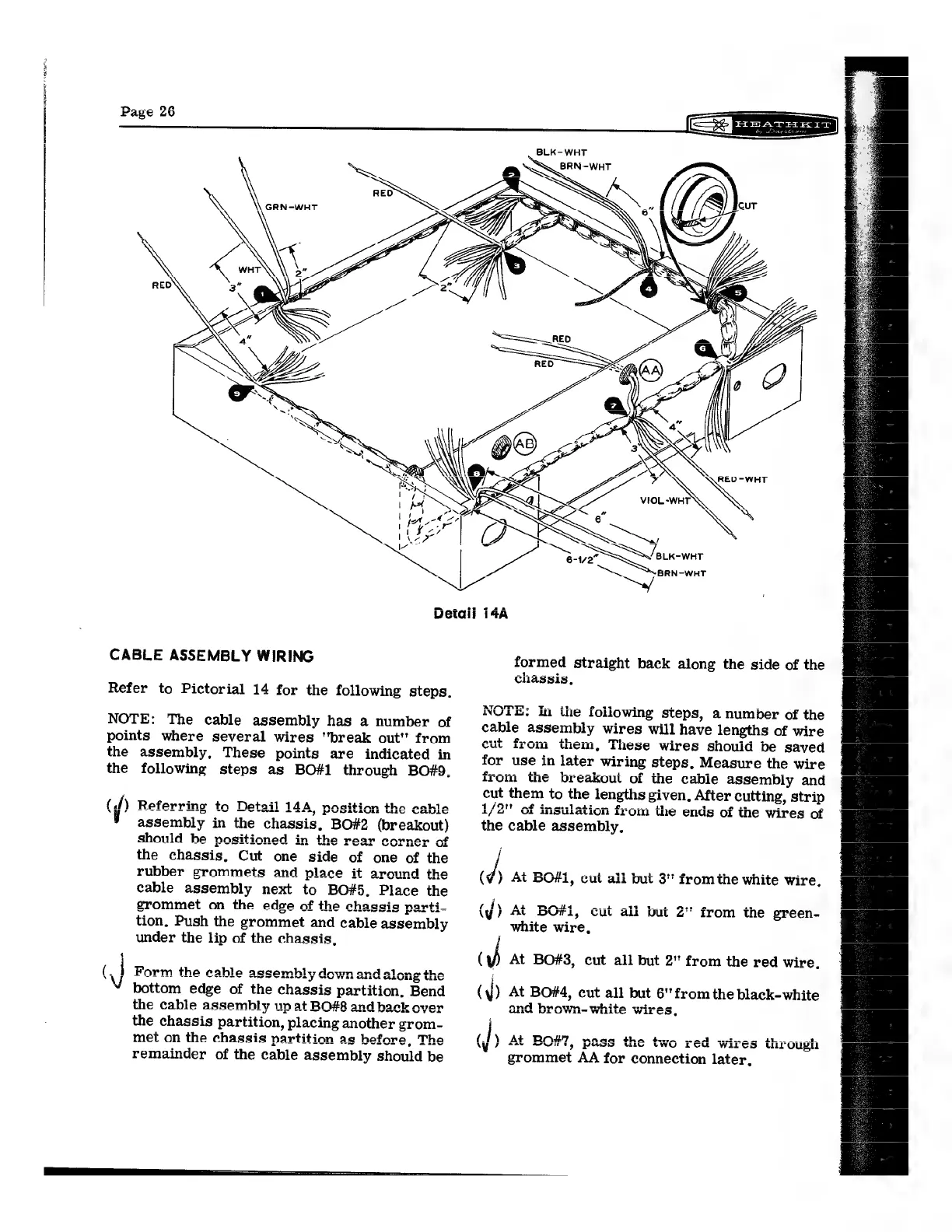
Detail
i4A
CABLE
ASSEMBLY
WIRING
formed
straight
back
along
the
side
of
the
chassis,
Refer
to
Pictorial
14
for
the
following
steps.
AAMT.
NOTE:
In
the
foliowing
steps,
a
number
of
the
NOTE:
The
cable
assembly
has
a
huniber
of
cable
assembly
wires
will
have
lengths
of
wire
points
where
several
wires
"break
out"
from
cut
from
them,
These
wires
should
be
saved
the
assembly,
These
points
are
indicated
in
for
use
in
later
wirin
g
steps,
Measure
the
wire
the
following
steps
as
BO#1
through
BO#9.
trom
the
breakout
of
the
cable
assembly
and
cut
them
to
the
lengths
given,
After
cutting,
strip
1/2"
of
insulation
from
the
ends
of
the
wires
of
aa
(f)
Referring
to
Detail
14A,
position
the
cable
assembly
in
the
chassis,
BO#2
(breakout)
the
cable
assembly,
should
he
positioned
in
the
rear
corner
of
;
the
chassis,
Cut
one
side
of
one
of
the
ye
rubber
grommets
and
place
it
around
the
(¥)
At
BO#I,
cut
ali
but
3"
fromthe
white
wire
cable
assembly
next
to
BO#5.
Place
the
;
grommet
on
the
edge
of
the
chagsig
parti-
(4)
At
BO#1,
cut
all
but
2"
from
the
green-
tion,
Push
the
grommet
and
cable
assembly
white
wire,
under
the
lip
of
the
chassis,
j
y
At
BO#3,
cut
all
but
2"
from
the
red
wire.
(,
Form
the
cable
assem
ge
Donde
change
fare
able
asser
ay
wl.
5
and
ee
whi
V’
bottom
edge
of
the
chassis
partition,
Ben
(
V)
At
BO#4,
cut
all
but
6"
from
the
black-white
ot
ite
wires,
the
chassis
partition,
placing
another
grom-
/
met
on
the
chassis
partition
as
before,
The
(J)
At
BO#7,
pass
the
two
red
wires
through
remainder
of
the
cable
assembly
should
be
grommet
AA
for
connection
later,

Related product manuals