EasyManua.ls Logo

Heathkit HW-12 - Page 39

Heathkit HW-12
67 pages
Print Icon
To Next Page IconTo Next Page
To Previous Page IconTo Previous Page
Loading...
an
i
SR
————————
,
:
HHATHEKIT
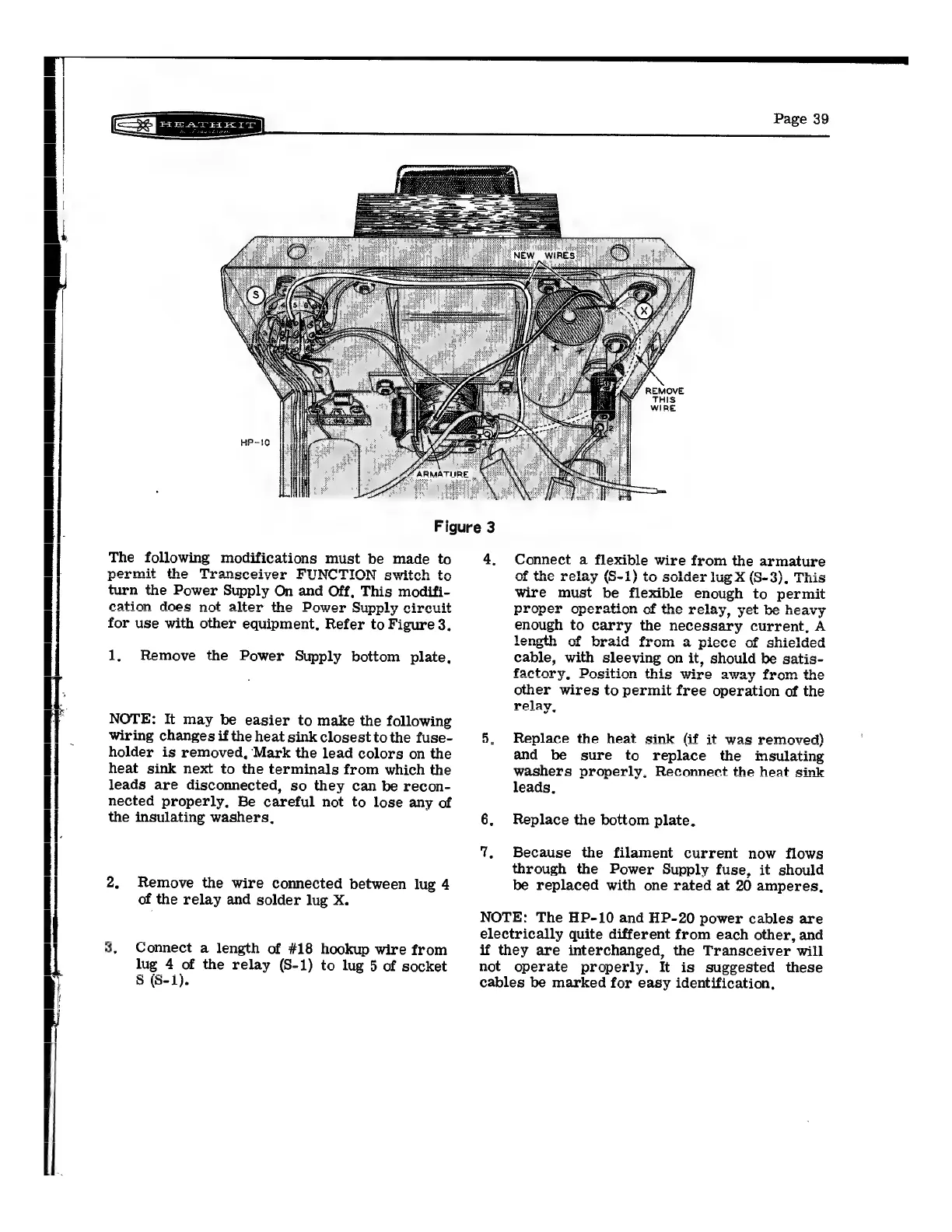
Figure
3
The
following
modifications
must
be
made
to
permit
the
Transceiver
FUNCTION
switch
to
turn
the
Power
Supply
On
and
Off,
This
modifi-
cation
does
not
alter
the
Power
Sunnly
circuit
ARIS
ES
LOL
AMES
Ie
OWS
CSUppsy
CiPCult
for
use
with
other
equipment,
Refer
to
Figure
3,
1.
Remove
the
Power
Supply
bottom
plate,
NOTE:
It
may
be
easier
to
make
the
following
wiring
changes
if
the
heat
sink
closest
to
the
fuse-
holder
is
removed,
Mark
the
lead
colors
on
the
heat
sink
next
to
the
terminals
from
which
the
leads
are
disconnected,
so
they
can
be
recon-
nected
properly,
Be
careful
not
to
lose
any
of
the
insulating
washers,
2,
Remove
the
wire
connected
between
lug
4
of
the
relay
and
solder
lug
X.
fou)
Connect
a
length
of
#18
hookup
wire
from
lug
4
of
the
relay
(S-1)
to
lug
5
of
socket
§
(S-1).
4,
Connect
a
flexible
wire
from
the
armature
of
the
relay
(S-1)
to
solder
lug
X
(S-3),
This
wire
must
be
flexible
enough
to
permit
+
Th.
ha
acre
proper
operation
of
the
relay,
yet
be
heavy
enough
to
carry
the
necessary
current,
A
length
of
braid
from
a
piece
of
shielded
cable,
with
sleeving
on
it,
should
be
satis-
factory
aAltOt
ve
2
O82
Position
this
wire
away
from
the
other
wires
to
permit
free
operation
of
the
5.
Replace
the
heat
sink
(if
it
was
removed)
and
be
sure
to
replace
the
imsulating
washers
properly,
Reconnect
the
heat
sink
leads,
6.
Replace
the
bottom
plate,
7,
Because
the
filament
current
now
flows
through
the
Power
Supply
fuse,
it
should
be
replaced
with
one
rated
at
20
amperes,
NOTE:
The
HP-10
and
HP-20
power
cables
are
electrically
quite
different
from
each
other,
and
if
they
are
interchanged,
the
Transceiver
will
not
operate
properly.
It
is
suggested
these
cables
be
marked
for
easy
identification,

Related product manuals