EasyManua.ls Logo

Heathkit HW-12 - Page 42

Heathkit HW-12
67 pages
Print Icon
To Next Page IconTo Next Page
To Previous Page IconTo Previous Page
Loading...
4,
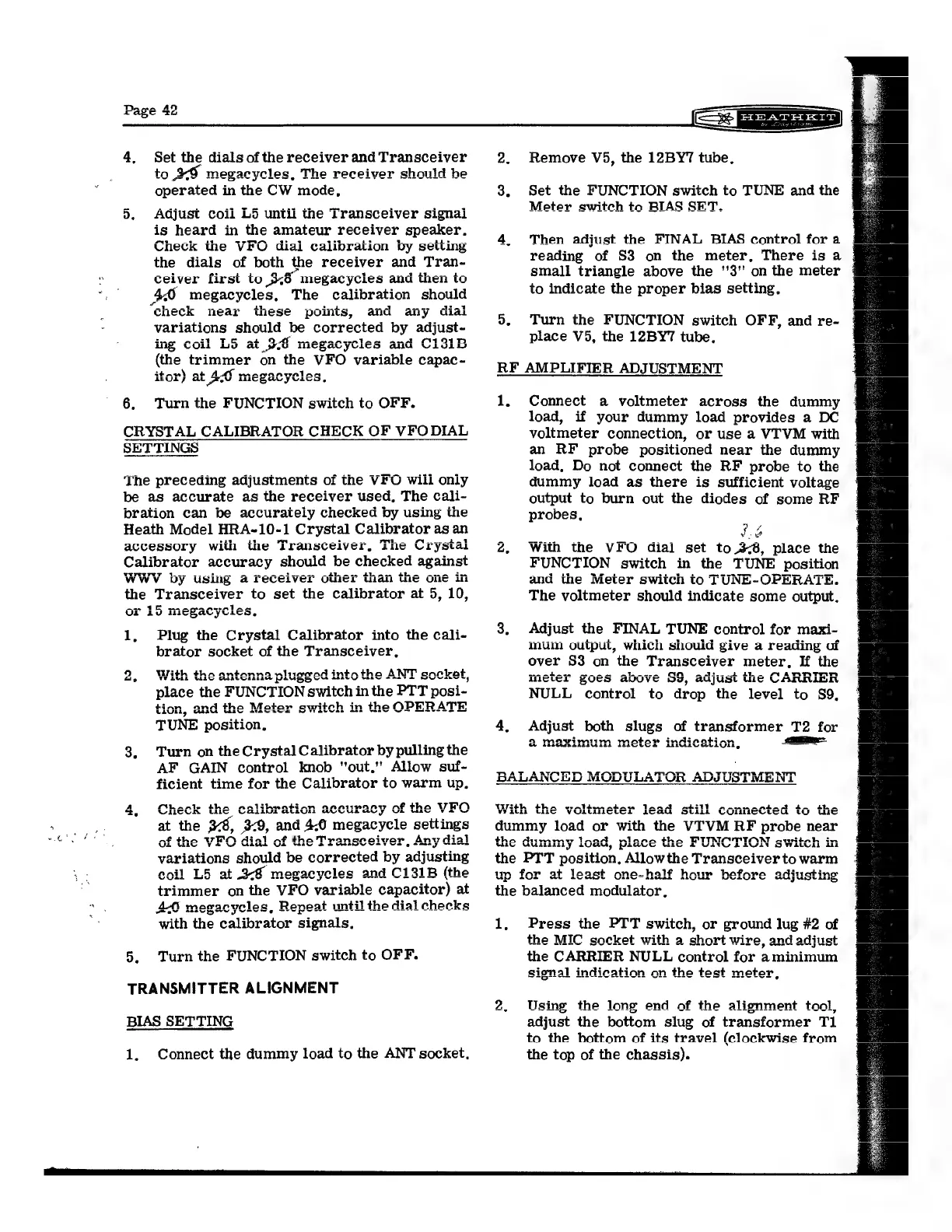
Set
the
dials
of
the
receiver
and
Transceiver
to
+o
megacycles,
The
receiver
should
he
10
7
ae
YOLES,
2425
TCes
vel
So
operated
in
the
CW
mode,
or
ry
Adjust
coil
L5
until
the
Transceiver
signai
is
heard
in
the
amateur
receiver
speaker.
Check
the
VFO
diai
calibration
by
setting
the
dials
of
both
¢
the
receiver
and
Tran-
xe
a
cant
ceiver
first
to
Bos
megacycles
and
then
to
40
megacycles,
The
calibration
should
elheelt
wnoavr
theses
nointe
menee
saad
CUICCR
lear
WESC
PULILS,
and
aly
Ulal
variations
should
be
corrected
by
adjust-
ing
coi
as
C131B
mg
coil
LS
at
ti
megacycles
and
C131B
the
trimmer
on
the
VFO
variable
capac-
trav
at
AM
maennvalaa
ul
Ot
eV
AIT
Han
yusco,
he
e
6.
Turn
the
FUNCTION
switch
to
OFF.
CRYSTAL
CALIBRATOR
CHECK
OF
VFO
DIAL
SETTINGS
The
preceding
adjustments
of
the
VFO
will
only
be
as
accurate
as
the
receiver
used.
The
cali-
bration
can
be
accurately
checked
by
using
the
Heath
Model
HRA~10-1
Crystal
Calibrator
as
an
accessory.
with
the
Transceiver,
The
Crystal
Calibrator
accuracy
should
be
checked
against
WWYV
by
using
a
receiver
other
than
the
one
in
the
Transceiver
to
set the
calibrator
at
5,
10,
ane
ee
meen
te
or
15
megacycles,
1,
Plug
the
Crystal
Calibrator
into
the
cali-
brator
socket
of
the
Transceiver,
ntothe
ANT
socket
=
ote
cxet,
1
in
the
PTT
posi-
n
the
OPERATE
10
VS
Est
«
tinn
and
the
Motor
eter
ULUli,
Usa
WAS
ave
TUNE
position.
3.
Turn
on
theCrystal
Calibrator
by
pulling
the
AF
GAIN
control
knob
"out.’'
Allow
suf-
ficient
time
for
the
Calibrator
to
warm
up.
uracy
of
the
VFO
VY
Ve
Way
and
eet
ese
yele
settings
t
eiver
Any
dial
vee
Wee
an
<
2B
me
n
nm
Bt
aE
bimine®
on
the
VEO
¢
megacycles,
Rene
wey
Aad
with
the
calibrator
signals,
at
renee
eat
ire
“ks
tonpeal
5,
Turn
the
FUNCTION
switch
to
OFF.
TRANSMITTER
ALIGNMENT
BIAS
SETTING
1,
Connect
the
dummy
load
to
the
ANT
socket.
5.
Remove
V5,
the
12BY7
tube,
Set
the
FUNCTION
switch
to
TUNE
and
the
Meter
switch
to
BIAS
SET.
Then
adjust
the
FINAL
BIAS
control
for
a
reading
of
S3
on
the
meter,
There
is
a
small
triangle
above
the
''3''
on
the
meter
to
indicate
the
proper
bias
setting,
Turn
the
FUNCTION
switch
OFF,
and
re-
place
V5,
the
12BY7
tube,
RF
AMPLIFIER
ADJUSTMENT
1,
st
t
dummy
load
or
with
the
VI'VM
RF
probe
the
dummy
1
Connect
a
voltmeter
across
the
dummy
load,
if
your
dummy
load
provides
a
DC
voltmeter
connection,
or
use
a
VI'VM
with
an
RF
probe
positioned
near
the
dummy
load.
Do
not
connect
the
RF
probe
to
the
dummy
load
as
there
is
sufficient
voltage
output
to
burn
out
the
diodes
of
some
RF
probes,
LG
With
the
VFO
dial
set
to
3-8,
place
the
FUNCTION
switch
in
the
TUNE
position
and
the
Meter
switch
to
TUNE-OPERATE.
The
voltmeter
should
indicate
some
output.
Adjust
the
FINAL
TUNE
control
for
mazi-
mum
output,
which
should
give
a
reading
of
over
S3
on
the
Transceiver
meter,
If
the
APN
Mm
meter
goes
above
88,
adjust
the
CARRIER
NULL
control
to
drop
the
level
to
S89,
Adjust
both
slugs
of
transformer
T2
for
Mmeayimiim
meter
indication
a
Maximum
meter
SHULL
ALLO,
wit
UUuliidiy
10GG,
P4aue’e
Wit
2
VA
22
OWA
A
the
PTT
position,
Allow
the
Transceiver
to
warm
fettl
uy
for
at
least
one-half
hour
before
adiu
o
Mp
Ee
el
Ch
ded
Muy
Ut
4445,
2
the
balanced
modulator,
1,
i)
Press
the
PTT
switch,
or
ground
lug
#2
of
the
MIC
socket
with
a
Shore
wire.
and
adiust
sae
wee
wh
a
snort
wir
Sy
att
ARS
the
aero
NULL
control
for
aminimum
indication
on
the
test
meter,
signal
ati
ae.
Lele
Using
the
long
end
of
the
alignment
tool
adjust
the
bottom
slug
of
transformer
T1
to
the
bottom
of
its
travel
(clockwise
from
the
top
of
the
chassis).
rt,

Related product manuals