EasyManua.ls Logo

Heathkit IO-4205 - Page 48

Heathkit IO-4205
208 pages
Print Icon
To Next Page IconTo Next Page
To Previous Page IconTo Previous Page
Loading...
Page 46
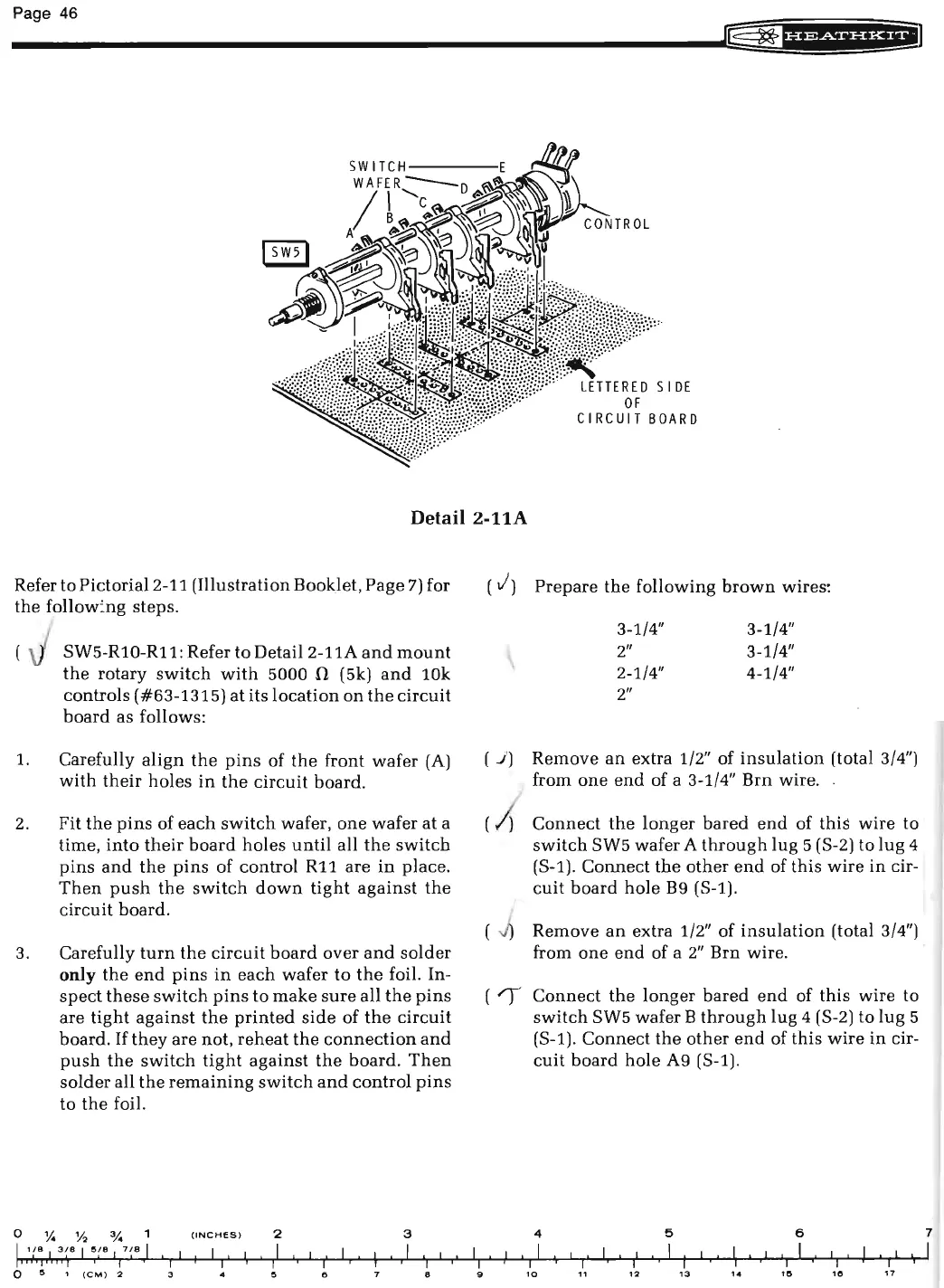
Detail
2-11A
Refer to Pictorial2-11 (Illustration Booklet, Page
7)
for
the
follow~ng
steps.
SW5-R10-R11: Refer to
Detail2-11A
and
mount
the
rotary
switch
with
5000
!1
(5k)
and
10k
controls ( #63-1315)
at
its
location
on
the
circuit
board
as follows:
1.
Carefully
align
the
pins
of
the
front wafer
(A)
with
their
holes
in
the
circuit
board
.
2.
Fit
the
pins
of
each
switch
wafer,
one
wafer
at
a
time,
into
their
board
holes
until
all
the
switch
pins
and
the
pins
of control R11 are
in
place
.
Then
push
the
switch
down
tight
against
the
circuit board.
3.
Carefully
turn
the
circuit
board
over
and
solder
only
the
end
pins
in
each
wafer
to
the
foil. In-
spect
these
switch
pins
to make
sure
all
the
pins
are
tight
against
the
printed
side
of
the
circuit
board.
If
they
are not,
reheat
the
connection
and
push
the
switch
tight
against
the
board.
Then
solder
all
the
remaining
switch
and
control
pins
to
the
foil.
0
y.
Y2
a;.
(INCHES
)
2 3
I
1(8
I
3
~
8
I
5re
I
7 / 8
I
I
I
I I I I
I
I
I
I
I
I
I
I
I
I
I
I
I
I I
I
I
I
II,,
I I
it
I)
0
5
1
(CM
) 2
3
5 6 8
I
I
I
I
9
( J)
Prepare
the
following
brown
wires:
3-1/4" 3-1/4"
2"
3-1/4"
2-1/4" 4-1/4"
2"
( ) ) Remove
an
extra 1/2" of
insulation
(total 3/4")
from
one
end
of a 3-1/4" Brn wire.
( )
Connect
the
longer
bared
end
of
this
wire to
switch
SW5 wafer A
through
lug
5 (S-2) to lug 4
(S-1).
Connect
the
other
end
of this wire
in
cir-
cuit
board
hole
B9
(S-1).
Remove
an
extra 1/2" of
insulation
(total 3/4")
from
one
end
of a
2"
Brn wire.
(
")
Connect
the
longer
bared
end
of
this
wire
to
switch
SW5 wafer B
through
lug 4 (S-2) to
lug
5
(S-1).
Connect
the
other
end
of this
wire
in
cir-
cuit
board
hole A9 (S-1).
4
5 6
I
I I I I I
I
I
I I
I
I I
I
I
I
I
I
I
'
I
I
I
I
I
I
I
I
I
I
I I
I
10
,
12
13
14
"' "'
17
7
I

Related product manuals