EasyManua.ls Logo

Heathkit IO-4205 - Page 78

Heathkit IO-4205
208 pages
Print Icon
To Next Page IconTo Next Page
To Previous Page IconTo Previous Page
Loading...
Page
76
INSIDE
OF
CRT
SHIELD
~
TAB
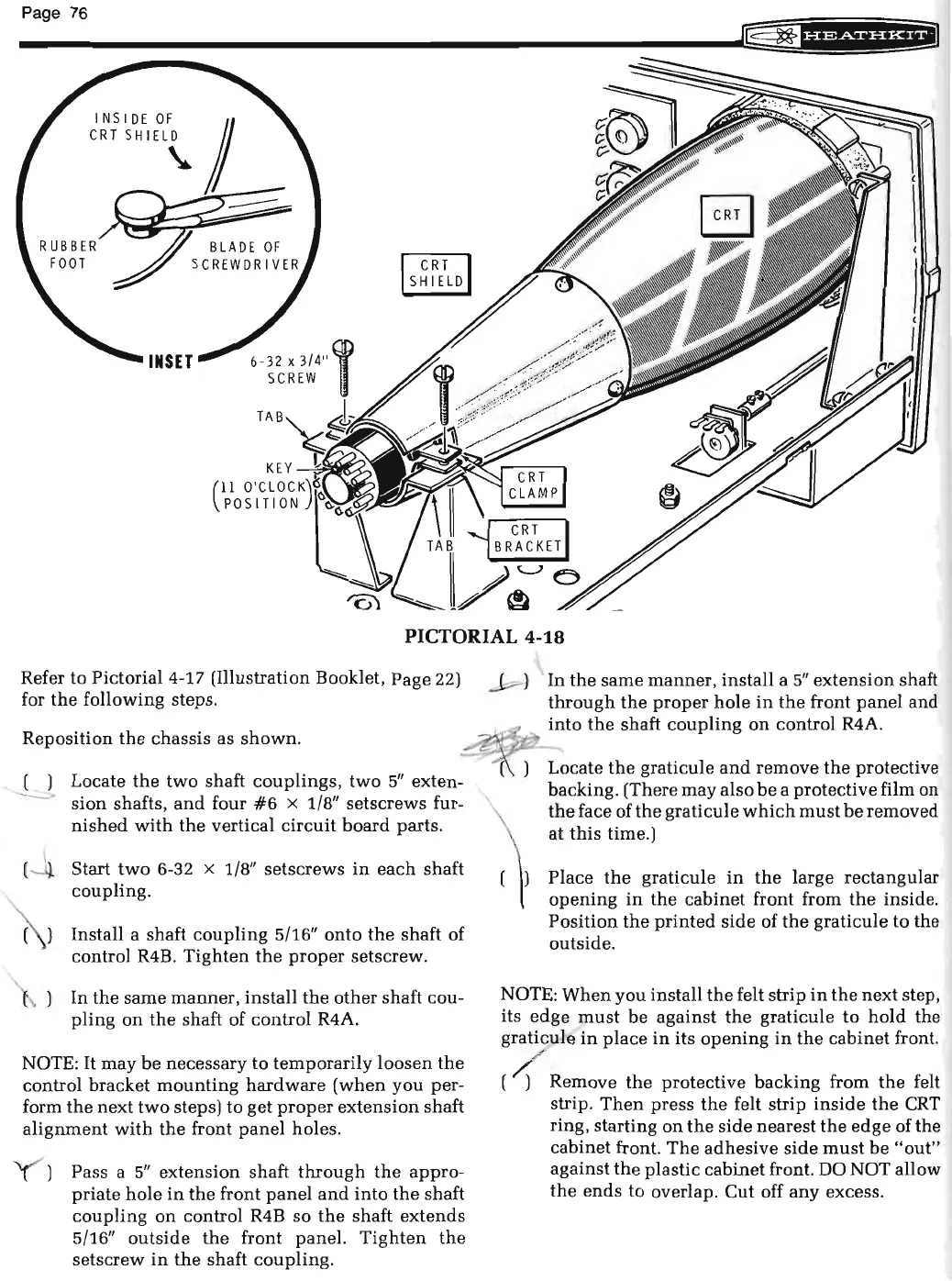
PICTORIAL 4-18
Refer to
Pictorial4-17
(Illustration Booklet, Page 22)
for
the
following
steps
.
Reposition
the
chassis as
shown.
--L.J.
Locate
the
two
shaft
couplings,
two
5"
exten-
sion
shafts,
and
four
#6
X 1/8" setscrews fur-
nished
with
the
vertical
circuit
board
parts
.
Start
two
6-32 x 1/8"
setscrews
in
each
shaft
coupling.
( ) Install a shaft
coupling
5/16"
onto
the
shaft of
control R4B.
Tighten
the
proper
setscrew.
In
the
same
manner,
install
the
other
shaft cou-
pling
on
the
shaft of
control
R4A.
NOTE:
It
may
be
necessary
to
temporarily
loosen
the
control bracket
mounting
hardware
(when
you
per-
form
the
next
two
steps) to get
proper
extension
shaft
alignment
with
the
front
panel
holes.
Pass a
5"
extension
shaft
through
the
appro-
priate
hole
in
the
front
panel
and
into
the
shaft
coupling
on
control R4B so
the
shaft
extends
5/16"
outside
the
front
panel.
Tighten
the
setscrew
in
the
shaft
coupling.
~
)
In
the
same
manner,
install
a
5"
extension
shaft
through
the
proper
hole
in
the
front
panel
and
~
~
....
into
the
shaft
coupling
on
control R4A.
Locate
the
graticule
and
remove
the
protective
backing. (There
may
also
be
a protective film on
the
face of
the
graticule
which
must
be
removed
at
this
time.)
Place
the
graticule
in
the
large rectangular
opening
in
the
cabinet
front from
the
inside.
Position
the
printed
side
of
the
graticule
to
the
outside.
NOTE:
When
you
install
the
felt strip
in
the
next
step,
its
edge
must
be
against
the
graticule
to
hold
the
graticule
in
place
in
its
opening
in
the
cabinet
front.
( { Remove
the
protective backing from
the
felt
strip.
Then
press
the
felt strip
inside
the
CRT
ring, starting
on
the
side
nearest
the
edge
ofthe
cabinet front.
The
adhesive
side
must
be
"out"
against
the
plastic cabinet front. DO NOT allow
the
ends
to overlap.
Cut
off
any
excess.

Related product manuals