2-4
&KDSWHU%$6,&23(5$7,21
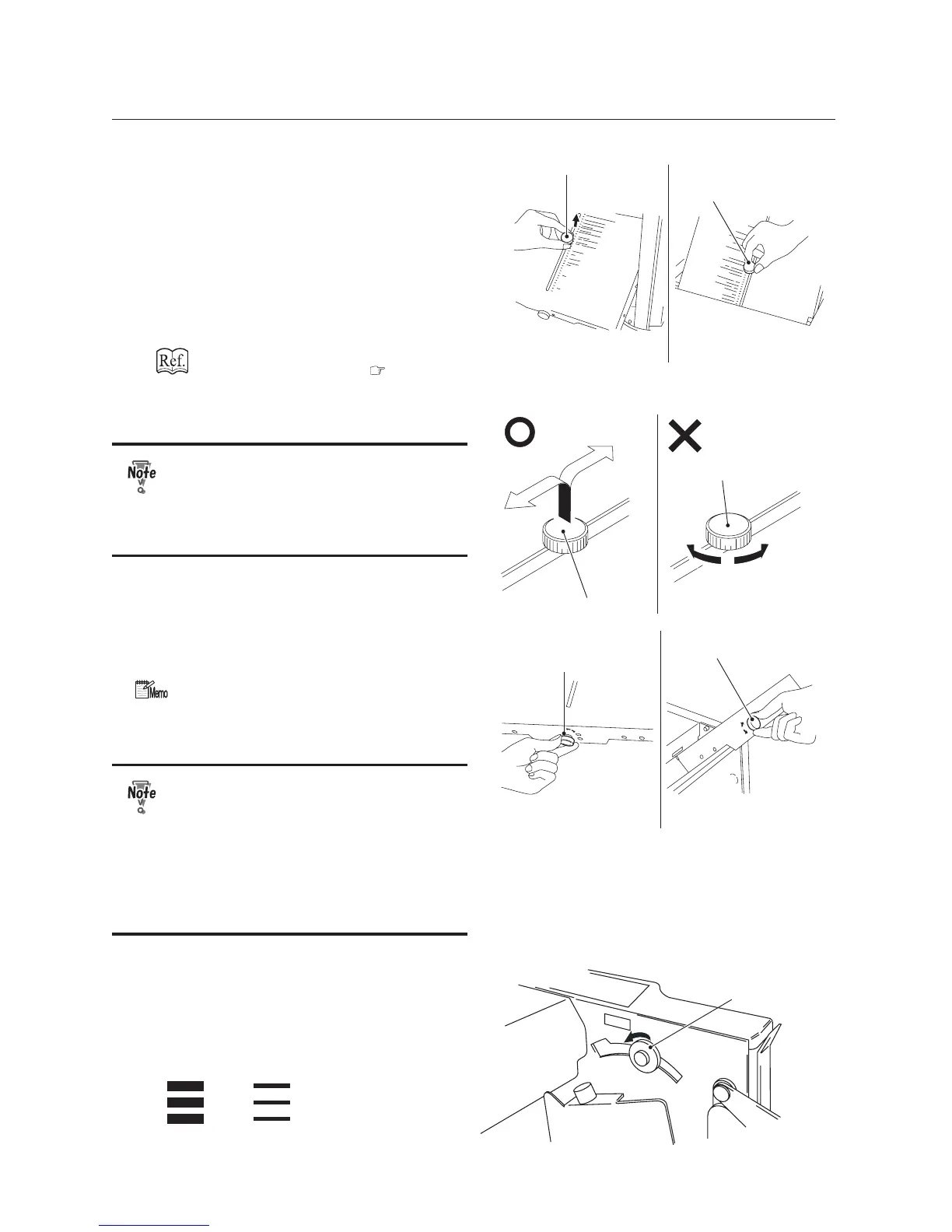
Rough adjustment knob
First folding plateSecond folding plate
Rough adjustment knob
6
Move the rough adjustment knob of
WKH¿UVWDQGVHFRQGIROGLQJSODWHV
to the mark of a folding pattern you
desire.
Because the second folding plate is not
used for a single fold, move the rough
adjustment knob of the second folding plate
to the upper end to prevent the paper from
being sent to the second folding plate.
)ROGLQJSDSHULQWRWZR S
Rough adjustment knob
Rough adjustment knob
6OLGHWKHURXJKDGMXVWPHQWNQREZKLOH
pulling it up.
The rough adjustment knob cannot
be turned either clockwise or
counterclockwise. Make sure that you
pull up the knob when you want to
move it.
Fine adjustment knob
Fine adjustment knob
First folding plateSecond folding plate
7XUQWKH¿QHDGMXVWPHQWNQREWRWKH
right and left a few times and check that
it moves slightly.
:KHQVWDFNLQJ$DQG%VL]HSDSHU
with long edge feed, move the rough
DGMXVWPHQWNQREWRWKHPDUNRI³$´
DQG³%´UHVSHFWLYHO\
Use the mark on the folding plate just
DVDUHIHUHQFH<RXPD\QHHG¿QH
adjustments according to various
conditions such as environmental
conditions (temperature, humidity),
paper quality, paper thickness, paper
¿EHUGLUHFWLRQFXWWLQJDFFXUDF\DQG
printing conditions.
Paper feed pressure
adjustment knob
7
Set the paper feed pressure
adjustment knob to “Thin paper.”
If the paper slips and no paper is conveyed,
change the paper feed pressure from “Thin
paper” to “Thick paper”.
ĸ
Not possible!


 To Next Page