15
12. Tap to start recording the live video; tap again to end and save it to Me > Picture &
Videos.
Video Recording
This camera only starts to record videos when the PIR sensor detects motions caused by
people or animals as the Motion Detection is enabled by default. It’s not designed for
7/24 all day recording.
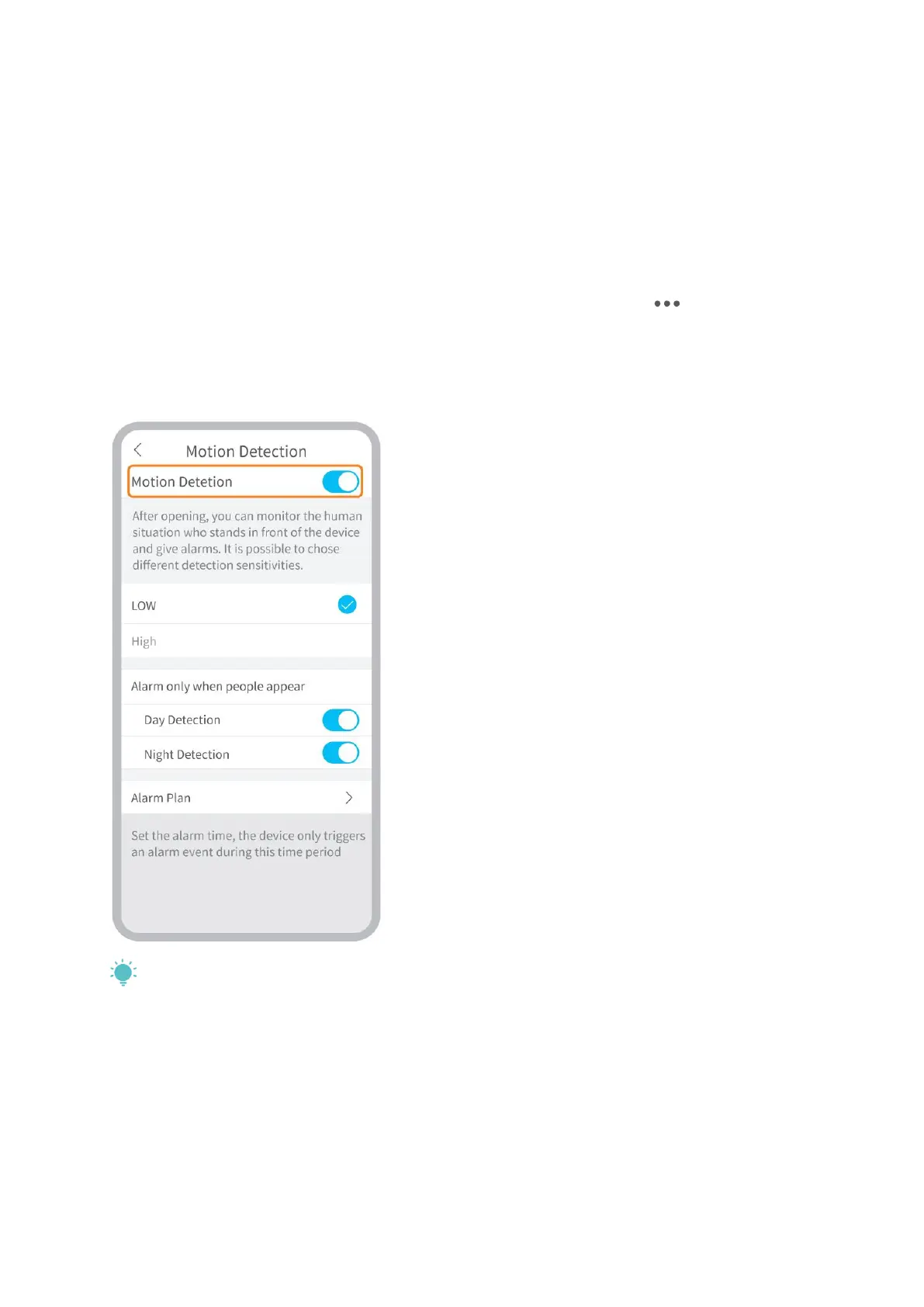
For more detailed settings about the Motion Detection, please go to > Settings >
Detection Alarm > Motion Detection.
• Setting the sensitivity level of Motion Detection to Low can decrease unnecessary
notifications of being disturbed and reduce false alarm.
• Enabling Alarm only when people appear,
the camera will only record videos and
send push notifications when it detects
motions caused by people.
• Making an Alarm Plan can avoid being
disturbed frequently as the camera will
detect motions according to schedules.
Tips:
• If you disable the motion detection, the camera will not record videos.
• If no memory card installed or no cloud plan subscribed to, the camera will not
record any video and you can only watch the live video.


 To Next Page