www.heinner.com 8Kg, 220-240V~50Hz
19
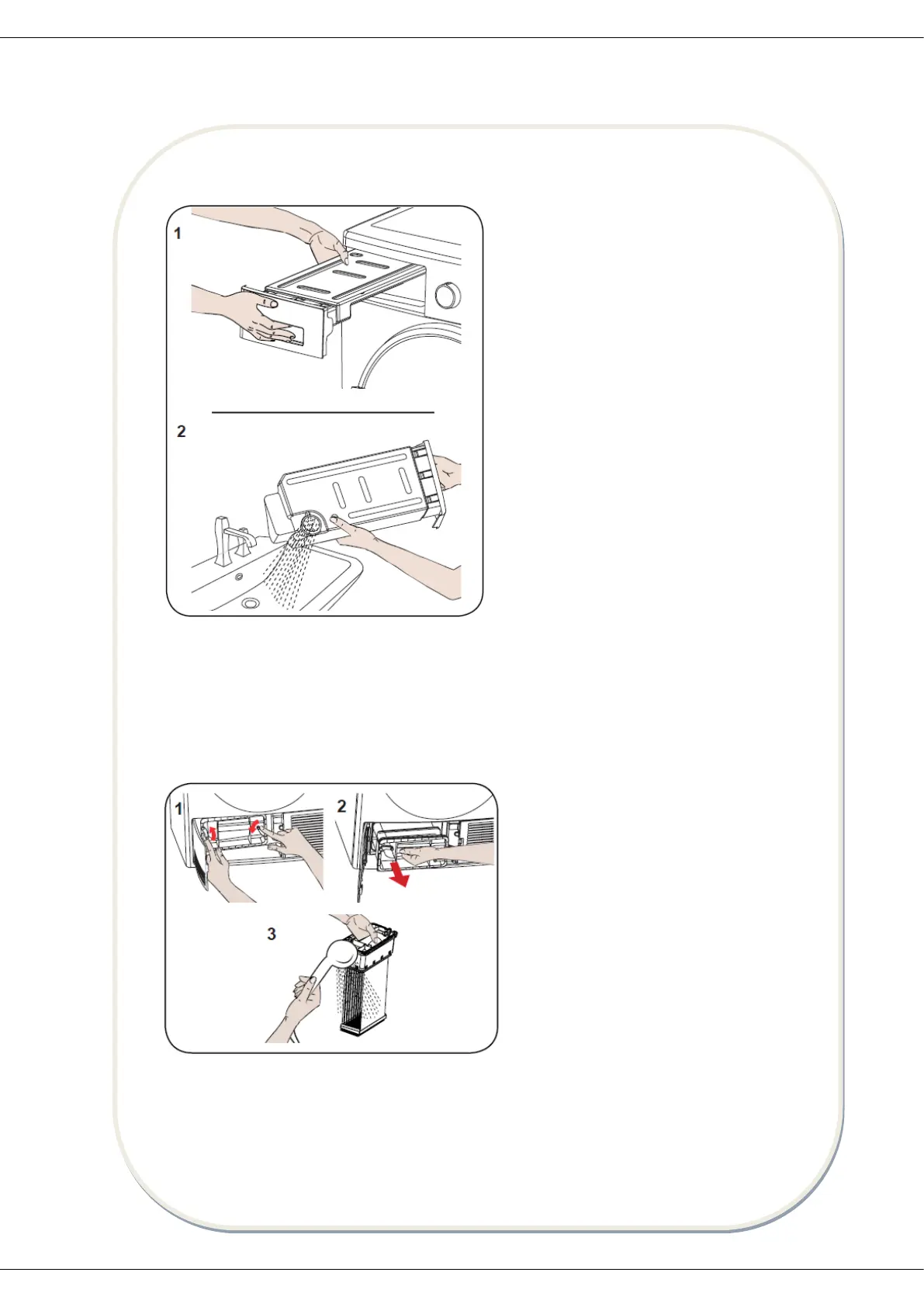
2. Emptying the water tank
3. Cleaning the condenser
IMPORTANT: Clean the condenser when you see the warning “Condenser Cleaning”.
IMPORTANT: EVEN IF THE “CONDENSER CLEANING WARNING LED” IS NOT ON: CLEAN THE
CONDENSER AFTER EVERY 30 DRYING PROCESSES OR ONCE A MONTH.
1. Pull the drawer cover and carefully
take out the tank.
2. Empty the water in the tank.
3. If there is lint accumulated on the
discharge cap in the tank, clean it with
water.
4. Refit the water tank.
IMPORTANT: Never remove the water
tank when the programme is running.
The water condensed in the water tank
is not suitable for human consumption.
IMPORTANT: Do not forget to empty the
water tank after each use.
If the drying process is completed, open
the loading door and wait for it to cool
down.
1. Open the plinth and release the 2 cover
locks of the condenser.
2. Hold the condenser by the plastic part
and pull it out.
3. Clean it with a showerhead and wait for
the water to drain off.
4. Fully insert the condenser into its seat
and lock the 2 locks.
5. Close the plinth cover.


 To Next Page