EasyManua.ls Logo

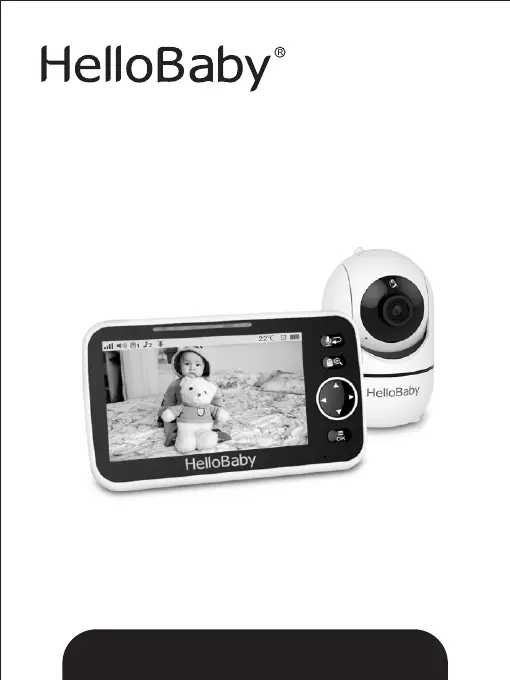
HelloBaby HB6550 - User Manual

HelloBaby HB6550
12 pages
Print Icon
To Next Page IconTo Next Page
Loading...
Ver: 1.4
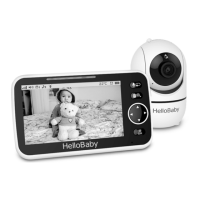
2.4GHz Digital Wireless Video Baby Monitor
User Manual
The pictures are for reference only, please subject to practicality.
www.hellobaby.net.cn
service@hellobaby.net.cn
Model: HB6550

Questions and Answers

  • B
    Brandon GreerJul 30, 2025
    What to do if my HelloBaby HB6550 Baby Monitor has interference or poor reception?
    • D
      Douglas MathisJul 30, 2025
      If you are experiencing interference or poor reception with your HelloBaby Baby Monitor, try the following: * Move the monitor closer to the camera. * Ensure that the camera and monitor are not placed near metal objects. * Check for other electronic devices that may be causing interference. * Make sure the battery power is not too low.
  • G
    Gina KnoxAug 6, 2025
    What to do if the HelloBaby HB6550 screen is frozen?
    • A
      Amanda HarmonAug 6, 2025
      If the screen on your HelloBaby Baby Monitor is frozen, try these steps: 1. Repower the baby unit by unplugging the adapter, and then plugging it back into the socket. 2. Press the RESET key located on the back of the parent unit.
  • A
    Angela BlackAug 14, 2025
    Why is there no reception on my HelloBaby HB6550 Baby Monitor?
    • C
      Caitlin GarciaAug 14, 2025
      If you're not getting any reception on your HelloBaby Baby Monitor, please check the following: * Ensure that both the camera and the monitor are turned ON. * Verify that the power adapters are properly connected. * Make sure the camera is not too far away from the monitor. * Ensure that the camera and monitor are properly paired by following the PAIRING instructions.
  • D
    David JohnsonAug 22, 2025
    How to stop audio feedback on HelloBaby HB6550?
    • M
      Michael ThomasAug 22, 2025
      If you're experiencing audio feedback (high-pitched noise) on your HelloBaby Baby Monitor, try these solutions: * Lower the volume on the monitor. * Ensure that the camera and monitor are not placed too close to each other.

Summary

Safety Instructions and Precautions

Warranty and Installation Guidelines

Warranty Terms

Details the one-year warranty coverage for defects in workmanship and materials.

Installation Guidelines

Provides advice on establishing radio links and factors affecting signal strength.

Placement of the Baby Monitor

Recommends optimal placement for the camera unit to ensure performance.

Getting Started and Product Overview

Getting Started

Guides on turning on the baby unit and parent unit.

Infrared Night Vision

Explains the automatic infrared night vision function for low light conditions.

Icons Overview

Details the meaning of various icons displayed on the parent unit screen.

Parent Unit Overview

Identifies and describes the components and buttons of the parent unit.

Baby Unit Overview

Identifies and describes the components of the camera unit.

Key Operation and Menu Functions

Key Operation

Explains how to use the keys for camera control and functions like zoom.

Menu Operation: Pairing

Details procedures for adding and deleting camera units to the parent unit.

Menu Operation: Volume

Instructions for adjusting the volume level on the parent unit.

Menu Operation: Brightness

Guidance on adjusting the screen brightness level.

Menu Operation: Temperature Setting

Covers setting temperature units, alarms, and alert limits.

Menu Operation: Lullaby

Instructions for selecting and playing lullabies from the camera unit.

Menu Operation: Alarm

Details on setting and managing alarm functions and timing.

Menu Operation: VOX Setting

Configuration for sound activation sensitivity to monitor baby's sounds.

Menu Operation: Language Setting

Instructions on how to select the desired language for the user interface.

Technical Data, Troubleshooting, and Disposal

Technical Data

Provides specifications like frequency, power, operating range, and battery life.

Troubleshooting

Lists common issues like no reception or interference and their solutions.

Maintenance

Recommendations for cleaning the baby monitor unit.

Disposal Guide

Instructions for environmentally responsible disposal of the product and batteries.

HelloBaby HB6550 Specifications

General IconGeneral
Resolution720p
Night VisionYes
Pan and TiltYes
Two-Way AudioYes
Temperature MonitoringYes
Range1000 feet
Wireless Technology2.4GHz FHSS
Screen Size5 inches
LullabiesYes
Power SourceRechargeable Battery
Vox ModeYes
TypeDigital
Multiple Camera SupportYes
ZoomDigital zoom
Battery Life8 hours
Mounting OptionsWall mount

Related product manuals