14 15
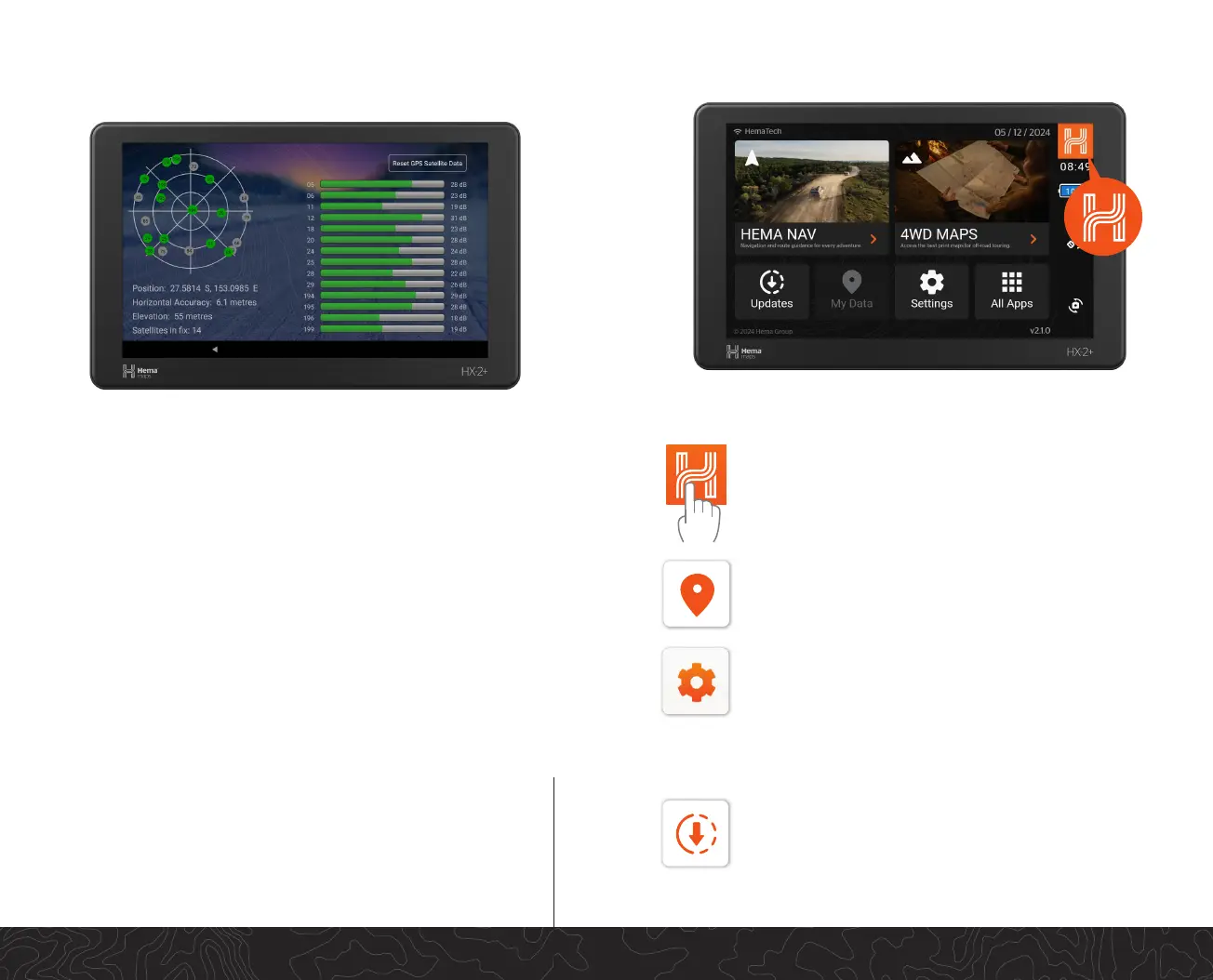
Home Panel
My Data provides one locaon to access and manage
waypoints and stored track les
Device Sengs
Tapping the Sengs buon will allow you to make system
changes (e.g... set date and me), manage Bluetooth
and Wi-Fi connecvity, manage power mode, relaunch
the Setup Wizard or display the About Screen. System
Sengs: access all the HX-2+ Operang System sengs.
Pressing the Navigaon buon allows you to return
to the previous screen you were on. If you hold the H
down for 2 seconds it will take you back to the
Home Screen.
Updates
To keep your HX-2+ running at its best check for updates
regularly. When you click on the Updates icon, the Hema
Update Manager opens. This page checks and displays
any system updates that are available for you HX-2+.
GPS Screens and Location Services
The HX-2+ has a number of features which allow you to validate your
current GPS signal(s) and detail your current locaon.
Satellite Status provides the status and details of the Satellites that the
HX-2+ has a x on.
Satellite connecon requires a line-of-sight to the sky.
Locaon accuracy may be reduced by heavy tree foliage, terrain
obstrucon (eg. tunnels or deep valleys) and heavy storm clouds.
To reconnect, try moving your posion monitor and satellite status


 To Next Page