EasyManua.ls Logo

HermanMiller OE1 - User Manual

HermanMiller OE1
9 pages
Print Icon
To Next Page IconTo Next Page
Loading...
HermanMiller OE1 Sit to Stand Table Installation Assembly Instructions1BW93X rev C1
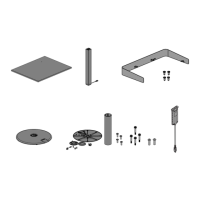
Parts Included
HermanMiller
OE Sit to Stand Table Installation Manual
How to Install OE Sit to Stand Table
Tools Required
1. Work Surface
Philips Screw Driver
2. Leg Assembly
. Base/outer column and top surface support 5. USB Power Module
(HZ285)
Package Contains:
Hover will come in three separate boxes
 – Surface (has inserts)
 – leg
 – Base/outer column and top surface support
Optional:
 - Surround if specied
 - USB Power Module (if specied)
. Surround (Optional)
 mm Hex wrench  mm Hex wrench
IMPORTANT SAFETY INSTRUCTIONS
When using an electrical furnishing, basic precautions should always be
followed, including the following:
Read all instructions before using this furnishing.
DANGER - To reduce the risk of electric shock always unplug this furnishing
from the electrical outlet before cleaning or relocating.
WARNING - To reduce the risk of burns, re, electric shock, or injury to
persons: Close supervision is necessary when this furnishing is used by, or
near children, invalids, or disabled persons.
Sitting or standing on product may cause risk of personal injury (use for chairs,
tables consider obvious misuse of product).
Use this furnishing only for its intended use as described in these instructions.
Do not use attachments not recommended by the manufacturer.
Never operate this furnishing if it has a damaged cord or plug, if it is not
working properly, if it has been dropped or damaged, or dropped into water.
Return the furnishing to a service center for examination and repair.
If using power drive set on low torque.
Keep the cord away from heated surfaces.
Never drop or insert any object into any opening.
Do not use outdoors.
Do not operate where aerosol (spray) products are being used or where oxygen
is being administered.
control box rating: .A, V, Hz
Duty cycle:  min on,  min o
For loading always put heavier items in the center and distribute the load in
order to prevent the possibility of the furniture tipping over.
WARNING - Risk of injury, Fire or Electric shock
Maximum Load lb. per surface.
Review the assembly instruction to conrm that the appropriate
critical components and accessories are being used with the
furnishing.
For user-maintenance recommendations including suggested
cleaners, refer to Herman Miller Customer Service - Care &
Maintenance.
SERVICING OF DOUBLE-INSULATED PRODUCTS
In a double-insulated product, two systems of insulation are provided
instead of grounding. No grounding means is provided on a double-
insulated product, nor is a means for grounding to be added to the
product. Servicing a double-insulated product requires extreme care
and knowledge of the system, and is to be done only by qualied
service personnel. Replacement parts for a double-insulated product
must be identical to the parts they replace. A double-insulated
product is marked with the words “DOUBLE INSULATION” or “DOUBLE
INSULATED.” The symbol (Square within a square) is also able to be
marked on the product.
To reduce the risk of electric shock, this furnishing has a polarized
plug (one blade is wider than the other). This plug will t in a
polarized outlet only one way. If the plug does not t fully in the
outlet, reverse the plug. If it still does not t, contact a qualied
electrician to install the popper outlet. Do not change the plug in any
way. *SAVE THESE INSTRUCTIONS*

Question and Answer IconNeed help?

Do you have a question about the HermanMiller OE1 and is the answer not in the manual?

Overview

The HermanMiller OE1 Sit-to-Stand Table is an adjustable height furnishing designed for use in various work environments. It allows users to easily switch between sitting and standing positions, promoting ergonomic comfort and flexibility.

Function Description:

The OE1 Sit-to-Stand Table is an electrically powered height-adjustable desk. It operates by means of a pedal switch that controls the movement of the leg assembly, allowing the work surface to be raised or lowered. The table is designed to support a maximum load of 60 lbs per surface. It includes a control box that manages the leg's movement and requires initialization (reset) to ensure proper functioning, especially if the desk moves down but not up. The table's design incorporates double insulation, meaning it does not require grounding, and servicing should only be performed by qualified personnel using identical replacement parts.

Important Technical Specifications:

  • Maximum Load: 60 lbs per surface.
  • Control Box Rating: 2.9A, 120V, 60Hz.
  • Duty Cycle: 2 minutes on, 18 minutes off. This duty cycle is crucial to prevent overheating of the motor and ensure longevity.
  • Power Plug: Polarized plug (one blade wider than the other) to reduce the risk of electric shock.
  • Torque Specifications for Screws:
    • M8 screws for leg to base: 8Nm or snug plus 1/8 turn.
    • Shoulder bolts/wave washers for outer column to base: 3Nm or snug plus 1/8 turn.
    • M8 flat head screws for top support to leg: 8Nm or snug plus 1/8 turn.
    • M5 screws for surface to top surface support: 3Nm or snug plus 1/8 turn.
  • Materials Identification: Plastic components are marked with ASTM recycling codes for proper segregation and recycling. Ferrous metals can be identified with a magnet, and non-ferrous metals should be separated.

Usage Features:

  • Height Adjustment: Controlled by a pedal switch, allowing users to raise or lower the work surface.
  • Initialization (Reset) Procedure: Essential for proper operation, especially if the desk exhibits issues moving upwards. This involves holding the pedal switch down to its lower limit, briefly releasing, then holding it down again for 5 seconds until a slight "handshake" movement is observed.
  • Optional Components: Can be equipped with a surround and a USB Power Module (HZ285) for added functionality.
  • Cable Management: Features integrated cable routing through the leg and column, with cord clips and wire managers to keep cables organized and prevent interference with table operation.
  • Assembly: The table comes in three main boxes (surface, leg, base/outer column/top surface support) and requires assembly using common tools like a Philips screwdriver and hex wrenches (3mm and 5mm).
  • Ergonomic Design: Promotes a healthy work posture by enabling seamless transitions between sitting and standing.
  • Safety Features: Includes warnings against misuse, operating with damaged cords, and using in hazardous environments. It also emphasizes the importance of distributing heavier items in the center to prevent tipping.

Maintenance Features:

  • Cleaning and Relocation: Always unplug the furnishing from the electrical outlet before cleaning or relocating to reduce the risk of electric shock.
  • Troubleshooting Guide: A comprehensive guide is provided for common issues, including:
    • P1. Initialize the control box ("reset"): Addresses issues where the desk moves down but not up.
    • P2. Check for obstructions: Guides users to inspect for physical impediments to movement.
    • P3. Check all cable connections: Instructs users to verify the AC Power Cable, DC Power Cable, Motor Cable, and Switch Cable connections. This often requires laying the unit on its side after unplugging it.
  • Service and Repair: In case of damage or malfunction, the furnishing should be returned to a service center for examination and repair. Servicing of double-insulated products requires specialized knowledge and identical replacement parts.
  • User-Maintenance Recommendations: Refer to Herman Miller Customer Service - Care & Maintenance for suggested cleaners and further user-maintenance guidelines.
  • Disassembly for Recycling: Provides instructions for disassembling the product by reversing the installation steps and segregating materials (plastics, ferrous metals, non-ferrous metals) for recycling.

HermanMiller OE1 Specifications

General IconGeneral
BrandHermanMiller
ModelOE1
CategoryIndoor Furnishing
LanguageEnglish

Related product manuals