26
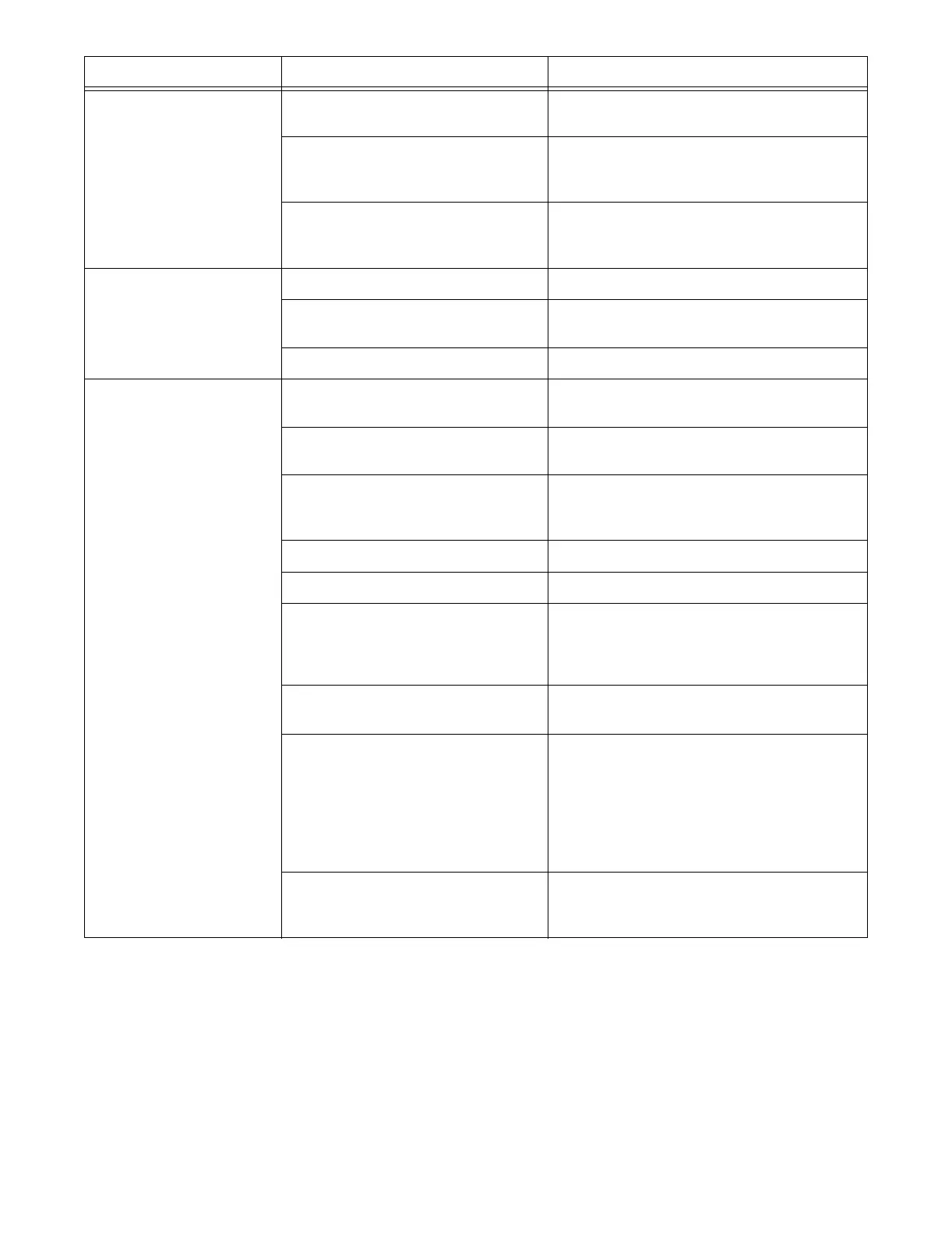
PROBLEM PROBABLE CAUSE CORRECTION
System will not
initialize after normal
start-up procedure
E-Stop switch engaged Pull out E-Stop switch. Restart system by
pressing Start.
Batteries fully discharged Check battery to ensure a full charge.
Replace with fully charged battery if
necessary.
No power to the receiver Check the diagnostic LEDs in the receiver
to be sure power is applied. Ensure that the
system is properly grounded.
The transmitter is
turned on, but does
not transmit (Power
LED not flashing)
Battery is discharged Replace battery with a fully charged battery.
Broken key switch Check wiring on key switch. Replace key
switch, wiring or contact element.
Coder board failure Contact Hetronic or your Dealer.
Transmitter is
transmitting (Power
LED flashing), but
crane/machine will
not respond
E-Stop switch engaged Pull out the E-Stop pushbutton and press
the Start pushbutton
Transmitter out of range Take the transmitter back into the range of
the receiver. Press the Start pushbutton.
A motion function was not in OFF
position when transmitter turned on
Ensure that all control devices are in OFF
(neutral) position when the Start button is
activated.
Receiver power off Turn on power to receiver.
Blown fuse in receiver Check all fuses. Replace if necessary.
E-Stop failure in transmitter Check E-Stop pushbutton for damage.
Check wiring to contact element for broken
or disconnected wires. Repair or replace
E-stop pushbutton or wiring.
E-Stop failure in receiver. Red
E-Stop LED on PCB is illuminated
Contact Hetronic or your Dealer
Transmitter/receiver frequency
channels do not match
Check frequency settings to be sure
transmitter and receiver are set to same
frequency channel
NOTE: Always match the transmitter
frequency channel to the receiver. NEVER
change the receiver frequency channel.
Contact Hetronic or your Dealer.
ADMO address codes of transmitter
and receiver do not match
Check that the ADMO address code is the
same for the transmitter and receiver.
Contact Hetronic or your Dealer.





 To Next Page