Easy HD Expressway!
WWW.HIDES.COM.TW 10
Backup and Restore DC Calibration Table
For each HV-320, a specific DC calibration table is kept in the NOR flash to optimize the DC LO
leakage.
This paragraph describes how to back up and restore the DC calibration table.
Check DC table existence:
You may check the existence of DC table with AVSenderUARTGUI.exe.
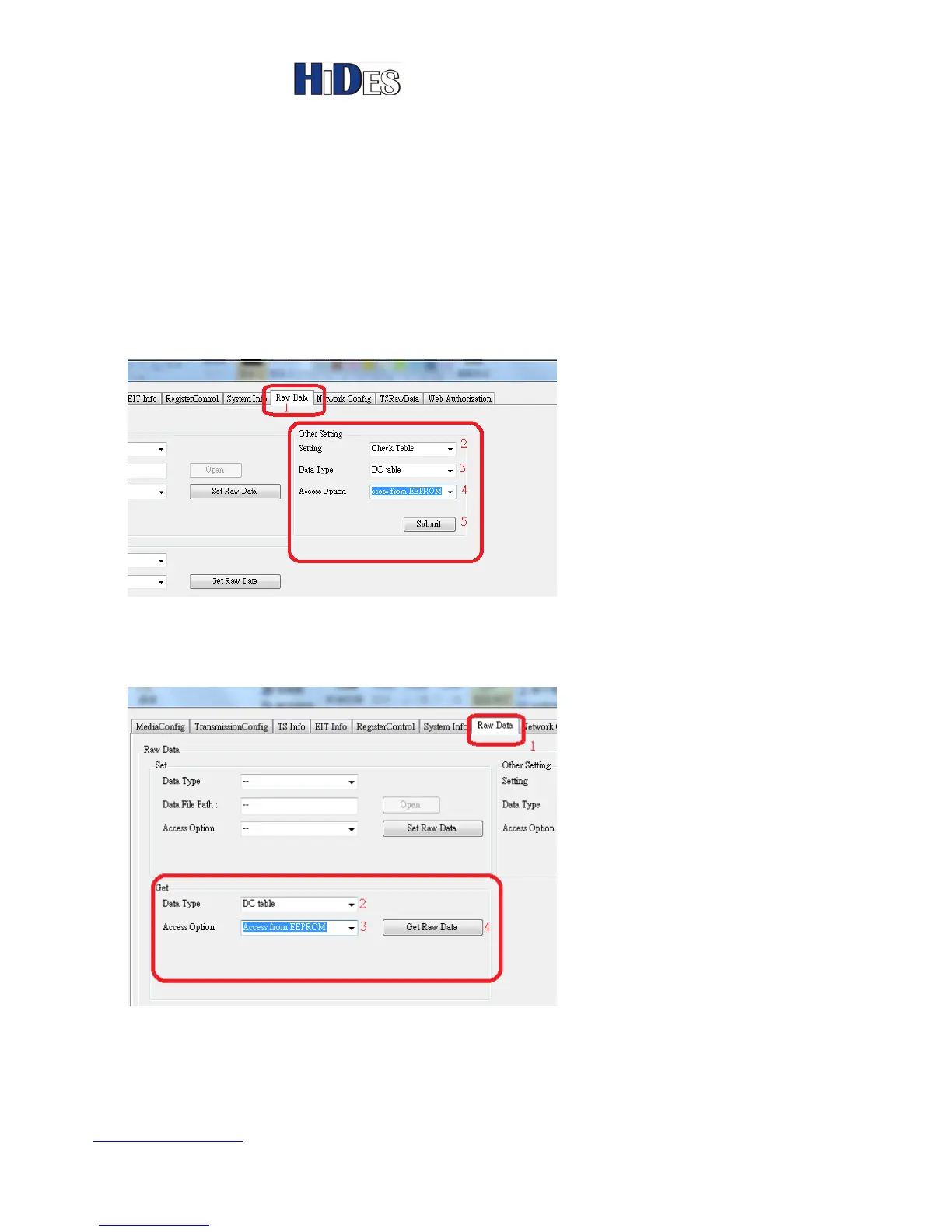
In the “Raw Data” page, “Other Setting” group, select “Check Table”-> “DC table”-> “Access from
EEPROM”, then click on the button “Submit”. A pop-up window will display if the table exists or nor.
Backup DC table:
In the “Raw Data” page, “Get” group, select “DC table”-> “Access from EEPROM”, then click on
the button “Get Raw Data”. A dialog window will pop up to input the saved file name for the DC
table.
Restore DC table:



 To Next Page